
HDL block diagram
Symbolator reads VHDL or Verilog component declarations and draws the block symbol: ports on the correct sides, buses grouped, names exactly as declared.
Generating it means the documentation cannot drift from the interface, which is the usual failure of hand-drawn block symbols.
#When to reach for one
Documenting module interfaces in a hardware design.
Integration diagrams showing how modules connect.
Design reviews where the port list is the subject.
#How to draw it in Capable
Route | Use when |
|---|---|
Symbolator | Generated directly from HDL source; never out of date. |
draw.io | System-level diagrams built from the generated symbols. |
#A worked example
A component declaration, drawn as a block symbol:
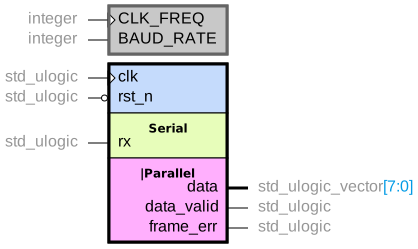
The source, which you can paste into a new diagram and edit:
#A few things that catch people out
Keep the source as the single definition; regenerate the diagram rather than editing it.
Section comments group ports on the symbol, which is what makes a large interface readable.
Generics belong on the symbol. They are part of the interface.
#Related
Approximately right is wrong here.






















