
System context diagram
A context diagram has one job: show your system as a single box, surrounded by the people who use it and the systems it talks to. No technology, no internals.
It is the diagram to put at the top of any architecture page, because it is the only one everybody can read.
#When to draw one
Opening an architecture document.
Explaining a system to somebody outside the team.
Agreeing scope: what is ours and what is not.
#What is on the diagram
Element | Meaning |
|---|---|
Person | Someone who uses the system |
Software system | Your system, drawn as one box |
External system | Something you depend on but do not own |
Relationship | Labelled with what it does and, optionally, how |
#A worked example
A context diagram with two external systems:
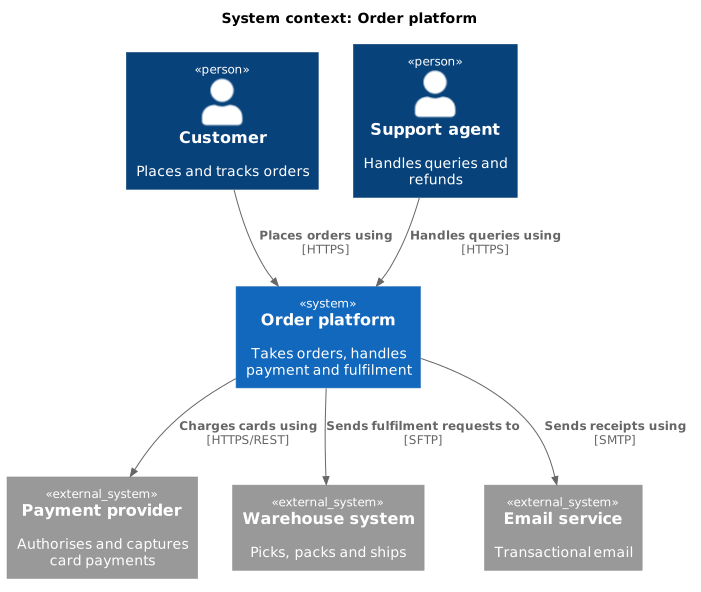
The source, which you can paste into a new diagram and edit:
#A few things that catch people out
No technology on a context diagram. If it mentions Kubernetes, it has become a container diagram.
Everything outside the box is either a person or an external system. There is no third category.
Keep it to one screen. If it does not fit, your system boundary is drawn too wide.
#Related
Context first. Always.






















