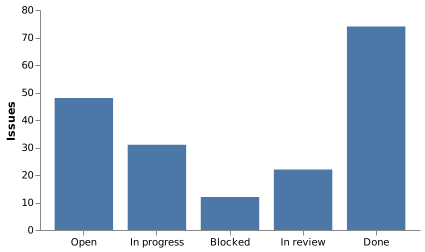
Bar chart (Vega)
Vega is a grammar rather than a chart library: you declare the data, the scales, the axes and the marks. This is the smallest complete example, and it is worth reading once even if you then use Vega-Lite for everything.
#What this example shows
Data declared as a named dataset.
Explicit x and y scales, with their ranges.
A rect mark encoding the data onto those scales.
#A worked example
Open it, edit it, or copy the source below.
The source, which you can paste into a new diagram and edit:
{
  "$schema": "https://vega.github.io/schema/vega/v5.json",
  "width": 380,
  "height": 220,
  "padding": 5,
  "data": [{
    "name": "table",
    "values": [
      {"stage": "Open", "count": 48},
      {"stage": "In progress", "count": 31},
      {"stage": "Blocked", "count": 12},
      {"stage": "In review", "count": 22},
      {"stage": "Done", "count": 74}
    ]
  }],
  "scales": [
    {"name": "x", "type": "band", "domain": {"data": "table", "field": "stage"}, "range": "width", "padding": 0.2},
    {"name": "y", "type": "linear", "domain": {"data": "table", "field": "count"}, "range": "height", "nice": true}
  ],
  "axes": [
    {"orient": "bottom", "scale": "x"},
    {"orient": "left", "scale": "y", "title": "Issues"}
  ],
  "marks": [{
    "type": "rect",
    "from": {"data": "table"},
    "encode": {
      "enter": {
        "x": {"scale": "x", "field": "stage"},
        "width": {"scale": "x", "band": 1},
        "y": {"scale": "y", "field": "count"},
        "y2": {"scale": "y", "value": 0},
        "fill": {"value": "#4c78a8"}
      }
    }
  }]
}
#Making it your own
The $schema URL is how Vega and Vega-Lite are told apart. Keep it.
nice: true rounds the axis to sensible numbers.
If this feels like a lot of ceremony for a bar chart, it is. Use Vega-Lite.
All the control, all the ceremony.