
WaveDrom
WaveDrom takes a list of signals, each with a wave string, and draws a timing diagram. Characters in the wave string mean clock edges, held values, transitions and don't-care periods.
It also draws register field diagrams, which is a useful second job.
#What it is good at
Hardware and protocol timing documentation.
Firmware notes comparing expected and observed behaviour.
Register layouts, using its reg mode.
#What it draws
Element | Syntax |
|---|---|
Clock | "wave": "p......" or "n......" |
Levels | 0 and 1 for low and high, . to hold |
Data | numbers 2 to 9 with a "data" array of labels |
Don't care | x |
Gap | | to break the timeline |
#A worked example
An I2C-style transfer with a gap in the middle:
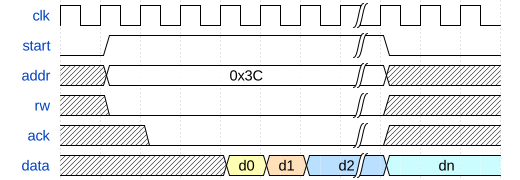
The source, which you can paste into a new diagram and edit:
#A few things that catch people out
The wave string is per character, so all signals must be the same length to line up.
p is a positive-edge clock, n a negative one; . holds the previous value.
Use x for don't-care; a flat 0 claims the line is actually low.
#Related
Thirty-one languages. Nobody knows them all.






















