Flowchart (draw.io)
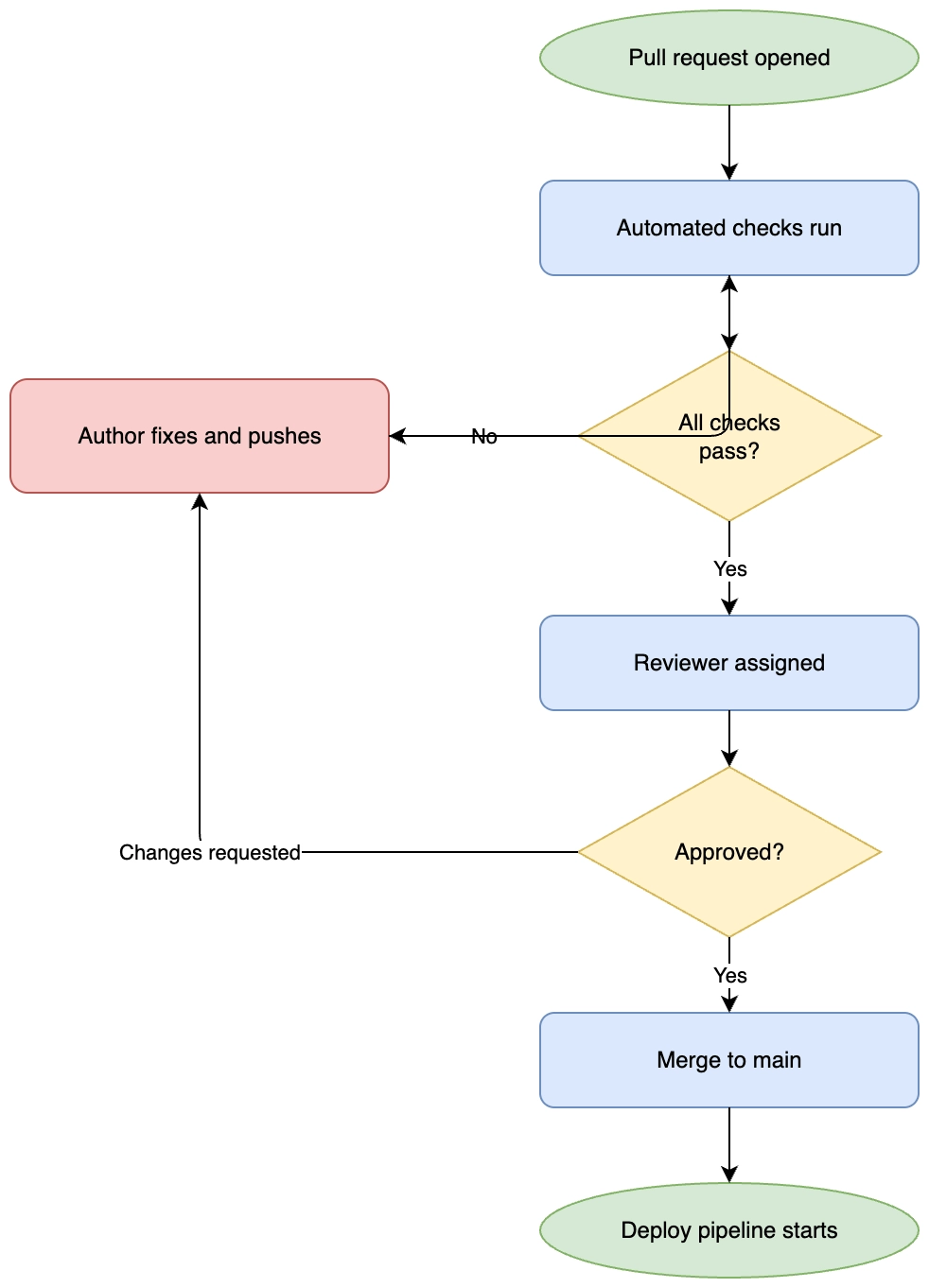
The same process as the Mermaid flowchart example, drawn on a canvas instead. Compare the two: the Mermaid version is shorter to write, and this one gives you exact control of where everything sits.
#What this example shows
Terminator, process and decision shapes with distinct fills.
Orthogonal, rounded connectors with labels on the branches.
A loop back to an earlier step, routed deliberately.
#A worked example
Open it, edit it, or copy the source below.
The source, which you can paste into a new diagram and edit:
<mxfile host="app.diagrams.net" modified="2026-09-02T00:00:00.000Z" agent="Capable" version="24.7.7">
<diagram name="Page-1" id="page-1">
<mxGraphModel dx="1100" dy="760" grid="1" gridSize="10" guides="1" tooltips="1" connect="1" arrows="1" fold="1" page="1" pageScale="1" pageWidth="1100" pageHeight="850" math="0" shadow="0">
<root>
<mxCell id="0" />
<mxCell id="1" parent="0" />
<mxCell id="n1" value="Pull request opened" style="ellipse;whiteSpace=wrap;html=1;fillColor=#d5e8d4;strokeColor=#82b366;" vertex="1" parent="1">
<mxGeometry x="360" y="40" width="200" height="50" as="geometry" />
</mxCell>
<mxCell id="n2" value="Automated checks run" style="rounded=1;whiteSpace=wrap;html=1;fillColor=#dae8fc;strokeColor=#6c8ebf;" vertex="1" parent="1">
<mxGeometry x="360" y="130" width="200" height="50" as="geometry" />
</mxCell>
<mxCell id="n3" value="All checks pass?" style="rhombus;whiteSpace=wrap;html=1;fillColor=#fff2cc;strokeColor=#d6b656;" vertex="1" parent="1">
<mxGeometry x="380" y="220" width="160" height="90" as="geometry" />
</mxCell>
<mxCell id="n4" value="Author fixes and pushes" style="rounded=1;whiteSpace=wrap;html=1;fillColor=#f8cecc;strokeColor=#b85450;" vertex="1" parent="1">
<mxGeometry x="80" y="235" width="200" height="60" as="geometry" />
</mxCell>
<mxCell id="n5" value="Reviewer assigned" style="rounded=1;whiteSpace=wrap;html=1;fillColor=#dae8fc;strokeColor=#6c8ebf;" vertex="1" parent="1">
<mxGeometry x="360" y="350" width="200" height="50" as="geometry" />
</mxCell>
<mxCell id="n6" value="Approved?" style="rhombus;whiteSpace=wrap;html=1;fillColor=#fff2cc;strokeColor=#d6b656;" vertex="1" parent="1">
<mxGeometry x="380" y="440" width="160" height="90" as="geometry" />
</mxCell>
<mxCell id="n7" value="Merge to main" style="rounded=1;whiteSpace=wrap;html=1;fillColor=#dae8fc;strokeColor=#6c8ebf;" vertex="1" parent="1">
<mxGeometry x="360" y="570" width="200" height="50" as="geometry" />
</mxCell>
<mxCell id="n8" value="Deploy pipeline starts" style="ellipse;whiteSpace=wrap;html=1;fillColor=#d5e8d4;strokeColor=#82b366;" vertex="1" parent="1">
<mxGeometry x="360" y="660" width="200" height="50" as="geometry" />
</mxCell>
<mxCell id="e1" value="" style="edgeStyle=orthogonalEdgeStyle;rounded=1;html=1;" edge="1" parent="1" source="n1" target="n2">
<mxGeometry relative="1" as="geometry" />
</mxCell>
<mxCell id="e2" value="" style="edgeStyle=orthogonalEdgeStyle;rounded=1;html=1;" edge="1" parent="1" source="n2" target="n3">
<mxGeometry relative="1" as="geometry" />
</mxCell>
<mxCell id="e3" value="No" style="edgeStyle=orthogonalEdgeStyle;rounded=1;html=1;" edge="1" parent="1" source="n3" target="n4">
<mxGeometry relative="1" as="geometry" />
</mxCell>
<mxCell id="e4" value="" style="edgeStyle=orthogonalEdgeStyle;rounded=1;html=1;" edge="1" parent="1" source="n4" target="n2">
<mxGeometry relative="1" as="geometry" />
</mxCell>
<mxCell id="e5" value="Yes" style="edgeStyle=orthogonalEdgeStyle;rounded=1;html=1;" edge="1" parent="1" source="n3" target="n5">
<mxGeometry relative="1" as="geometry" />
</mxCell>
<mxCell id="e6" value="" style="edgeStyle=orthogonalEdgeStyle;rounded=1;html=1;" edge="1" parent="1" source="n5" target="n6">
<mxGeometry relative="1" as="geometry" />
</mxCell>
<mxCell id="e7" value="Changes requested" style="edgeStyle=orthogonalEdgeStyle;rounded=1;html=1;" edge="1" parent="1" source="n6" target="n4">
<mxGeometry relative="1" as="geometry" />
</mxCell>
<mxCell id="e8" value="Yes" style="edgeStyle=orthogonalEdgeStyle;rounded=1;html=1;" edge="1" parent="1" source="n6" target="n7">
<mxGeometry relative="1" as="geometry" />
</mxCell>
<mxCell id="e9" value="" style="edgeStyle=orthogonalEdgeStyle;rounded=1;html=1;" edge="1" parent="1" source="n7" target="n8">
<mxGeometry relative="1" as="geometry" />
</mxCell>
</root>
</mxGraphModel>
</diagram>
</mxfile>
#Making it your own
Open the editor and drag anything; the layout is entirely yours.
Change the fill colours in the format panel to match your house style.
If you find yourself redrawing this shape often, save it as a template.
Open it. Drag something. It is a real canvas.