
UML diagrams
UML is a family, not a diagram. Most teams use four of its fourteen types and ignore the rest, which is a perfectly reasonable thing to do.
Everything below is drawable in Capable today. Where a text language exists we recommend it, because UML diagrams change often and text changes cheaply.
#When to reach for one
Explaining a design to people who will maintain it.
Recording how something works after the fact, when the code is the only documentation.
Teaching: UML is one of the few notations most engineers already half-know.
#How to draw it in Capable
Route | Use when |
|---|---|
PlantUML | The broadest UML coverage, and the usual answer. |
Mermaid | Class and sequence diagrams, with a lighter syntax. |
draw.io | When you want manual control of a large class diagram. |
#A worked example
A sequence diagram, the most useful UML type in practice:
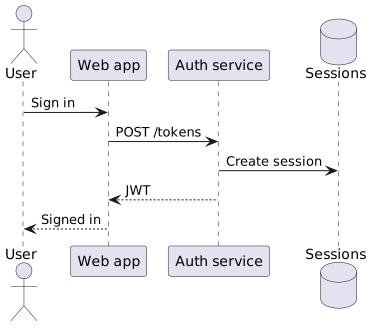
The source, which you can paste into a new diagram and edit:
#Which UML type, and what to draw it with
UML type | Best drawn with | Answers |
|---|---|---|
Sequence | PlantUML or Mermaid | In what order do these components talk? |
Class | PlantUML, Mermaid or Nomnoml | What are the types and how do they relate? |
Use case | PlantUML | Who uses this, and for what? |
State machine | PlantUML or Mermaid | What states can this be in, and what moves it? |
Activity | PlantUML | What happens, in what order, with what branches? |
Component and deployment | PlantUML or draw.io | What is deployed where? |
#A few things that catch people out
You do not have to use all of UML. Four types cover most needs.
Sequence diagrams age well; class diagrams age badly. Generate class diagrams close to the code.
Strict UML notation matters only when someone will read it strictly.
#Related
Cheap to change means it stays true.






















