ArchiMate diagram
ArchiMate is the notation for enterprise architecture: business, application and technology layers, with defined element types and relationships. It is heavier than C4 and answers a broader question.
The shapes ship with the draw.io editor, and the PlantUML standard library has an ArchiMate set if you prefer text.
#When to reach for one
Enterprise architecture work where the notation is expected.
Mapping business capabilities onto the applications that deliver them.
Portfolio views: which systems support which processes.
#How to draw it in Capable
#A worked example
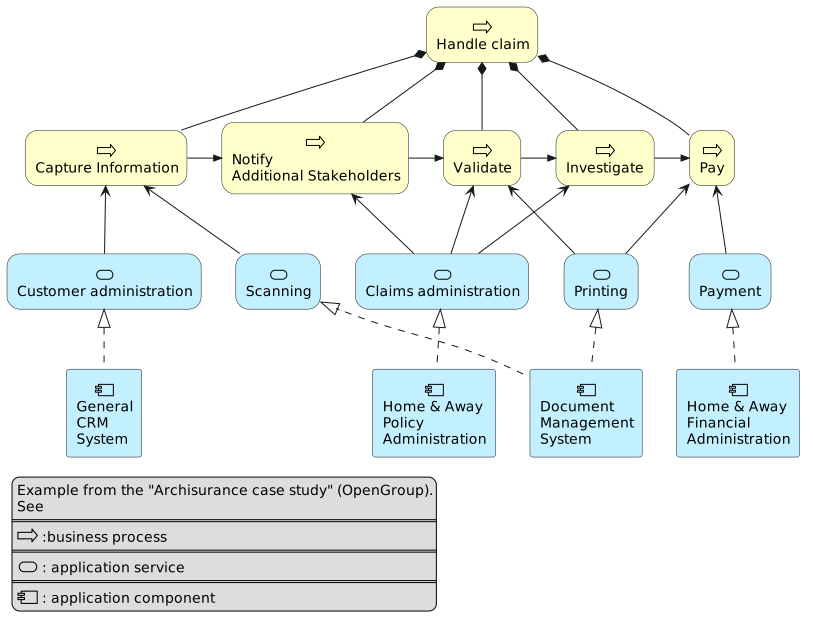
A small ArchiMate view across three layers:
The source, which you can paste into a new diagram and edit:
@startuml
skinparam rectangle<<behavior>> {
	roundCorner 25
}
sprite $bProcess jar:archimate/business-process
sprite $aService jar:archimate/application-service
sprite $aComponent jar:archimate/application-component

rectangle "Handle claim"  as HC <<$bProcess>><<behavior>> #Business
rectangle "Capture Information"  as CI <<$bProcess>><<behavior>> #Business
rectangle "Notify\nAdditional Stakeholders" as NAS <<$bProcess>><<behavior>> #Business
rectangle "Validate" as V <<$bProcess>><<behavior>> #Business
rectangle "Investigate" as I <<$bProcess>><<behavior>> #Business
rectangle "Pay" as P <<$bProcess>><<behavior>> #Business

HC *-down- CI
HC *-down- NAS
HC *-down- V
HC *-down- I
HC *-down- P

CI -right->> NAS
NAS -right->> V
V -right->> I
I -right->> P

rectangle "Scanning" as scanning <<$aService>><<behavior>> #Application
rectangle "Customer administration" as customerAdministration <<$aService>><<behavior>> #Application
rectangle "Claims administration" as claimsAdministration <<$aService>><<behavior>> #Application
rectangle Printing <<$aService>><<behavior>> #Application
rectangle Payment <<$aService>><<behavior>> #Application

scanning -up-> CI
customerAdministration  -up-> CI
claimsAdministration -up-> NAS
claimsAdministration -up-> V
claimsAdministration -up-> I
Payment -up-> P

Printing -up-> V
Printing -up-> P

rectangle "Document\nManagement\nSystem" as DMS <<$aComponent>> #Application
rectangle "General\nCRM\nSystem" as CRM <<$aComponent>>  #Application
rectangle "Home & Away\nPolicy\nAdministration" as HAPA <<$aComponent>> #Application
rectangle "Home & Away\nFinancial\nAdministration" as HFPA <<$aComponent>>  #Application

DMS .up.|> scanning
DMS .up.|> Printing
CRM .up.|> customerAdministration
HAPA .up.|> claimsAdministration
HFPA .up.|> Payment

legend left
Example from the "Archisurance case study" (OpenGroup).
See
====
<$bProcess> :business process
====
<$aService> : application service
====
<$aComponent> : application component
endlegend
@enduml
#A few things that catch people out
ArchiMate relationship types are strict; the notation is most of the value.
Draw views, not the whole model. An ArchiMate diagram showing everything helps nobody.
If you only need software architecture, C4 is lighter and usually enough.
Cheap to change means it stays true.