
Concept map
A concept map differs from a mind map in one important way: the links are labelled, and any concept can link to any other. That turns a hierarchy into a network, and the labels carry most of the meaning.
It is the better choice when the relationships between ideas are the thing you are trying to understand.
#When to reach for one
Learning or teaching a domain, where the relationships matter.
Domain modelling before committing to entities.
Untangling a subject where everything seems to relate to everything.
#How to draw it in Capable
Route | Use when |
|---|---|
Graphviz | Arbitrary graphs with labelled edges and automatic layout. |
Mermaid | Smaller maps where the flowchart syntax is enough. |
#A worked example
Concepts and the relationships between them, labelled:
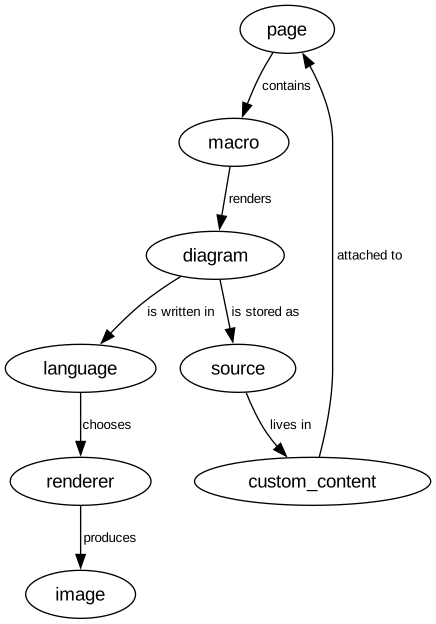
The source, which you can paste into a new diagram and edit:
#A few things that catch people out
Label every edge. An unlabelled concept map is a mind map with extra lines.
Read each link aloud as a sentence: subject, verb, object. If it does not read, the link is wrong.
Cross links between branches are the valuable part; a map with none is a hierarchy.
#Related
Generate first. Organise second.






















