
Wiring and cable diagram
Cable documentation is fiddly and error-prone by hand, and WireViz was built for exactly this: describe connectors, wires and connections in text, and get a correct harness drawing with a bill of materials.
Because it is generated, the diagram and the pinout cannot disagree.
#When to reach for one
Harness and loom documentation for hardware products.
Field service documentation where the pinout is the instruction.
Test rigs and lab setups that somebody else will have to rebuild.
#How to draw it in Capable
Route | Use when |
|---|---|
WireViz | Generated harness drawings with pinouts and a parts list. |
draw.io | Simple point-to-point wiring where generation is overkill. |
#A worked example
A three-wire harness with a real pinout:
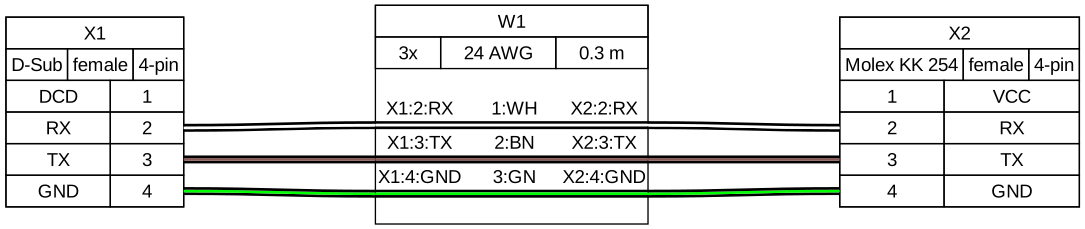
The source, which you can paste into a new diagram and edit:
#A few things that catch people out
Wire colours in the diagram must match the wire colours in the box. Generate from one source.
Include gauge and length; they are the two facts a person building it needs.
Pin numbering direction matters. Say whether you are looking at the front or the rear of the connector.
#Related
Approximately right is wrong here.






















