
Context diagram (C4)

A context diagram has one job: show your system as a single box with the people who use it and the systems it depends on. No technology, no internals, no exceptions.


#What this example shows

  • Person, System and System_Ext, which are the only three element types allowed here.

  • Relationships labelled with what they do and how.

  • A boundary that is implied by the single system box.


#A worked example

Open it, edit it, or copy the source below.
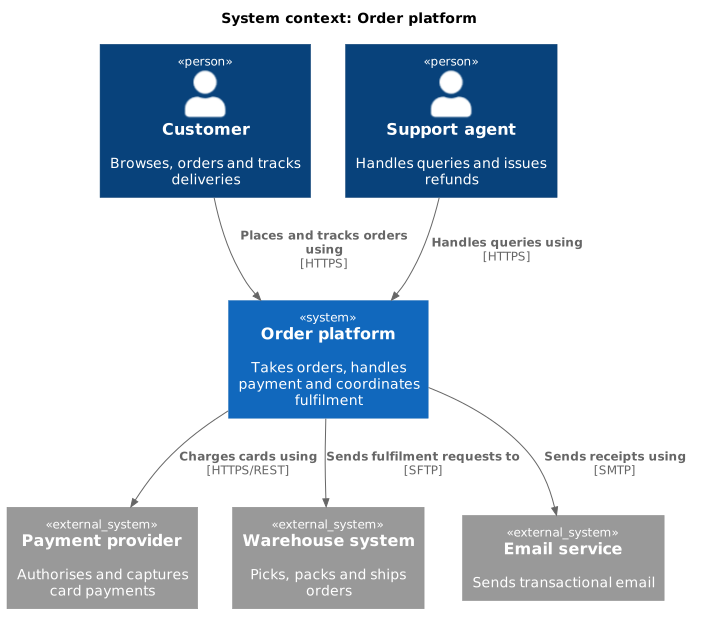
Context diagram (C4)

The source, which you can paste into a new diagram and edit:

@startuml
!include <C4/C4_Context>

title System context: Order platform

Person(customer, "Customer", "Browses, orders and tracks deliveries")
Person(agent, "Support agent", "Handles queries and issues refunds")

System(orders, "Order platform", "Takes orders, handles payment and coordinates fulfilment")

System_Ext(payments, "Payment provider", "Authorises and captures card payments")
System_Ext(warehouse, "Warehouse system", "Picks, packs and ships orders")
System_Ext(email, "Email service", "Sends transactional email")

Rel(customer, orders, "Places and tracks orders using", "HTTPS")
Rel(agent, orders, "Handles queries using", "HTTPS")
Rel(orders, payments, "Charges cards using", "HTTPS/REST")
Rel(orders, warehouse, "Sends fulfilment requests to", "SFTP")
Rel(orders, email, "Sends receipts using", "SMTP")
@enduml

#Making it your own

  • If the diagram mentions a technology inside your own system, it has become a container diagram.

  • Everything outside the box is a person or an external system. There is no third category.

  • Add SHOW_LEGEND() before @enduml if the audience is new to C4.


Context first. Always.






















