
Component view
A component diagram zooms into a single container and shows its major internal parts. Most teams need this for one or two containers at most, and never for the rest.
Draw it where the internal structure is genuinely difficult, and skip it everywhere else.
#When to draw one
A container with complicated internal structure.
Explaining a design before implementing it.
Onboarding onto the part of the system people find hardest.
#What is on the diagram
Element | Meaning |
|---|---|
Component | A grouping of related functionality inside a container |
Container boundary | A box around the components |
Relationship | How components call each other |
External containers | Drawn outside, so the boundaries stay clear |
#A worked example
Inside the Order API, at component level:
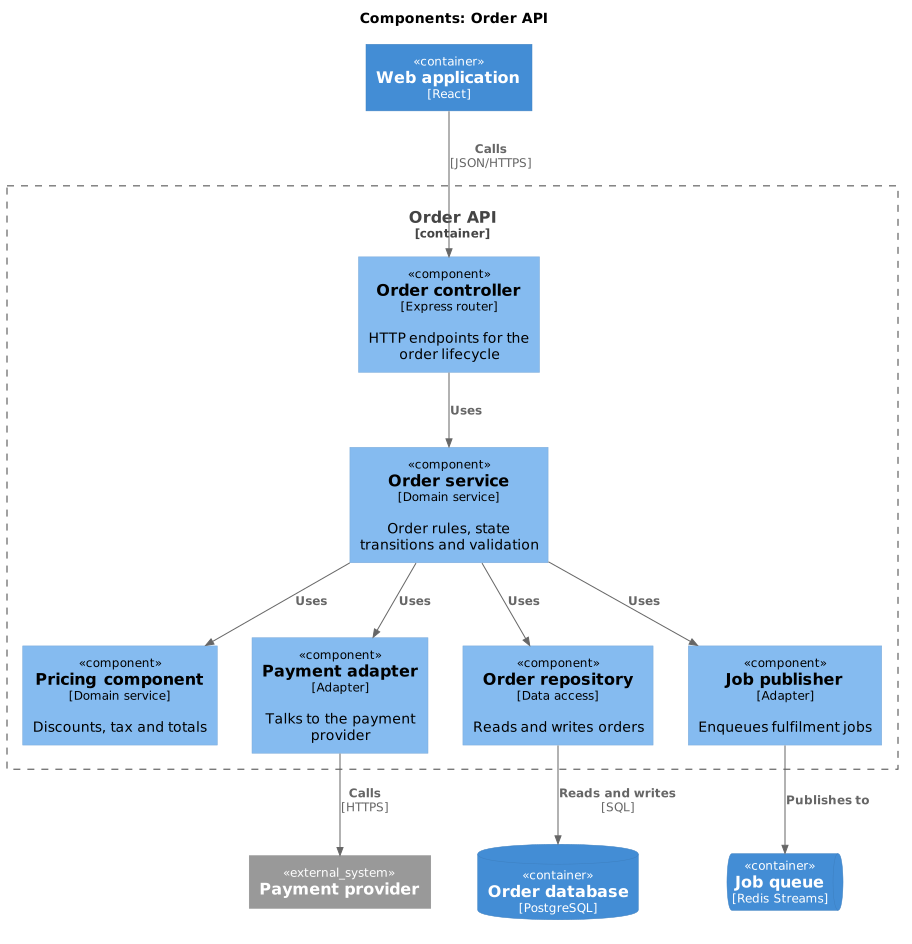
The source, which you can paste into a new diagram and edit:
#A few things that catch people out
Level 3 is optional. Drawing it for every container is how C4 documentation becomes unmaintainable.
Components are groupings of functionality, not classes. If you are drawing classes, you have gone one level too far.
Keep other containers outside the boundary so the reader can see where the container ends.
#Related
Context first. Always.






















