
Container diagram
The container diagram is the one most teams actually need. It shows the applications and data stores that make up your system, what each is built with, and how they talk to each other.
In C4, a container is something that runs: a web app, an API, a database, a queue. It is not a Docker container, though it often is one.
#When to draw one
The main architecture diagram for a system.
Onboarding engineers who will work on it.
Design reviews of a change that crosses containers.
#What is on the diagram
Element | Meaning |
|---|---|
Container | An application or data store that runs independently |
Technology | Written on each container: the runtime or engine |
System boundary | A box around your containers |
Relationship | Labelled with purpose and protocol |
#A worked example
A container diagram with a queue and two data stores:
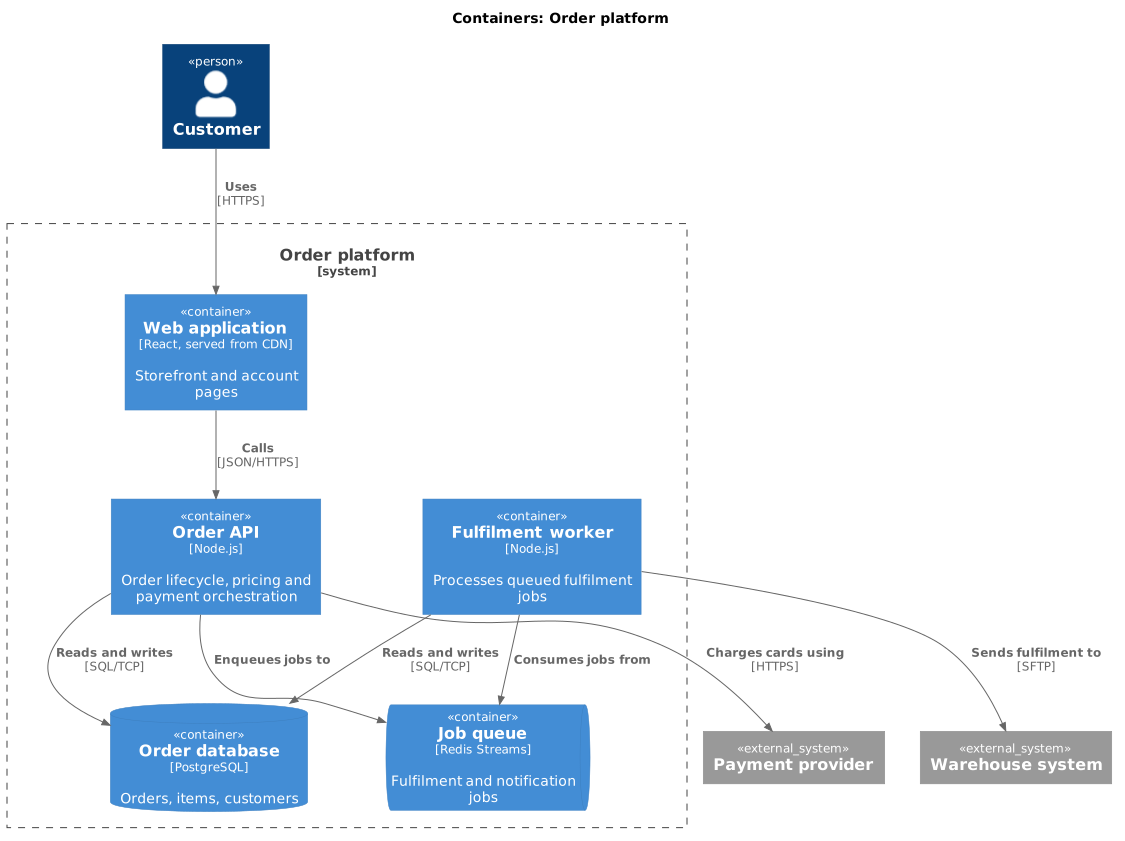
The source, which you can paste into a new diagram and edit:
#A few things that catch people out
Put the technology on every container. It is half the value of the diagram.
Two containers sharing a database are more coupled than the diagram suggests. Say so.
Keep external systems outside the boundary, drawn the same way as on the context diagram.
#Related
Context first. Always.






















