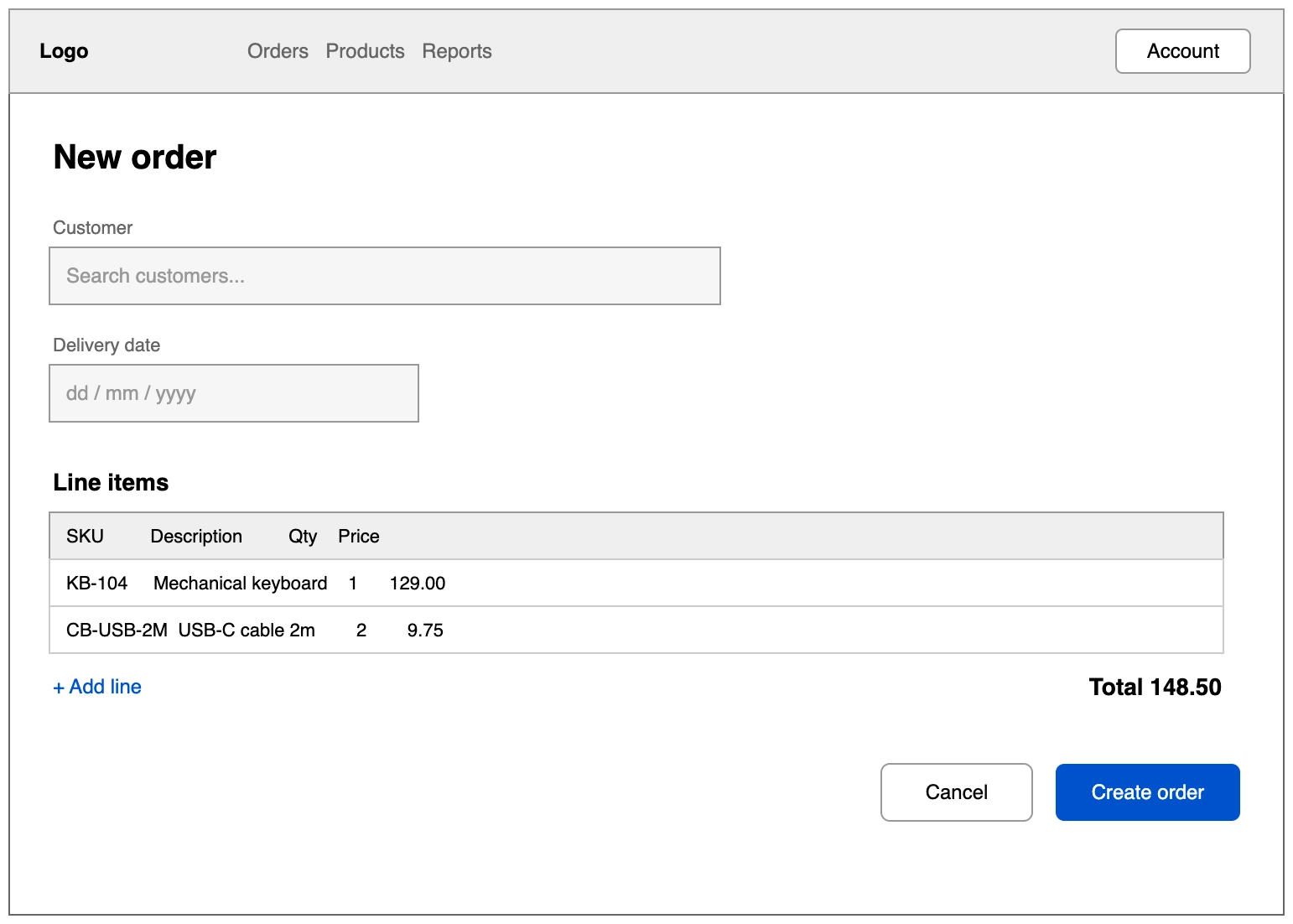
UI wireframe (draw.io)
A wireframe built from plain shapes rather than a mockup library, so it stays legible and quick to edit. It is the fidelity that gets you structural feedback.
#What this example shows
A device frame containing every other element as a child.
Placeholder text in a muted colour, so it reads as a placeholder.
A primary and secondary button, distinguished by fill.
#A worked example
Open it, edit it, or copy the source below.
The source, which you can paste into a new diagram and edit:
<mxfile host="app.diagrams.net" modified="2026-09-02T00:00:00.000Z" agent="Capable" version="24.7.7">
<diagram name="Page-1" id="page-1">
<mxGraphModel dx="1100" dy="760" grid="1" gridSize="10" guides="1" tooltips="1" connect="1" arrows="1" fold="1" page="1" pageScale="1" pageWidth="1100" pageHeight="850" math="0" shadow="0">
<root>
<mxCell id="0" />
<mxCell id="1" parent="0" />
<mxCell id="frame" value="" style="rounded=0;whiteSpace=wrap;html=1;fillColor=#ffffff;strokeColor=#666666;" vertex="1" parent="1">
<mxGeometry x="120" y="40" width="760" height="540" as="geometry" />
</mxCell>
<mxCell id="nav" value="" style="rounded=0;whiteSpace=wrap;html=1;fillColor=#eeeeee;strokeColor=#999999;" vertex="1" parent="frame">
<mxGeometry x="0" y="0" width="760" height="50" as="geometry" />
</mxCell>
<mxCell id="logo" value="Logo" style="text;html=1;align=left;verticalAlign=middle;fontStyle=1;" vertex="1" parent="nav">
<mxGeometry x="16" y="10" width="80" height="30" as="geometry" />
</mxCell>
<mxCell id="menu" value="Orders   Products   Reports" style="text;html=1;align=left;verticalAlign=middle;fontColor=#666666;" vertex="1" parent="nav">
<mxGeometry x="140" y="10" width="320" height="30" as="geometry" />
</mxCell>
<mxCell id="acct" value="Account" style="rounded=1;whiteSpace=wrap;html=1;fillColor=#ffffff;strokeColor=#999999;" vertex="1" parent="nav">
<mxGeometry x="660" y="12" width="80" height="26" as="geometry" />
</mxCell>
<mxCell id="h1" value="New order" style="text;html=1;align=left;verticalAlign=middle;fontSize=20;fontStyle=1;" vertex="1" parent="frame">
<mxGeometry x="24" y="70" width="300" height="36" as="geometry" />
</mxCell>
<mxCell id="lbl1" value="Customer" style="text;html=1;align=left;verticalAlign=middle;fontSize=11;fontColor=#666666;" vertex="1" parent="frame">
<mxGeometry x="24" y="120" width="200" height="20" as="geometry" />
</mxCell>
<mxCell id="f1" value="Search customers..." style="rounded=0;whiteSpace=wrap;html=1;fillColor=#f5f5f5;strokeColor=#999999;align=left;spacingLeft=8;fontColor=#999999;" vertex="1" parent="frame">
<mxGeometry x="24" y="142" width="400" height="34" as="geometry" />
</mxCell>
<mxCell id="lbl2" value="Delivery date" style="text;html=1;align=left;verticalAlign=middle;fontSize=11;fontColor=#666666;" vertex="1" parent="frame">
<mxGeometry x="24" y="190" width="200" height="20" as="geometry" />
</mxCell>
<mxCell id="f2" value="dd / mm / yyyy" style="rounded=0;whiteSpace=wrap;html=1;fillColor=#f5f5f5;strokeColor=#999999;align=left;spacingLeft=8;fontColor=#999999;" vertex="1" parent="frame">
<mxGeometry x="24" y="212" width="220" height="34" as="geometry" />
</mxCell>
<mxCell id="tbl" value="Line items" style="text;html=1;align=left;verticalAlign=middle;fontSize=14;fontStyle=1;" vertex="1" parent="frame">
<mxGeometry x="24" y="270" width="200" height="24" as="geometry" />
</mxCell>
<mxCell id="th" value="SKU         Description         Qty    Price" style="rounded=0;whiteSpace=wrap;html=1;fillColor=#eeeeee;strokeColor=#999999;align=left;spacingLeft=8;fontSize=11;" vertex="1" parent="frame">
<mxGeometry x="24" y="300" width="700" height="28" as="geometry" />
</mxCell>
<mxCell id="r1" value="KB-104     Mechanical keyboard    1      129.00" style="rounded=0;whiteSpace=wrap;html=1;fillColor=#ffffff;strokeColor=#cccccc;align=left;spacingLeft=8;fontSize=11;" vertex="1" parent="frame">
<mxGeometry x="24" y="328" width="700" height="28" as="geometry" />
</mxCell>
<mxCell id="r2" value="CB-USB-2M  USB-C cable 2m        2        9.75" style="rounded=0;whiteSpace=wrap;html=1;fillColor=#ffffff;strokeColor=#cccccc;align=left;spacingLeft=8;fontSize=11;" vertex="1" parent="frame">
<mxGeometry x="24" y="356" width="700" height="28" as="geometry" />
</mxCell>
<mxCell id="add" value="+ Add line" style="text;html=1;align=left;verticalAlign=middle;fontColor=#0052cc;fontSize=12;" vertex="1" parent="frame">
<mxGeometry x="24" y="392" width="120" height="24" as="geometry" />
</mxCell>
<mxCell id="total" value="Total 148.50" style="text;html=1;align=right;verticalAlign=middle;fontSize=14;fontStyle=1;" vertex="1" parent="frame">
<mxGeometry x="520" y="392" width="204" height="24" as="geometry" />
</mxCell>
<mxCell id="cancel" value="Cancel" style="rounded=1;whiteSpace=wrap;html=1;fillColor=#ffffff;strokeColor=#999999;" vertex="1" parent="frame">
<mxGeometry x="520" y="450" width="90" height="34" as="geometry" />
</mxCell>
<mxCell id="save" value="Create order" style="rounded=1;whiteSpace=wrap;html=1;fillColor=#0052cc;strokeColor=none;fontColor=#ffffff;" vertex="1" parent="frame">
<mxGeometry x="624" y="450" width="110" height="34" as="geometry" />
</mxCell>
</root>
</mxGraphModel>
</diagram>
</mxfile>
#Making it your own
Swap the plain shapes for the mockup shape library if you need higher fidelity.
Label it clearly as a wireframe, or it will be treated as a design.
Add the empty and error states as extra pages in the same diagram.
Open it. Drag something. It is a real canvas.