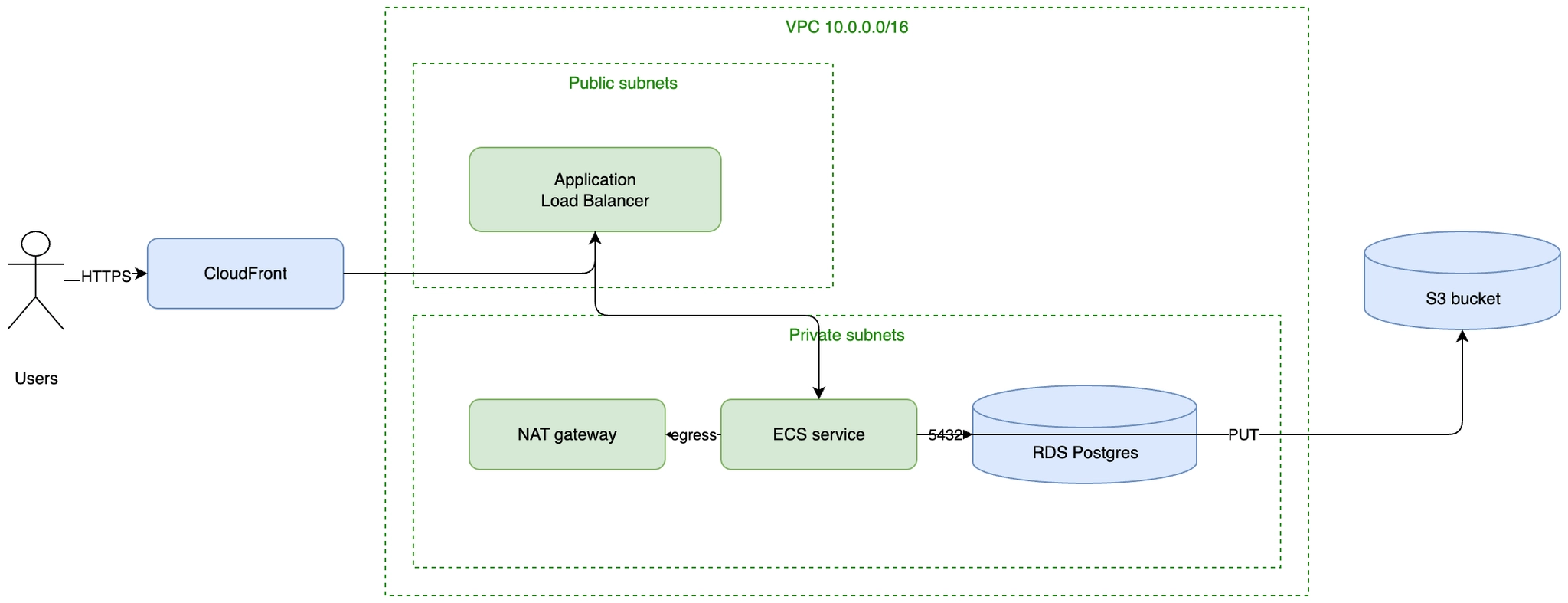
AWS architecture (draw.io)
An AWS diagram with the boundaries that matter drawn as real containers: the VPC, the public subnets and the private subnets. Swap the plain boxes for the official AWS shapes from the shape library.
#What this example shows
Nested containers acting as VPC and subnet boundaries.
Traffic flowing inwards through the public subnet only.
Egress through a NAT gateway, drawn explicitly.
#A worked example
Open it, edit it, or copy the source below.
The source, which you can paste into a new diagram and edit:
<mxfile host="app.diagrams.net" modified="2026-09-02T00:00:00.000Z" agent="Capable" version="24.7.7">
<diagram name="Page-1" id="page-1">
<mxGraphModel dx="1100" dy="760" grid="1" gridSize="10" guides="1" tooltips="1" connect="1" arrows="1" fold="1" page="1" pageScale="1" pageWidth="1100" pageHeight="850" math="0" shadow="0">
<root>
<mxCell id="0" />
<mxCell id="1" parent="0" />
<mxCell id="u" value="Users" style="ellipse;shape=umlActor;verticalLabelPosition=bottom;html=1;" vertex="1" parent="1">
<mxGeometry x="60" y="220" width="40" height="70" as="geometry" />
</mxCell>
<mxCell id="cf" value="CloudFront" style="rounded=1;whiteSpace=wrap;html=1;fillColor=#dae8fc;strokeColor=#6c8ebf;" vertex="1" parent="1">
<mxGeometry x="160" y="225" width="140" height="50" as="geometry" />
</mxCell>
<mxCell id="vpc" value="VPC 10.0.0.0/16" style="rounded=0;whiteSpace=wrap;html=1;dashed=1;fillColor=none;strokeColor=#248814;verticalAlign=top;fontColor=#248814;" vertex="1" parent="1">
<mxGeometry x="340" y="60" width="660" height="420" as="geometry" />
</mxCell>
<mxCell id="pub" value="Public subnets" style="rounded=0;whiteSpace=wrap;html=1;dashed=1;fillColor=none;strokeColor=#248814;verticalAlign=top;fontColor=#248814;" vertex="1" parent="vpc">
<mxGeometry x="20" y="40" width="300" height="160" as="geometry" />
</mxCell>
<mxCell id="prv" value="Private subnets" style="rounded=0;whiteSpace=wrap;html=1;dashed=1;fillColor=none;strokeColor=#248814;verticalAlign=top;fontColor=#248814;" vertex="1" parent="vpc">
<mxGeometry x="20" y="220" width="620" height="180" as="geometry" />
</mxCell>
<mxCell id="alb" value="Application Load Balancer" style="rounded=1;whiteSpace=wrap;html=1;fillColor=#d5e8d4;strokeColor=#82b366;" vertex="1" parent="pub">
<mxGeometry x="40" y="60" width="180" height="60" as="geometry" />
</mxCell>
<mxCell id="nat" value="NAT gateway" style="rounded=1;whiteSpace=wrap;html=1;fillColor=#d5e8d4;strokeColor=#82b366;" vertex="1" parent="prv">
<mxGeometry x="40" y="60" width="140" height="50" as="geometry" />
</mxCell>
<mxCell id="ecs" value="ECS service" style="rounded=1;whiteSpace=wrap;html=1;fillColor=#d5e8d4;strokeColor=#82b366;" vertex="1" parent="prv">
<mxGeometry x="220" y="60" width="140" height="50" as="geometry" />
</mxCell>
<mxCell id="rds" value="RDS Postgres" style="shape=cylinder3;boundedLbl=1;backgroundOutline=1;html=1;fillColor=#dae8fc;strokeColor=#6c8ebf;" vertex="1" parent="prv">
<mxGeometry x="400" y="50" width="160" height="70" as="geometry" />
</mxCell>
<mxCell id="s3" value="S3 bucket" style="shape=cylinder3;boundedLbl=1;backgroundOutline=1;html=1;fillColor=#dae8fc;strokeColor=#6c8ebf;" vertex="1" parent="1">
<mxGeometry x="1030" y="220" width="140" height="70" as="geometry" />
</mxCell>
<mxCell id="a1" value="HTTPS" style="edgeStyle=orthogonalEdgeStyle;rounded=1;html=1;" edge="1" parent="1" source="u" target="cf">
<mxGeometry relative="1" as="geometry" />
</mxCell>
<mxCell id="a2" value="" style="edgeStyle=orthogonalEdgeStyle;rounded=1;html=1;" edge="1" parent="1" source="cf" target="alb">
<mxGeometry relative="1" as="geometry" />
</mxCell>
<mxCell id="a3" value="" style="edgeStyle=orthogonalEdgeStyle;rounded=1;html=1;" edge="1" parent="1" source="alb" target="ecs">
<mxGeometry relative="1" as="geometry" />
</mxCell>
<mxCell id="a4" value="5432" style="edgeStyle=orthogonalEdgeStyle;rounded=1;html=1;" edge="1" parent="1" source="ecs" target="rds">
<mxGeometry relative="1" as="geometry" />
</mxCell>
<mxCell id="a5" value="PUT" style="edgeStyle=orthogonalEdgeStyle;rounded=1;html=1;" edge="1" parent="1" source="ecs" target="s3">
<mxGeometry relative="1" as="geometry" />
</mxCell>
<mxCell id="a6" value="egress" style="edgeStyle=orthogonalEdgeStyle;rounded=1;html=1;" edge="1" parent="1" source="ecs" target="nat">
<mxGeometry relative="1" as="geometry" />
</mxCell>
</root>
</mxGraphModel>
</diagram>
</mxfile>
#Making it your own
Enable the AWS shape library and replace each box with its official icon.
Add availability zones as a second layer of containers if resilience is the story.
Annotate security groups; they are not boundaries you can draw as boxes.
Open it. Drag something. It is a real canvas.