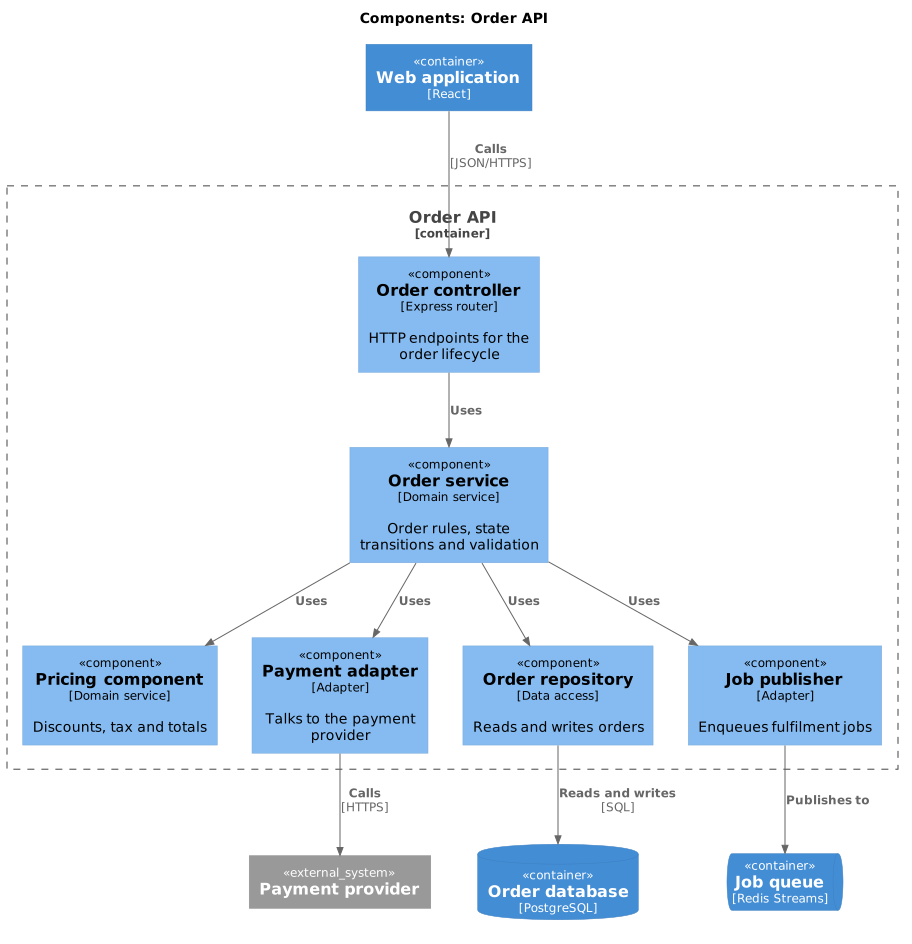
Component diagram (C4)
Level 3 is optional and most containers never need one. Draw it for the container people find hardest, and skip it everywhere else.
#What this example shows
Container_Boundary, which scopes the diagram to one container.
Components as groupings of functionality, not as classes.
Other containers drawn outside the boundary.
#A worked example
Open it, edit it, or copy the source below.
The source, which you can paste into a new diagram and edit:
@startuml
!include <C4/C4_Component>

title Components: Order API

Container(web, "Web application", "React")
ContainerDb(db, "Order database", "PostgreSQL")
ContainerQueue(queue, "Job queue", "Redis Streams")
System_Ext(payments, "Payment provider")

Container_Boundary(api, "Order API") {
  Component(ctrl, "Order controller", "Express router", "HTTP endpoints for the order lifecycle")
  Component(svc, "Order service", "Domain service", "Order rules, state transitions and validation")
  Component(price, "Pricing component", "Domain service", "Discounts, tax and totals")
  Component(pay, "Payment adapter", "Adapter", "Talks to the payment provider")
  Component(repo, "Order repository", "Data access", "Reads and writes orders")
  Component(pub, "Job publisher", "Adapter", "Enqueues fulfilment jobs")
}

Rel(web, ctrl, "Calls", "JSON/HTTPS")
Rel(ctrl, svc, "Uses")
Rel(svc, price, "Uses")
Rel(svc, pay, "Uses")
Rel(svc, repo, "Uses")
Rel(svc, pub, "Uses")
Rel(repo, db, "Reads and writes", "SQL")
Rel(pub, queue, "Publishes to")
Rel(pay, payments, "Calls", "HTTPS")
@enduml
#Making it your own
Components are groupings of functionality. If you are drawing classes, you have gone a level too far.
Keep other containers outside the boundary so the reader can see where this one ends.
Drawing level 3 for every container is how C4 documentation becomes unmaintainable.
Context first. Always.