
ActDiag
ActDiag draws swimlane activity diagrams. You declare the flow once, then say which lane each activity belongs to, and it places everything.
It is the fastest route to a swimlane diagram that stays tidy when you add a step.
#What it is good at
Cross-team processes where the handoffs are the point.
Swimlane diagrams that change often enough that redrawing is annoying.
Process documentation generated from a script.
#What it draws
Element | Syntax |
|---|---|
Flow | a -> b -> c; |
Lane | lane name { a; b; } |
Lane label | lane finance { label = "Finance team"; } |
Activity label | a [label = "Approve"]; |
#A worked example
A three-lane onboarding process:
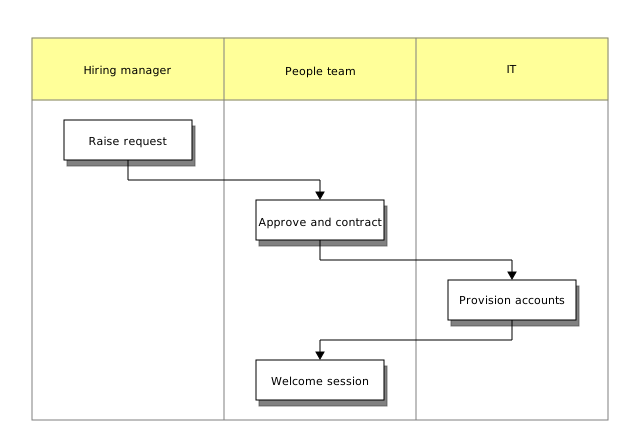
The source, which you can paste into a new diagram and edit:
#A few things that catch people out
Declare the flow first, then the lanes. Doing it the other way round produces odd layouts.
An activity belongs to exactly one lane; put it in two and the last one wins.
For BPMN semantics rather than lanes, use the BPMN editor.
#Related
Thirty-one languages. Nobody knows them all.






















