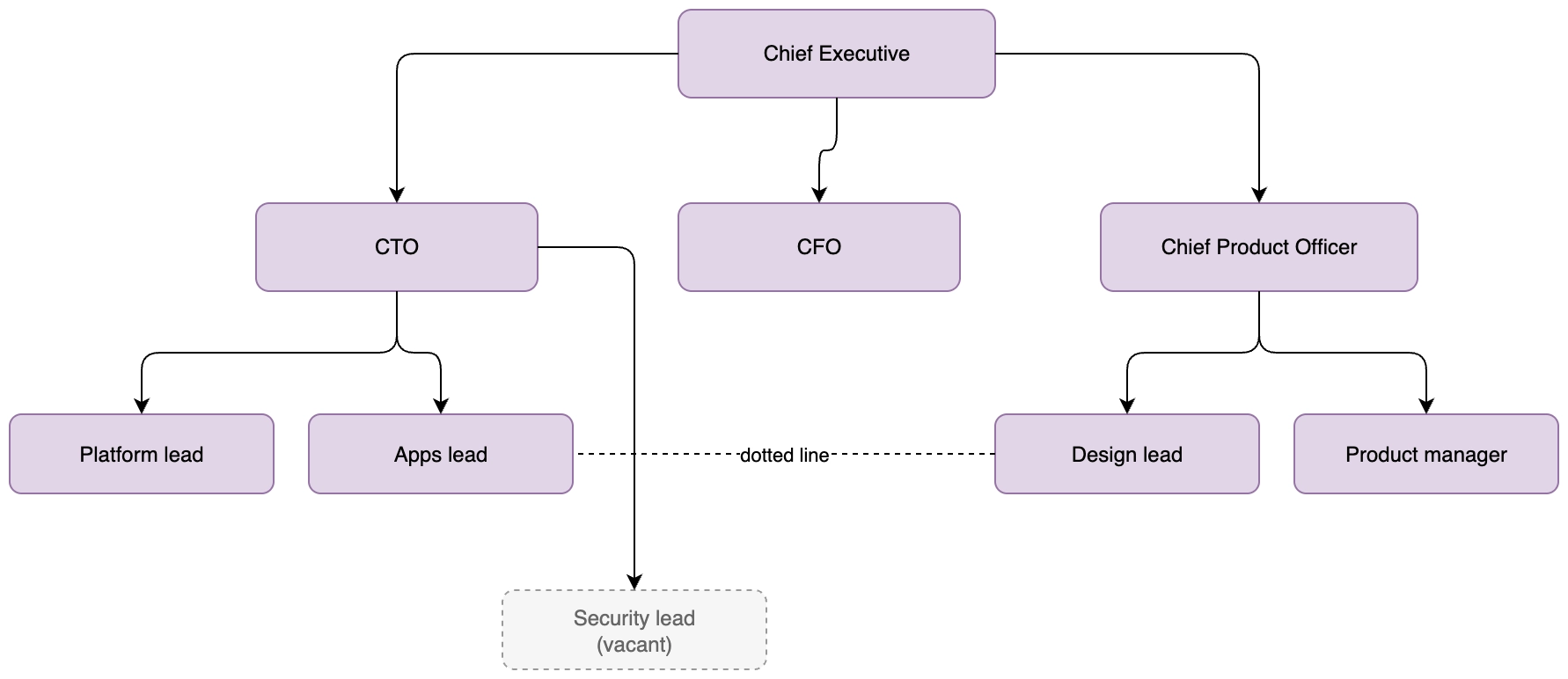
Org chart (draw.io)
An org chart with the two things people actually look for: which roles are vacant, and which relationships are dotted rather than solid.
#What this example shows
A vacancy drawn with a dashed border and muted text.
A dotted-line relationship with no arrowhead.
A tree layout you can regenerate from the Arrange menu.
#A worked example
Open it, edit it, or copy the source below.
The source, which you can paste into a new diagram and edit:
<mxfile host="app.diagrams.net" modified="2026-09-02T00:00:00.000Z" agent="Capable" version="24.7.7">
<diagram name="Page-1" id="page-1">
<mxGraphModel dx="1100" dy="760" grid="1" gridSize="10" guides="1" tooltips="1" connect="1" arrows="1" fold="1" page="1" pageScale="1" pageWidth="1100" pageHeight="850" math="0" shadow="0">
<root>
<mxCell id="0" />
<mxCell id="1" parent="0" />
<mxCell id="c" value="Chief Executive" style="rounded=1;whiteSpace=wrap;html=1;fillColor=#e1d5e7;strokeColor=#9673a6;" vertex="1" parent="1">
<mxGeometry x="440" y="40" width="180" height="50" as="geometry" />
</mxCell>
<mxCell id="cto" value="CTO" style="rounded=1;whiteSpace=wrap;html=1;fillColor=#e1d5e7;strokeColor=#9673a6;" vertex="1" parent="1">
<mxGeometry x="200" y="150" width="160" height="50" as="geometry" />
</mxCell>
<mxCell id="cfo" value="CFO" style="rounded=1;whiteSpace=wrap;html=1;fillColor=#e1d5e7;strokeColor=#9673a6;" vertex="1" parent="1">
<mxGeometry x="440" y="150" width="160" height="50" as="geometry" />
</mxCell>
<mxCell id="cpo" value="Chief Product Officer" style="rounded=1;whiteSpace=wrap;html=1;fillColor=#e1d5e7;strokeColor=#9673a6;" vertex="1" parent="1">
<mxGeometry x="680" y="150" width="180" height="50" as="geometry" />
</mxCell>
<mxCell id="plat" value="Platform lead" style="rounded=1;whiteSpace=wrap;html=1;fillColor=#e1d5e7;strokeColor=#9673a6;" vertex="1" parent="1">
<mxGeometry x="60" y="270" width="150" height="45" as="geometry" />
</mxCell>
<mxCell id="apps" value="Apps lead" style="rounded=1;whiteSpace=wrap;html=1;fillColor=#e1d5e7;strokeColor=#9673a6;" vertex="1" parent="1">
<mxGeometry x="230" y="270" width="150" height="45" as="geometry" />
</mxCell>
<mxCell id="sec" value="Security lead (vacant)" style="rounded=1;whiteSpace=wrap;html=1;dashed=1;fillColor=#f5f5f5;strokeColor=#999999;fontColor=#666666;" vertex="1" parent="1">
<mxGeometry x="400" y="270" width="150" height="45" as="geometry" />
</mxCell>
<mxCell id="des" value="Design lead" style="rounded=1;whiteSpace=wrap;html=1;fillColor=#e1d5e7;strokeColor=#9673a6;" vertex="1" parent="1">
<mxGeometry x="620" y="270" width="150" height="45" as="geometry" />
</mxCell>
<mxCell id="pm" value="Product manager" style="rounded=1;whiteSpace=wrap;html=1;fillColor=#e1d5e7;strokeColor=#9673a6;" vertex="1" parent="1">
<mxGeometry x="790" y="270" width="150" height="45" as="geometry" />
</mxCell>
<mxCell id="o1" value="" style="edgeStyle=orthogonalEdgeStyle;rounded=1;html=1;" edge="1" parent="1" source="c" target="cto">
<mxGeometry relative="1" as="geometry" />
</mxCell>
<mxCell id="o2" value="" style="edgeStyle=orthogonalEdgeStyle;rounded=1;html=1;" edge="1" parent="1" source="c" target="cfo">
<mxGeometry relative="1" as="geometry" />
</mxCell>
<mxCell id="o3" value="" style="edgeStyle=orthogonalEdgeStyle;rounded=1;html=1;" edge="1" parent="1" source="c" target="cpo">
<mxGeometry relative="1" as="geometry" />
</mxCell>
<mxCell id="o4" value="" style="edgeStyle=orthogonalEdgeStyle;rounded=1;html=1;" edge="1" parent="1" source="cto" target="plat">
<mxGeometry relative="1" as="geometry" />
</mxCell>
<mxCell id="o5" value="" style="edgeStyle=orthogonalEdgeStyle;rounded=1;html=1;" edge="1" parent="1" source="cto" target="apps">
<mxGeometry relative="1" as="geometry" />
</mxCell>
<mxCell id="o6" value="" style="edgeStyle=orthogonalEdgeStyle;rounded=1;html=1;" edge="1" parent="1" source="cto" target="sec">
<mxGeometry relative="1" as="geometry" />
</mxCell>
<mxCell id="o7" value="" style="edgeStyle=orthogonalEdgeStyle;rounded=1;html=1;" edge="1" parent="1" source="cpo" target="des">
<mxGeometry relative="1" as="geometry" />
</mxCell>
<mxCell id="o8" value="" style="edgeStyle=orthogonalEdgeStyle;rounded=1;html=1;" edge="1" parent="1" source="cpo" target="pm">
<mxGeometry relative="1" as="geometry" />
</mxCell>
<mxCell id="o9" value="dotted line" style="edgeStyle=orthogonalEdgeStyle;html=1;dashed=1;endArrow=none;" edge="1" parent="1" source="des" target="apps">
<mxGeometry relative="1" as="geometry" />
</mxCell>
</root>
</mxGraphModel>
</diagram>
</mxfile>
#Making it your own
Use Arrange, Layout, Tree to re-tidy after adding a person.
Draw roles rather than only people; roles survive individuals leaving.
Keep it on an internal page. Org charts are more sensitive than most diagrams.
Open it. Drag something. It is a real canvas.