Swimlane process (draw.io)
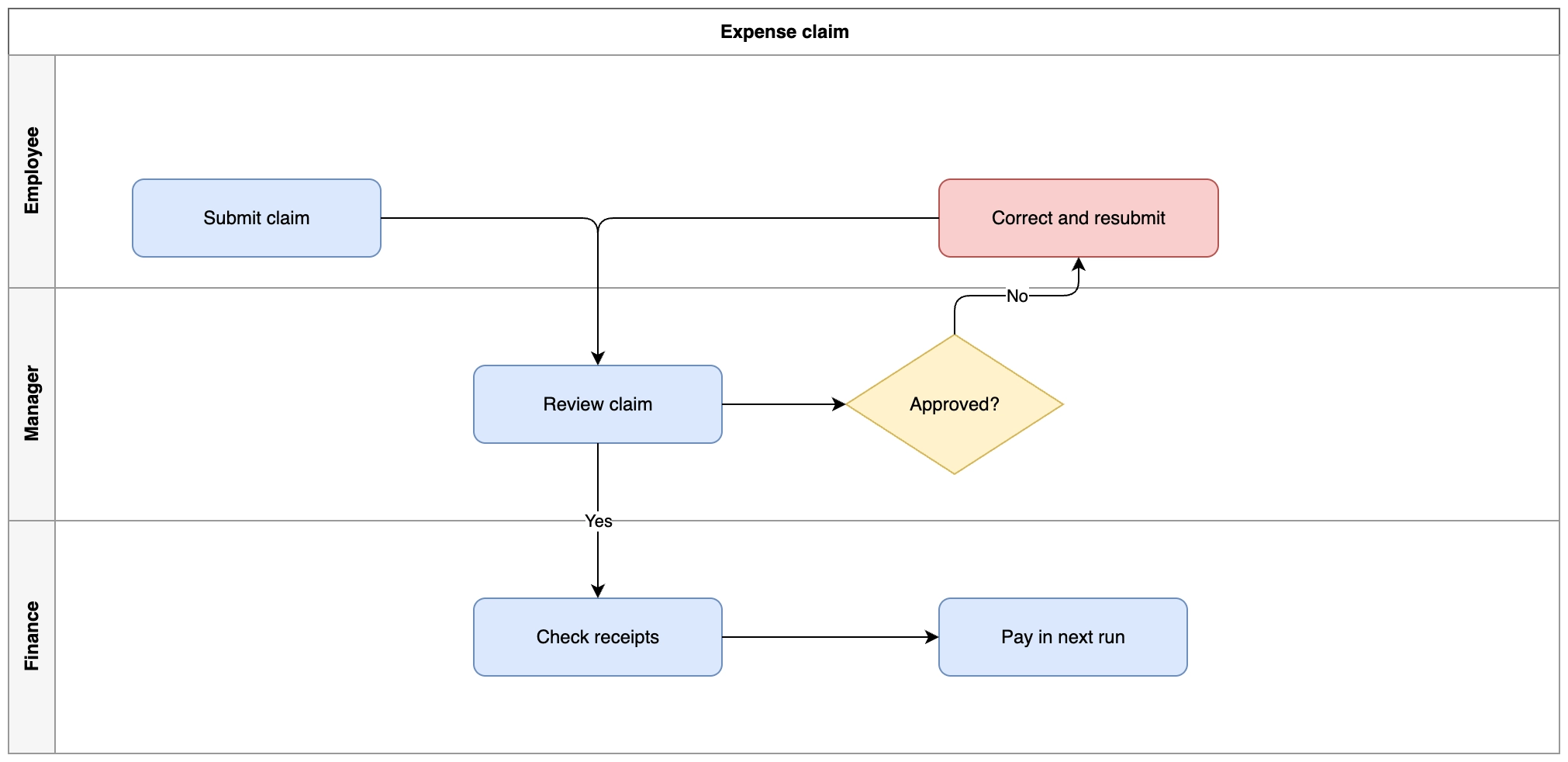
A swimlane pool with three lanes. The value is that every handoff crosses a lane boundary, which is where processes usually break down.
#What this example shows
A pool containing lanes, each holding its own activities.
Shapes as children of a lane, so they move with it.
A rejection path crossing back into an earlier lane.
#A worked example
Open it, edit it, or copy the source below.
The source, which you can paste into a new diagram and edit:
<mxfile host="app.diagrams.net" modified="2026-09-02T00:00:00.000Z" agent="Capable" version="24.7.7">
  <diagram name="Page-1" id="page-1">
    <mxGraphModel dx="1100" dy="760" grid="1" gridSize="10" guides="1" tooltips="1" connect="1" arrows="1" fold="1" page="1" pageScale="1" pageWidth="1100" pageHeight="850" math="0" shadow="0">
      <root>
        <mxCell id="0" />
        <mxCell id="1" parent="0" />
        <mxCell id="p1" value="Expense claim" style="swimlane;html=1;startSize=30;horizontal=1;fillColor=none;strokeColor=#666666;" vertex="1" parent="1">
          <mxGeometry x="40" y="40" width="1000" height="480" as="geometry" />
        </mxCell>
        <mxCell id="l1" value="Employee" style="swimlane;html=1;startSize=30;horizontal=0;fillColor=#f5f5f5;strokeColor=#999999;" vertex="1" parent="p1">
          <mxGeometry x="0" y="30" width="1000" height="150" as="geometry" />
        </mxCell>
        <mxCell id="l2" value="Manager" style="swimlane;html=1;startSize=30;horizontal=0;fillColor=#f5f5f5;strokeColor=#999999;" vertex="1" parent="p1">
          <mxGeometry x="0" y="180" width="1000" height="150" as="geometry" />
        </mxCell>
        <mxCell id="l3" value="Finance" style="swimlane;html=1;startSize=30;horizontal=0;fillColor=#f5f5f5;strokeColor=#999999;" vertex="1" parent="p1">
          <mxGeometry x="0" y="330" width="1000" height="150" as="geometry" />
        </mxCell>
        <mxCell id="s1" value="Submit claim" style="rounded=1;whiteSpace=wrap;html=1;fillColor=#dae8fc;strokeColor=#6c8ebf;" vertex="1" parent="l1">
          <mxGeometry x="80" y="80" width="160" height="50" as="geometry" />
        </mxCell>
        <mxCell id="s2" value="Correct and resubmit" style="rounded=1;whiteSpace=wrap;html=1;fillColor=#f8cecc;strokeColor=#b85450;" vertex="1" parent="l1">
          <mxGeometry x="600" y="80" width="180" height="50" as="geometry" />
        </mxCell>
        <mxCell id="s3" value="Review claim" style="rounded=1;whiteSpace=wrap;html=1;fillColor=#dae8fc;strokeColor=#6c8ebf;" vertex="1" parent="l2">
          <mxGeometry x="300" y="50" width="160" height="50" as="geometry" />
        </mxCell>
        <mxCell id="s4" value="Approved?" style="rhombus;whiteSpace=wrap;html=1;fillColor=#fff2cc;strokeColor=#d6b656;" vertex="1" parent="l2">
          <mxGeometry x="540" y="30" width="140" height="90" as="geometry" />
        </mxCell>
        <mxCell id="s5" value="Check receipts" style="rounded=1;whiteSpace=wrap;html=1;fillColor=#dae8fc;strokeColor=#6c8ebf;" vertex="1" parent="l3">
          <mxGeometry x="300" y="50" width="160" height="50" as="geometry" />
        </mxCell>
        <mxCell id="s6" value="Pay in next run" style="rounded=1;whiteSpace=wrap;html=1;fillColor=#dae8fc;strokeColor=#6c8ebf;" vertex="1" parent="l3">
          <mxGeometry x="600" y="50" width="160" height="50" as="geometry" />
        </mxCell>
        <mxCell id="f1" value="" style="edgeStyle=orthogonalEdgeStyle;rounded=1;html=1;" edge="1" parent="1" source="s1" target="s3">
          <mxGeometry relative="1" as="geometry" />
        </mxCell>
        <mxCell id="f2" value="" style="edgeStyle=orthogonalEdgeStyle;rounded=1;html=1;" edge="1" parent="1" source="s3" target="s4">
          <mxGeometry relative="1" as="geometry" />
        </mxCell>
        <mxCell id="f3" value="No" style="edgeStyle=orthogonalEdgeStyle;rounded=1;html=1;" edge="1" parent="1" source="s4" target="s2">
          <mxGeometry relative="1" as="geometry" />
        </mxCell>
        <mxCell id="f4" value="" style="edgeStyle=orthogonalEdgeStyle;rounded=1;html=1;" edge="1" parent="1" source="s2" target="s3">
          <mxGeometry relative="1" as="geometry" />
        </mxCell>
        <mxCell id="f5" value="Yes" style="edgeStyle=orthogonalEdgeStyle;rounded=1;html=1;" edge="1" parent="1" source="s4" target="s5">
          <mxGeometry relative="1" as="geometry" />
        </mxCell>
        <mxCell id="f6" value="" style="edgeStyle=orthogonalEdgeStyle;rounded=1;html=1;" edge="1" parent="1" source="s5" target="s6">
          <mxGeometry relative="1" as="geometry" />
        </mxCell>
      </root>
    </mxGraphModel>
  </diagram>
</mxfile>
#Making it your own
Drag a lane's title bar to resize it; the contents move with it.
Add a lane by right-clicking the pool.
Above five lanes, group roles rather than adding more.
Open it. Drag something. It is a real canvas.