
WireViz
WireViz takes YAML describing connectors, cables and connections, and produces a harness drawing complete with pin labels, wire colours, gauges and a bill of materials.
It is the only tool here that produces a parts list as a side effect of documenting the wiring.
#What it is good at
Cable harness and loom documentation.
Test rigs and lab setups somebody else will rebuild.
Field service documentation where the pinout is the instruction.
#What it draws
Element | Syntax |
|---|---|
Connectors | connectors: X1: {type, subtype, pinlabels} |
Cables | cables: W1: {gauge, length, colors} |
Connections | connections: - [X1: [1,2], W1: [1,2], X2: [1,2]] |
Notes | notes: on any connector or cable |
#A worked example
A power and signal harness with two connectors:
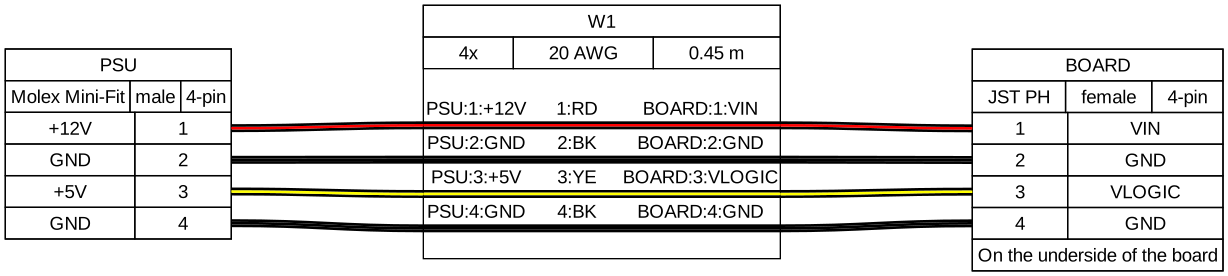
The source, which you can paste into a new diagram and edit:
#A few things that catch people out
Colour codes are two-letter abbreviations: RD red, BK black, YE yellow, and so on.
Length is in metres, and it appears in the parts list, so get it right.
Say which side of a connector the pin numbering refers to.
#Related
Thirty-one languages. Nobody knows them all.






















