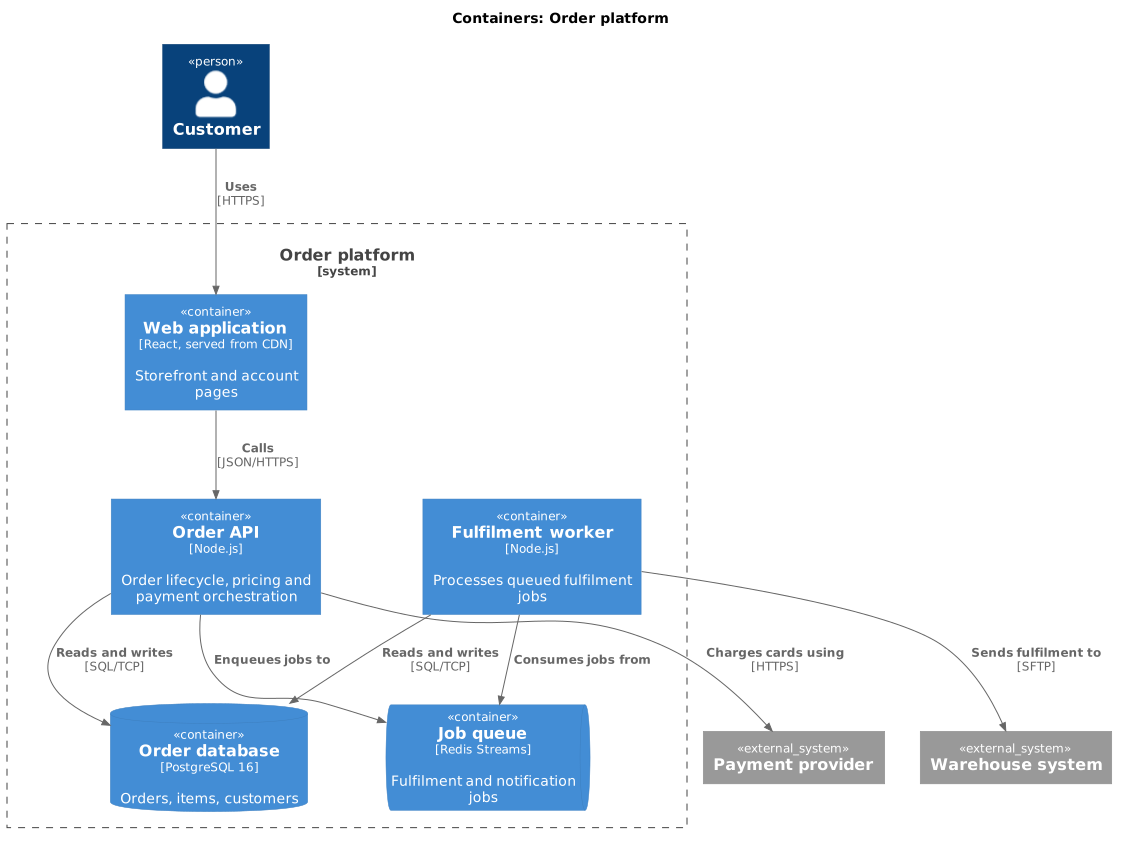
Container diagram (C4)
The container diagram is the one most teams actually need. A container is anything that runs independently: an app, an API, a database, a queue.
#What this example shows
System_Boundary, which draws the line around your own containers.
ContainerDb and ContainerQueue, which carry meaning at a glance.
Technology written on every container.
#A worked example
Open it, edit it, or copy the source below.
The source, which you can paste into a new diagram and edit:
@startuml
!include <C4/C4_Container>

title Containers: Order platform

Person(customer, "Customer")

System_Boundary(orders, "Order platform") {
  Container(web, "Web application", "React, served from CDN", "Storefront and account pages")
  Container(api, "Order API", "Node.js", "Order lifecycle, pricing and payment orchestration")
  Container(worker, "Fulfilment worker", "Node.js", "Processes queued fulfilment jobs")
  ContainerDb(db, "Order database", "PostgreSQL 16", "Orders, items, customers")
  ContainerQueue(queue, "Job queue", "Redis Streams", "Fulfilment and notification jobs")
}

System_Ext(payments, "Payment provider")
System_Ext(warehouse, "Warehouse system")

Rel(customer, web, "Uses", "HTTPS")
Rel(web, api, "Calls", "JSON/HTTPS")
Rel(api, db, "Reads and writes", "SQL/TCP")
Rel(api, queue, "Enqueues jobs to")
Rel(api, payments, "Charges cards using", "HTTPS")
Rel(worker, queue, "Consumes jobs from")
Rel(worker, db, "Reads and writes", "SQL/TCP")
Rel(worker, warehouse, "Sends fulfilment to", "SFTP")
@enduml
#Making it your own
Put the technology on every container; it is half the value of the diagram.
Two containers sharing a database are more coupled than the picture suggests. Say so.
The include line decides which macros exist. Container() needs the Container include.
Context first. Always.