
DITAA
Ditaa renders ASCII art into filled shapes with colour, rounded corners and drop shadows. Special markers in the source control the styling.
The source stays readable as plain text, which is the reason to choose it over redrawing.
#What it is good at
Diagrams that already exist in a README or code comment.
Documentation that must remain readable as plain text.
Quick diagrams where typing boxes is faster than drawing them.
#What it draws
Element | Syntax |
|---|---|
Box | +------+ with | sides |
Rounded corners | / and \ instead of + |
Colour | {c} style markers, or cRED colour codes |
Dashed line | = in the line |
Point marker | * on a line |
#A worked example
ASCII art with colour markers:
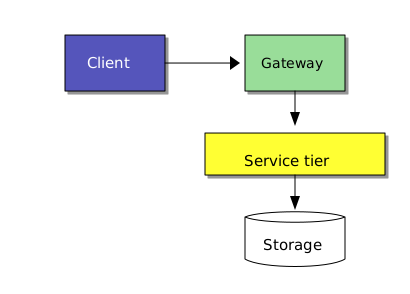
The source, which you can paste into a new diagram and edit:
#A few things that catch people out
Alignment is the syntax. A pipe one column out breaks the box.
Colour codes are three-letter markers inside the box, such as cRED and cBLU.
Svgbob produces cleaner line art; Ditaa produces filled shapes. Pick per diagram.
#Related
Thirty-one languages. Nobody knows them all.






















