
PlantUML
PlantUML draws more diagram types than anything else available, and it has been doing it long enough that most of the syntax is stable and well documented.
It is heavier than Mermaid and worth it when you need a type Mermaid does not have, or the standard library shapes.
#What it is good at
UML in its full range, not just the four common types.
Diagrams that need the standard library: AWS, Azure, C4, ArchiMate icon sets.
Long-lived documentation, because the syntax rarely breaks between versions.
#What it draws
Diagram | Syntax starts with |
|---|---|
Sequence | @startuml then participant |
Class | @startuml then class |
Activity | @startuml then start / :step; |
Component | @startuml then component |
State | @startuml then state |
Use case | @startuml then actor / usecase |
Deployment | @startuml then node |
Object, timing, gantt | @startuml with the matching keywords |
#A worked example
An activity diagram with a branch and a parallel section:
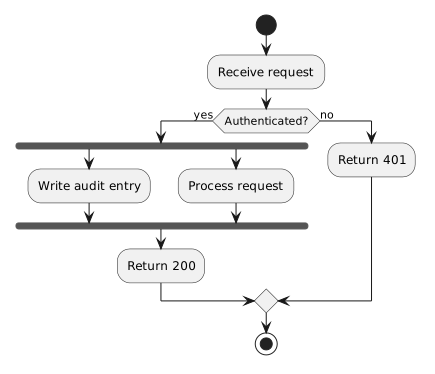
The source, which you can paste into a new diagram and edit:
#A few things that catch people out
Every diagram needs @startuml and @enduml, or it will not be recognised as PlantUML.
The standard library is included via !include; those shapes are what make C4 and cloud diagrams work.
PlantUML lays out its own diagrams, and fighting the layout is rarely worth the time.
#Related
Learn one properly. Borrow the rest when you need them.






















