
Mermaid
Mermaid is the language to learn first. It covers most of the diagrams people actually draw, the syntax is short enough to read without training, and it lays itself out so adding a node never means rearranging the diagram.
It is also the fallback: source with no recognisable marker or extension is stored as Mermaid.
#What it is good at
Flowcharts, sequence diagrams and ER models, which is most documentation.
Diagrams that change often, because a text diff shows exactly what changed.
Diagrams a non-specialist will need to edit after you have gone.
#What it draws
Diagram | Syntax starts with |
|---|---|
Flowchart | flowchart TD |
Sequence | sequenceDiagram |
Class | classDiagram |
State | stateDiagram-v2 |
Entity relationship | erDiagram |
Gantt | gantt |
Git graph | gitGraph |
Mind map | mindmap |
Timeline | timeline |
Pie, quadrant, Sankey | pie / quadrantChart / sankey-beta |
Journey | journey |
#A worked example
A sequence diagram, which is Mermaid at its best:
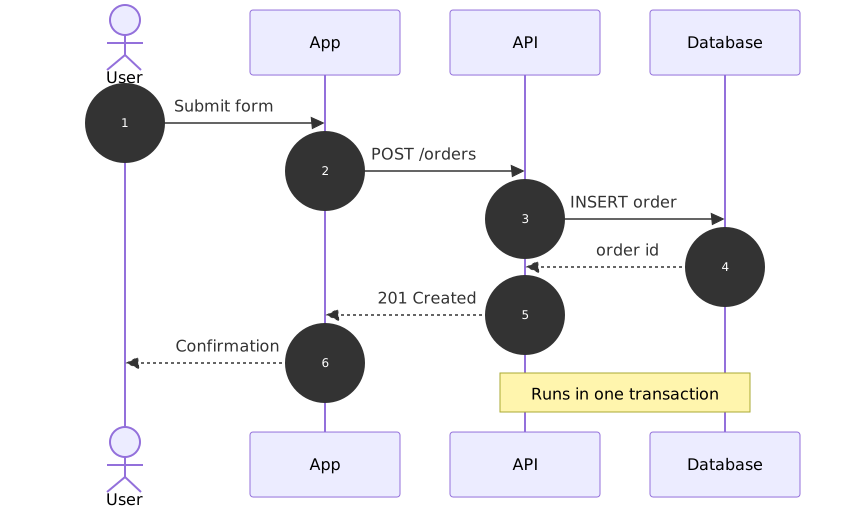
The source, which you can paste into a new diagram and edit:
#A few things that catch people out
Mermaid has no marker of its own, so it is what unrecognised source becomes.
graph TD is Mermaid; digraph is Graphviz. The two are easy to confuse and behave differently.
Layout is automatic. If you need a node in a specific place, you want draw.io or D2.
#Related
Learn one properly. Borrow the rest when you need them.























