
C4
C4-PlantUML is PlantUML plus the C4 macro library, which gives you the right shapes and the discipline of zoom levels without learning a new tool.
It is the quickest way into C4 if you already use PlantUML, and the right choice when you want one diagram at a time rather than a whole model.
#What it is good at
Architecture documentation aimed at a mixed audience.
One-off diagrams where a full Structurizr model would be overkill.
Teams already comfortable with PlantUML.
#What it draws
Diagram | Syntax starts with |
|---|---|
Context (level 1) | !include <C4/C4_Context> |
Container (level 2) | !include <C4/C4_Container> |
Component (level 3) | !include <C4/C4_Component> |
Dynamic and deployment | !include <C4/C4_Dynamic> or C4_Deployment |
#A worked example
A container diagram, C4 level 2:
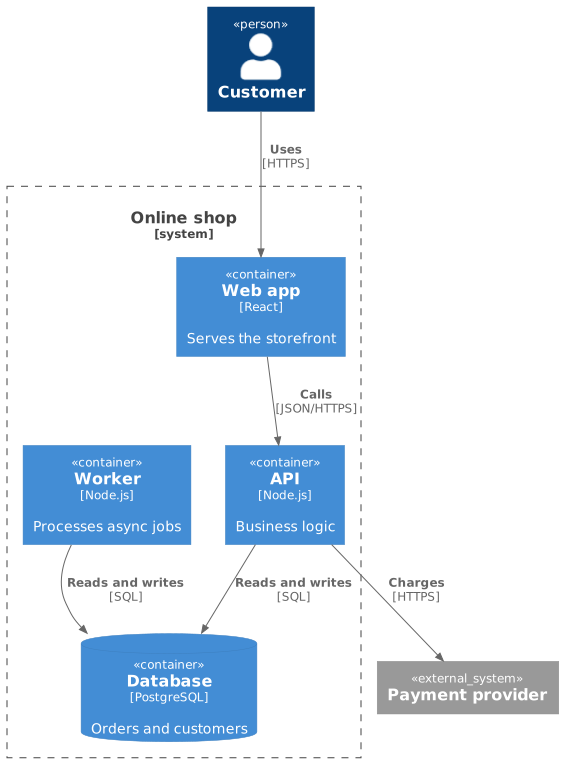
The source, which you can paste into a new diagram and edit:
#A few things that catch people out
Do not mix levels. A container diagram with people and external systems on it is a context diagram that grew.
The include line decides which macros exist. Using Container() without the container include fails.
Above about six diagrams, Structurizr's single model becomes easier to keep consistent.
#Related
Learn one properly. Borrow the rest when you need them.






















