
BlockDiag
BlockDiag is the simplest of the diagram generators: write a chain of arrows and you have a diagram. Nodes are created by being mentioned.
It is worth knowing because the same author wrote ActDiag, SeqDiag, NWDiag, PacketDiag and RackDiag, and they all share this syntax.
#What it is good at
Quick block diagrams where nothing needs styling.
Diagrams generated by a script, because the syntax is trivial to emit.
Documentation where a chain of steps is genuinely the whole picture.
#What it draws
Element | Syntax |
|---|---|
Chain | a -> b -> c; |
Label | a [label = "Step one"]; |
Group | group { b; c; } |
Shape | a [shape = diamond]; |
Branch | a -> b; a -> c; |
#A worked example
A chain, a branch and a group:
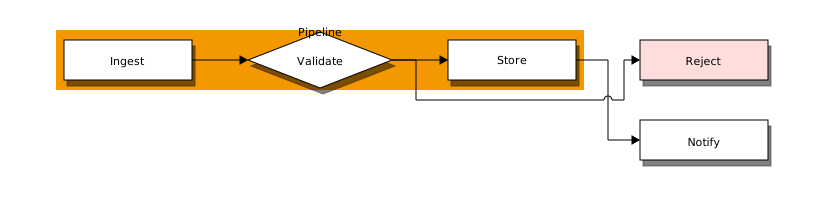
The source, which you can paste into a new diagram and edit:
#A few things that catch people out
Nodes do not need declaring; mentioning one in an arrow creates it.
Every statement ends with a semicolon, which is the most common syntax error.
For anything needing real layout control, D2 or Graphviz will serve you better.
#Related
Thirty-one languages. Nobody knows them all.























