
How it works

Capable Calendar turns the dates already living on your Confluence pages into real calendars, and adds shared, saveable calendars of its own.

It comes with three page macros (Calendar, Clock and Event), a full Calendar page where you create and manage saved calendars, a page byline showing how many dates a page contains, a card in the Confluence homepage feed, a Capable Dashboard widget, and a panel and column in Capable Search.

Events come from three sources: Capable Event macros on pages, Confluence's own date chips on pages (in paragraphs, table rows, task items and decision items), and events saved inside a Capable calendar.
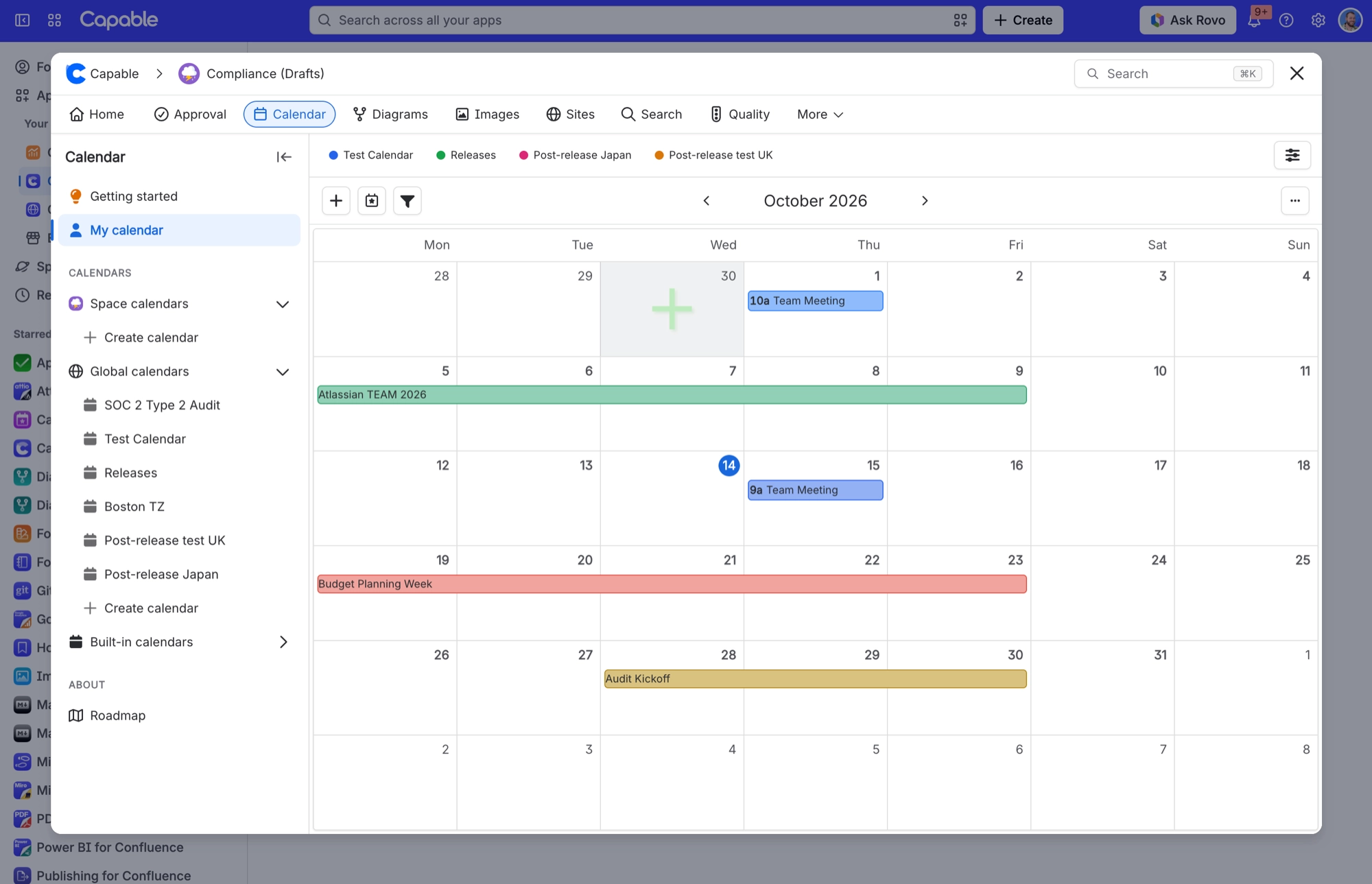
Capable Calendar page with My calendar open, showing an October month view that combines events from several saved calendars
My calendar brings events from several saved calendars into one month view. The coloured chips above the grid show which calendar each event comes from.

The pages below explain how each part behaves, so you know what to expect before you rely on it.


#In this section

Calendar viewsCalendar has five views: Day, Week, Month (the default), Year and Agenda. Pick the one that suits what you need to see.Where events come fromA Capable calendar draws its events from three sources, called event types: Capable Event macros on pages, Confluence's own date chips on pages, and In-Calendar Events saved inside a Capable calendar. Dates on pages are read live every time a calendar is shown.How Confluence dates on a page become eventsA date in a paragraph makes one event running from the earliest to the latest date in that paragraph; @-mentions in the same paragraph become participants and the remaining paragraph text becomes the title.Live editor datesWhile a page is open in the Confluence editor, a Calendar macro reads dates from what you are typing rather than the saved page, so new dates appear immediately. Those live events are read-only.Duplicate collapsingAn event arriving from more than one source appears once. Events from the current page are added first, so they win.Calendar pageThe full Calendar page, where you browse your saved calendars, open any of them with the full toolbar, and import, export or subscribe.Saved calendars are Confluence contentA saved calendar is Confluence content in its own right. It lives in a page, blog post or space, follows that location's permissions, is indexed, and can be trashed like any other content.Who can create and edit eventsWhether you can add or change events depends on your Confluence permissions on the calendar itself. Built-in calendars are always read-only.Saved event editorYou create and edit events saved inside a calendar in one dialog with five tabs. It covers the name, priority, colour, dates, attendees, linked content, tags and which calendar the event belongs to.Built-in calendarsCapable Calendar comes with two ready-made, read-only calendars: Mentions and Recently viewed pages.My CalendarYour own private calendar view. It brings together up to five calendars you choose, plus every event you're a participant of.Importing an .ics fileImport events from an .ics file into a saved calendar, and see which events are skipped along the way.Personal iCal subscriptionEach signed-in user can create their own personal, read-only feed link for a saved calendar from the Subscribe button. The panel shows the URL with a Copy button, one-click Google, Apple and Outlook buttons, and a Revoke link button.iCal feed contentWhat goes into a Capable Calendar iCal feed: the calendar's name, a 60-minute refresh hint, and each event's title, description, link, tags, priority and attendees.Feed freshnessYour feed is ready the moment you subscribe, and changes to events usually reach your subscribed calendar app within 5 to 15 minutes.Feed securityCalendar feed links are checked against Confluence permissions every time they are used, and stop working for good when someone loses access to the calendar.


How it actually behaves.






















