
Common tasks
Rather than a tour, this is the list of things people do, with the route to each.
#What you can do
Task | Where | Notes |
|---|---|---|
Show the dates already on a page as a calendar | Page editor → insert "Calendar (Capable)" (Suite) or "Calendar macro (Capable)" (standalone) | Leave Source unset. The macro then shows the Capable Event macros and Confluence date chips found on that page. |
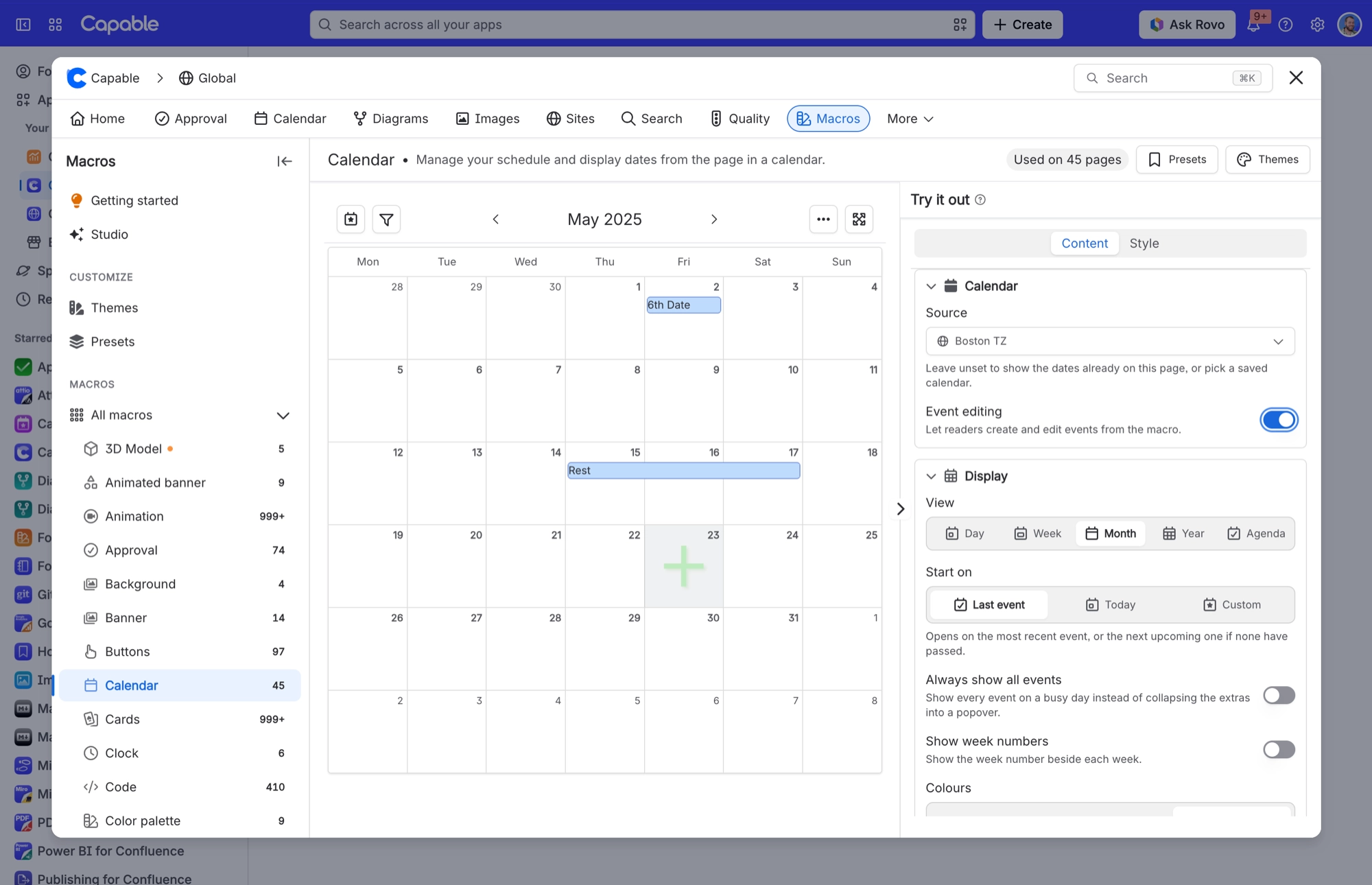
Point a page calendar at a shared, saved calendar | Calendar macro config → Content tab → Source | Pick a space or global calendar, or use "Create new calendar". Turning on "Event editing" then lets readers create and edit events from inside the macro. |
Choose the view the macro opens in | Calendar macro config → Content tab → View | Day, Week, Month (default), Year or Agenda. Readers cannot switch views inside the macro. They press Maximize to open a full calendar with a switcher. |
Control which period the calendar opens on | Calendar macro config, or Calendar Configuration panel → Start on | Last event (default), Today, or Custom plus a date. The jump to the last event only happens on opening. Once a reader moves to another period, the calendar stays there. |
Hide specific dates from the grid | Calendar macro config → Content tab → Hidden on-page events | Click a date chip to toggle it off. Only affects dates found on the current page. |
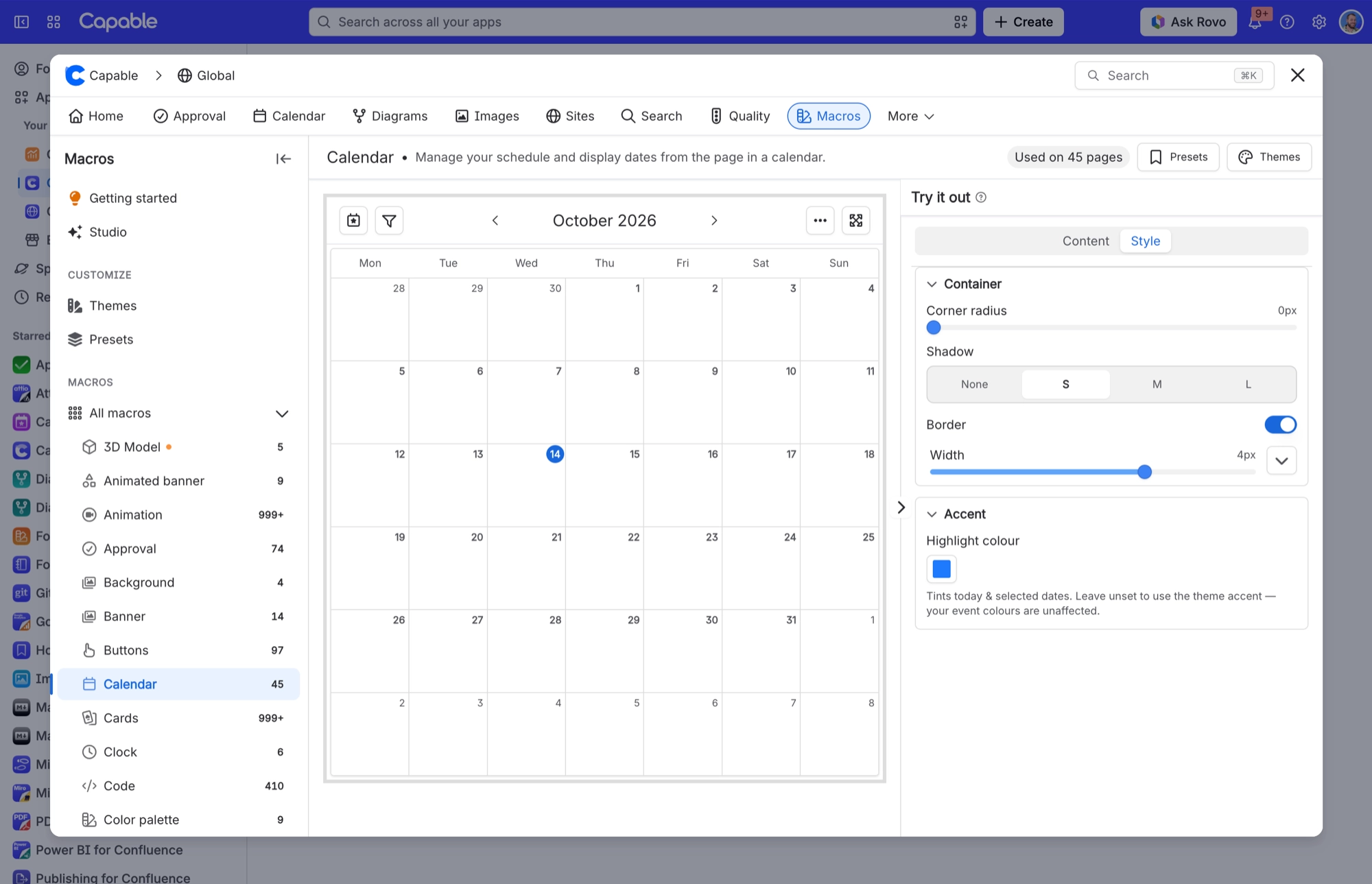
Frame or tint the calendar | Calendar macro config → Style tab | Corner radius, Shadow, Border (with width and colour) and Highlight colour. Highlight colour only tints today and selected dates, never the event colours. |
Add a set of world clocks | Page editor → insert "Clock (Capable)" / "Clock macro (Capable)" | Defaults to Los Angeles, New York and London. Drag to reorder, Add Zone to append, and give any zone a custom Title. Three presets exist: Americas, EMEA, APAC. |
Add an inline event date to a page | Page editor → insert "Event (Capable)" / "Event macro (Capable)" | Set Title, dates and times, assignee and time zone. Options control All-day, Show user, Show title and 24-Hour format. All four are on by default. |
Have Confluence's own dates picked up automatically | Anywhere on a page. A date in a paragraph, a table row, an action item or a decision item. | A paragraph or a table row containing dates makes one event spanning the earliest to latest date in it. @-mentions become participants and the surrounding text becomes the title. |
Create a saved, shared calendar | Calendar page → catalogue → create a calendar (or "Create new calendar" from the macro's Source picker) | The calendar is stored as Confluence content in the space or page you create it in, so it inherits that location's permissions. |
Add or edit an event inside a saved calendar | Open the calendar → click a date or an event | Event names need 4 to 100 characters. Descriptions can be up to 255 characters, and each tag up to 50. |
Choose which pages a saved calendar reads for dates | Calendar Configuration panel → Pages | Recently viewed, Pages where mentioned, Specific pages (max 25), Pages from search (filters or CQL, sort, Result Limit). None of these do anything unless "Native page dates" or "Capable Events" is turned on under Events. |
Import an existing .ics calendar | Calendar catalogue → Import | Drop or select a .ics file. Jira-integration events, events with no start date and events with titles under 4 characters are skipped, and recurring events import as their first occurrence only. |
Build a personal cross-calendar view | Calendar → My Calendar → Manage sources | Add up to 5 source calendars. "Assigned to me" is on by default, and your choices are private to you. |
Subscribe to a calendar from Google, Apple or Outlook | Open a calendar → Subscribe button (calendar with a plus) → "Create subscription link" | Then click Google, Apple or Outlook for a one-click hand-off, or press Copy and paste the URL into your calendar app's "add by URL" / "subscribe from internet" field. Some apps block the hand-off. If yours does, copy the URL and add it by hand. |
Re-display a subscription link you already made | Calendar page → Subscribe button | The panel shows the link you made earlier. Very old links, made before links could be shown again, get a "Show a new link" button instead, which replaces the old one. |
Revoke your own subscription link | Calendar page → Subscribe → "Revoke link" | The link stops working straight away and cannot be brought back. Creating a fresh link for the same calendar also revokes the previous one. |
Turn personal iCal subscriptions on or off for the whole site | Confluence settings → Capable → Features → "Calendar subscriptions" (Capable Calendar → Features in the standalone app) | Confluence administrators only. On by default. Takes effect within about a minute. Turning it off stops new links being made, but links already handed out keep working until you revoke them. |
Review or revoke everyone's subscription links | Confluence settings → Capable → Calendar tab | Confluence administrators only. Lists user, calendar, status and created date with per-row Revoke and a Revoke all button; 25 rows per page. Revocation is permanent. |
Hide Calendar in one space, or force it always on | Space settings → Capable → capability list → Calendar | Space administrators. Choose Auto, Always or Never. In the Suite, Auto means the byline appears only on pages Capable has indexed as containing dates. |
Hide the Calendar capability across the whole site | Confluence settings → Capable → Capabilities | Confluence administrators only. Suite only. The standalone Capable Calendar app has no Capabilities tab. |
Trigger or check content indexing | Confluence settings → Capable → Indexing | Confluence administrators only. Suite only. Worth a look, because the Suite byline and the CQL date search both rely on the index. |
Search for pages by their dates | Capable Search → CQL fields "Capable Date Start", "Capable Date End" and "Capable Date Users" | These read from the date index, which keeps up to 200 unique start dates per page. |
Turn a pasted calendar link into a calendar macro | Page editor. Paste a link to a saved Capable calendar. | It turns into a Calendar macro already pointed at that calendar. |
#Where the Calendar macro settings live
Most of the page-calendar tasks above happen in the Calendar macro's settings, which are split across a Content tab and a Style tab.
#A few things worth knowing
Some tasks need an administrator. The Notes column says so.
Anything relying on search needs the page to have been indexed first.
Macro names differ slightly between the standalone app and the suite.
#Related
What people actually do.






















