
Site settings
Most settings live on the site's own Settings pages. A few are set page by page in the Page metadata panel. This is the complete list. Colours, fonts, the banner and the footer are on Theming your site.
Two of them are display-only, which is worth knowing before you go looking for the edit control.
Settings opens on an overview of cards, one per area, each with a line showing its current state. Confluence admins see nine: General, Appearance, Spaces & URLs, Navigation, Redirects, Access, Integrations, Custom domains and Collaborators. Site collaborators see the first seven.
#Every setting
#General
Setting | What it does |
|---|---|
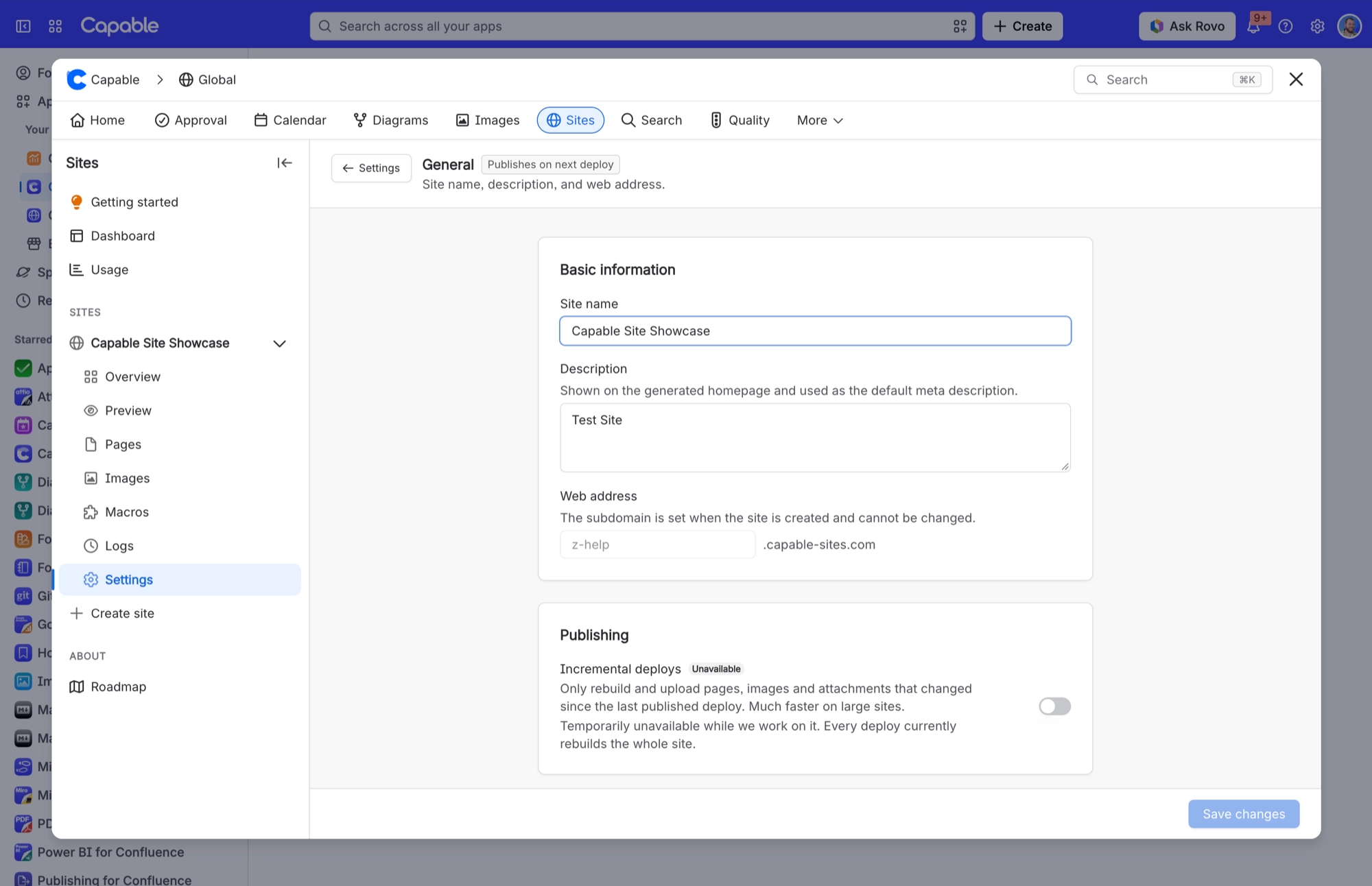
Site name | Renames the site. Publishes on next deploy. |
Description | The site's meta description, used for search-engine and social previews, and shown on the generated homepage. Publishes on next deploy. |
Web address | Read-only: "The subdomain is set when the site is created and cannot be changed." |
Incremental deploys | Permanently disabled and badged "Unavailable": "Every deploy currently rebuilds the whole site." |
Danger zone → Delete site | Deletes the site, takes it offline and frees up its subdomain. You're asked to confirm, and it can't be undone. It doesn't release a custom domain, so remove that first if you want to reuse it. |
#Spaces & URLs
Only Confluence admins can change these. Collaborators see the published spaces and their URLs, read-only.
Setting | What it does |
|---|---|
Published spaces (add, remove, reorder) | Which Confluence spaces the site publishes, and in what order. The order is the site navigation. Publishes on next deploy. |
Public name (per space) | Overrides the Confluence space name everywhere the space is named on the site (navigation, switcher, tabs, homepage cards, llms.txt). It doesn't change URLs. |
URL slug (per space) | The folder the space publishes under. Visitors reach the space at both |
Home space (house icon) | Makes one space the site's front door: it moves first, is labelled "Home", and is served at /. The generated card-grid homepage is replaced by a redirect to it. |
#Redirects
Open to collaborators as well as admins. Publishes on next deploy.
Setting | What it does |
|---|---|
Redirect rules | Sends visitors from an old address to a page on this site. Select Add redirect to add a rule as a row, with a from path, a to path and 301 permanent or 302 temporary. Or select Edit as text to paste rules in bulk, one per line, such as |
#Navigation
Setting | What it does |
|---|---|
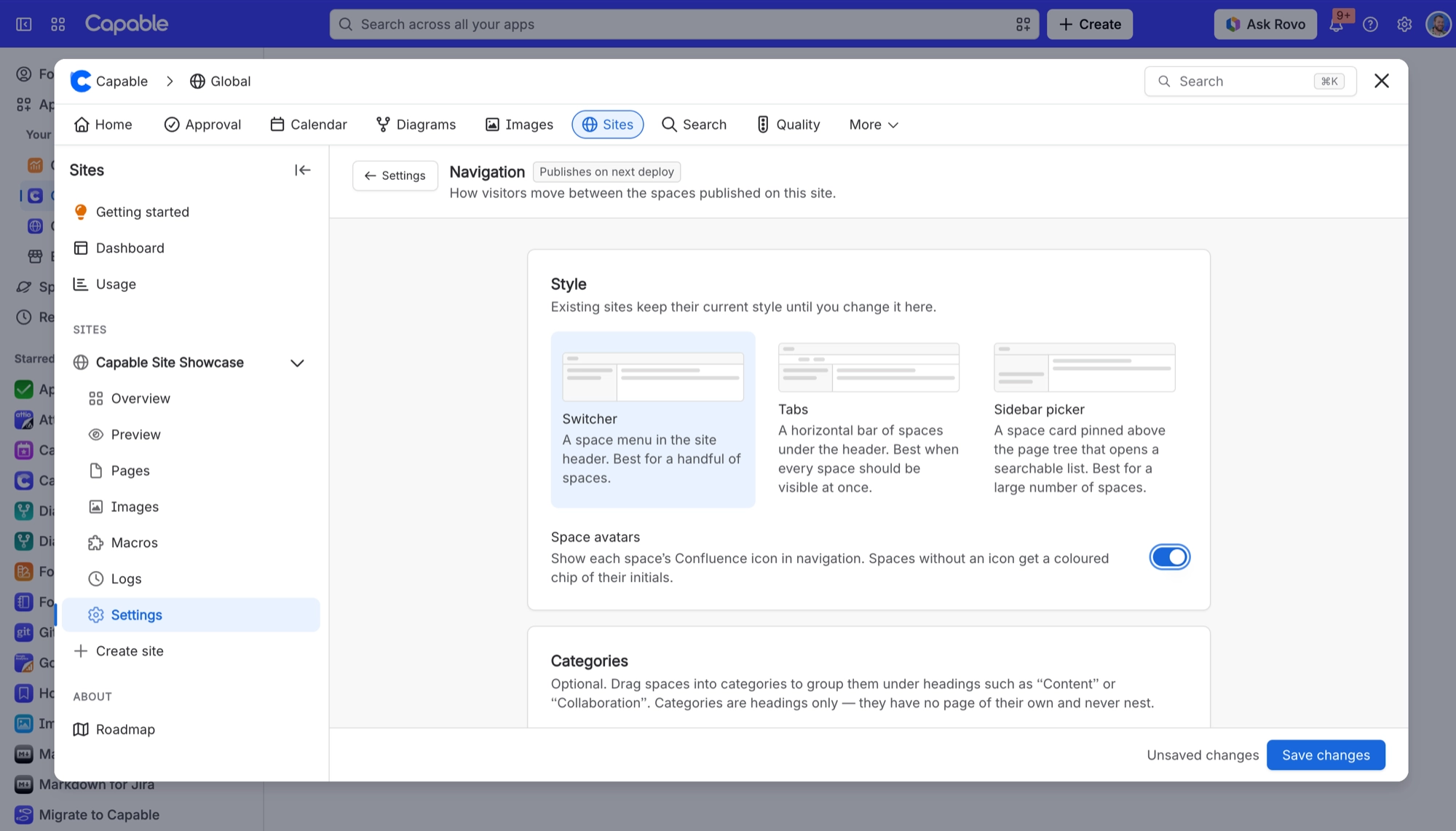
Style → Switcher | A space menu button in the site header showing the current space, opening a grouped list. Hidden on narrow screens (below 780 pixels wide). |
Style → Tabs | A single scrolling bar of spaces under the header. Categories become labelled clusters on the same line. |
Style → Sidebar picker | A space card pinned above the page tree that opens a searchable panel you can also use from the keyboard. Hides both the header switcher and the tabs bar. |
Space avatars | Shows each space's Confluence icon in navigation. Spaces without an icon get a coloured chip of their initials, and each space always gets the same colour. |
Categories | Optional grouping of spaces under headings. Headings only: they have no page of their own and never nest. They also become section headings on the generated homepage. |
#Access
Access changes apply immediately, with no deploy. Only Confluence admins can change the mode or the Google and Microsoft settings. See Access modes.
Setting | What it does |
|---|---|
Public | "Anyone with the link". No sign-in, and search engines can index it. |
Password | "One shared password", at least 8 characters. You can't save until you've set one: "Set a password to enable password protection". |
Atlassian | "Visitors sign in with their Atlassian account." It uses Capable's own Atlassian sign-in, so there's no client ID or secret for you to set up. |
"Visitors sign in with their Google account." Admins only. Needs at least one Workspace domain or individual account. | |
Microsoft | "Visitors sign in with a work or school account." Admins only. Needs at least one organisation. |
Email domains (Atlassian) | Limits Atlassian sign-in to the domains you list, up to 100. "Leave empty to allow any Atlassian account." |
Workspace domains (Google) | "Anyone with an account on these domains." Matched to the Google Workspace the account belongs to, up to 100. |
Individual accounts (Google) | "Optional. Exact addresses, such as a Gmail account." Up to 100. |
Organisations (Microsoft) | "Type an email domain to look it up, or paste a tenant ID." Up to 20. Find tenant ID opens the Entra admin center. |
Allow guests (Microsoft) | Lets in guests of the organisation. Only available with exactly one organisation: "Needs exactly one organisation." |
Email domains (Microsoft) | "Optional. Narrows the organisations above to these domains." |
Stay signed in for | How long a visitor stays signed in: 1 hour, 8 hours, 24 hours, 7 days or 30 days. Google and Microsoft stop at 7 days. Only shown for the protected modes. |
Sign everyone out | "Ends all visitor sessions now. Access changes do this automatically." Admins only, after you confirm. Also signs visitors out of staging previews. |
A site still on the retired bring-your-own sign-in shows "This site uses a retired sign-in setup. Pick a new mode above."
#Integrations
Setting | What it does |
|---|---|
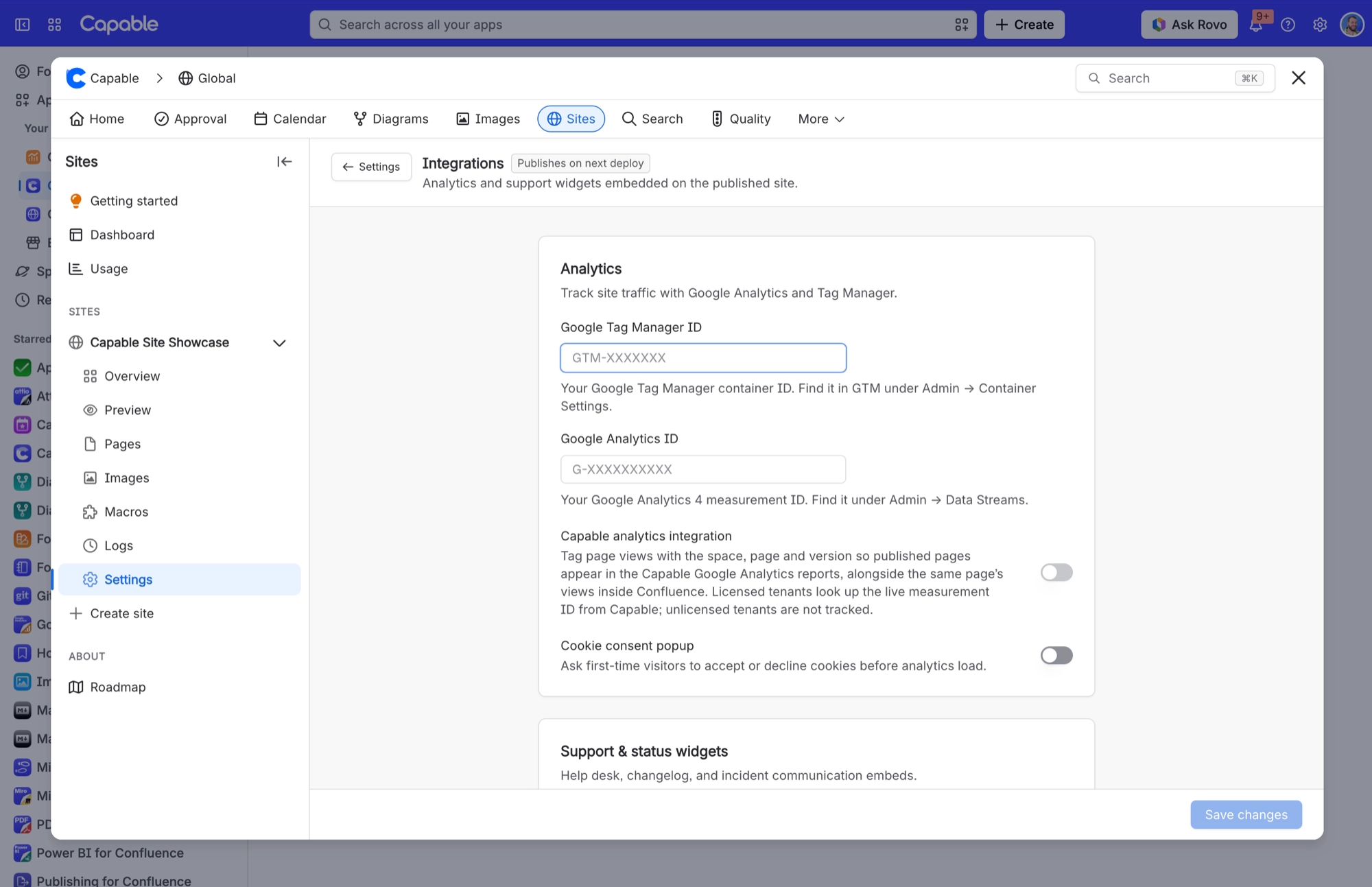
Google Tag Manager ID | Adds your Tag Manager container to published pages. Help text: "Find it in GTM under Admin → Container Settings." Publishes on next deploy. |
Google Analytics ID | Adds a Google Analytics 4 measurement tag. "Find it under Admin → Data Streams." Publishes on next deploy. |
Capable analytics integration | Tags page views with the space, page and version, so published pages show up in the Capable Google Analytics reports next to the same page's views inside Confluence. Needs a Google Analytics ID. Only licensed sites are tracked. |
Cookie consent popup | "Ask visitors which cookies to allow before analytics and widgets load." Visitors can accept all, reject all or choose by category, and change their mind from a Cookie settings link in the footer. See Integrations and cookie consent. |
Tag Manager handles consent | Shown once the cookie consent popup is on and a Tag Manager ID is set. Loads your container straight away and lets its own consent settings decide which tags fire. Off by default, which keeps the container waiting until a visitor accepts all cookies. |
Jira Service Management widget | Adds the Jira Service Management help widget. "Find it in Jira Service Management under Channels → Widget." |
Released changelog | Adds a Released changelog widget. "Find it in the Released dashboard under Widget → Embed Code." |
Statuspage | Adds a Statuspage incident banner. "Find it in the Statuspage URL: https://<page-id>.statuspage.io" |
Open in Confluence | Adds a link on every published page back to the original Confluence page. The setting itself warns that visitors without Confluence access will hit a login wall, and that the link shows your Confluence site address. Add the label |
#Collaborators
Setting | What it does |
|---|---|
Users and groups | Lets people edit and deploy this site without being Confluence admins. Groups count, so changes to group membership carry through. Applies immediately, no deploy needed. |
#Custom domains
Setting | What it does |
|---|---|
Add domain | Claims one full domain name, such as docs.example.com, for this site and gives you a |
Continue setup | Requests the security certificate for your domain and starts setting it up, then shows the DNS validation CNAME you need to add. Only available while the domain is awaiting verification. Once the 48-hour claim expires, you have to start again. |
Retry | Runs setup again for a domain marked Failed, keeping its existing certificate. It only works on a Failed domain. If the certificate is the problem, remove the domain and add it again instead. |
Remove | Asks you to confirm ("Remove this domain?" → Confirm). A claimed or failed domain disappears straight away. A live one shows Removing… while its hosting is taken down. |
Refresh | Checks domain status on demand. It's disabled for 10 seconds after each use, showing "Refresh (Ns)". The list also refreshes itself every 15 seconds while any domain is still being set up. |
#Per page (Page metadata panel)
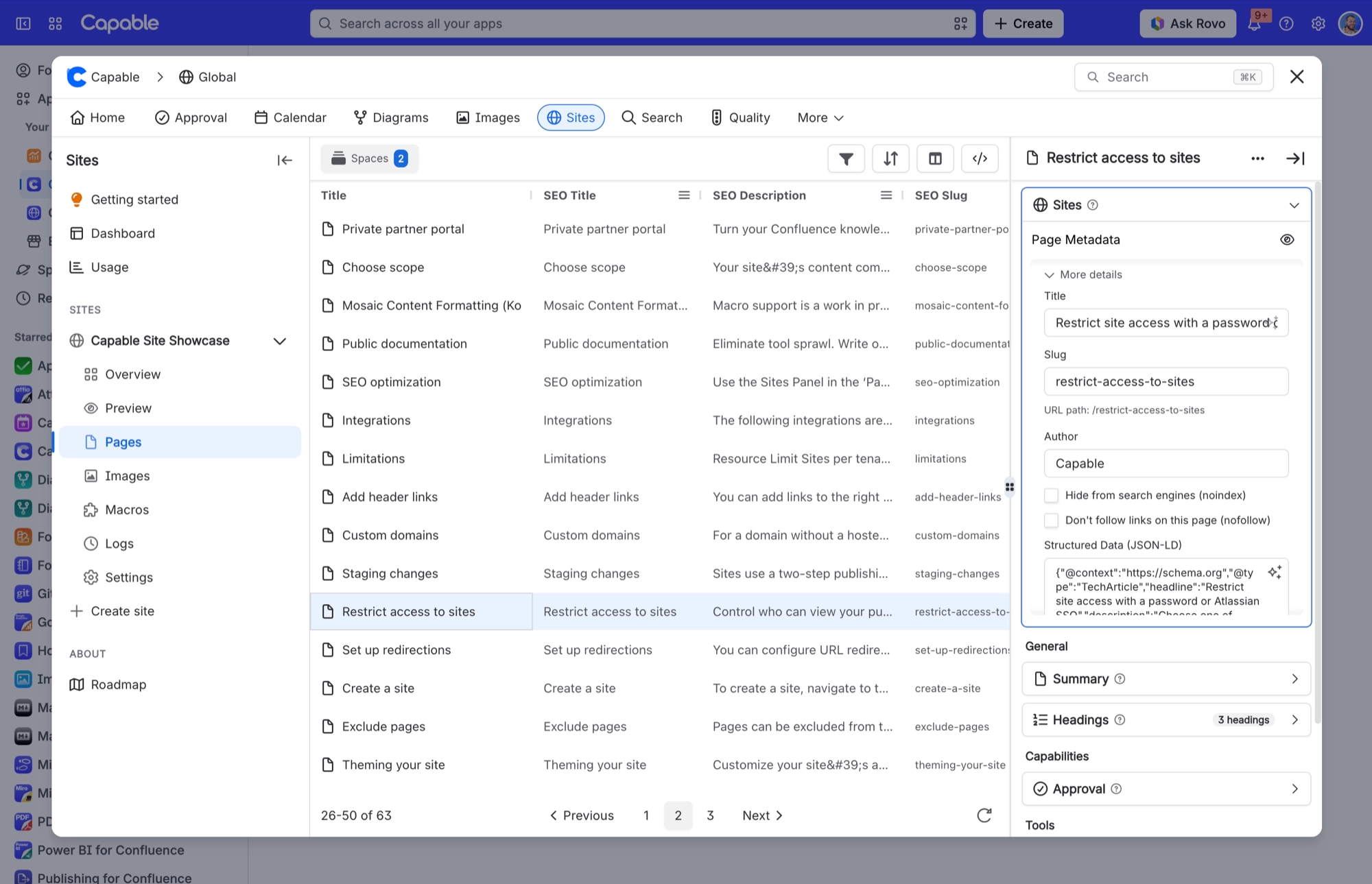
Select a page in the site's Pages list to open its Page metadata panel. Title, Slug, Author and the options below them sit under More details.
Setting | What it does |
|---|---|
Description | The page's meta description and social-card description. Has a "Suggest with AI" button. |
Cover image | Drag and drop to upload. It becomes the image shown, as a large card, when the page is shared on social media. |
Title (under "More details") | Overrides the page title in the browser tab and social cards. Has "Suggest with AI". |
Slug (under "More details") | Changes the last part of the page's published address. Previews the result as /{spaceSlug}/{slug}. Changing it automatically adds a redirect from the old address. |
Author | Published as the page's author meta tag. Separate from the site's "Author" byline switch. |
Hide from search engines (noindex) | Asks search engines not to index this page. |
Don't follow links on this page (nofollow) | Asks search engines not to follow the page's links. |
Structured data (JSON-LD) | Published as a JSON-LD block that search engines read. Has "Suggest with AI". If the JSON isn't valid, it's left out without a warning. |
Canonical URL (legacy) | No longer offered in the settings. If none is set, the page's own published address is used as its canonical address. |
The web address is fixed at creation and incremental deploys are permanently disabled. Both appear in General and neither can be changed.
#A few things worth knowing
Most settings changes need an Update and Promote to reach the live site, just like content changes. Look for the Publishes on next deploy badge at the top of each settings page. Access, Custom domains and Collaborators show Applies immediately instead.
All of a site's settings are stored together. If very long redirect rules and custom CSS push them past the storage limit, saving fails with "Site settings are too large to save" and tells you to shorten one of them.
Collaborators can deploy and promote but can't delete the site or remove production. They can't change Spaces & URLs, the access mode, Google or Microsoft sign-in, custom domains or collaborators.
Only Confluence admins can create or delete sites.
#Related
Two of these are display-only.






















