
More apps
Your site can include macros from several other Confluence apps. Each example below is the real macro, shown as it appears once your site is published.
#PlantUML Diagrams (Stratus)
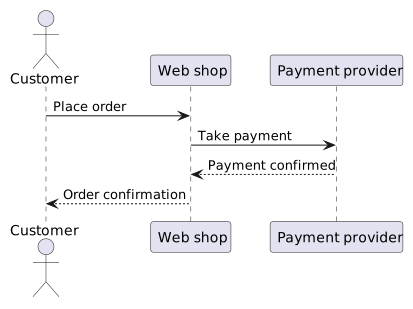
A PlantUML diagram is published as the image the app saves with it.
#HTML (Appfire)
HTML from the macro is shown in a frame of its own, so its styling stays inside it.
#LaTeX Math (Appfire)
A block equation is typeset on its own line.
A = P\left(1 + \frac{r}{n}\right)^{nt}The inline macro sits inside a sentence: the square root of two is about \sqrt{2} \approx 1.414.
#Easy Math (Narva)
A block equation is typeset on its own line.
a^2 + b^2 = c^2
The inline macro sits inside a sentence: Euler's identity is e^{i\pi} + 1 = 0.
#HTML & iFrame Embed (Narva)
HTML from the macro is shown in a frame of its own, so its styling stays inside it.
#Tabs (Vectors)
Tabs keep alternatives side by side, so visitors pick the one that applies to them.
Download the installer and run it. Windows asks once for permission to make changes.
Open the disk image and drag the app into your Applications folder.
Install the package with your distribution's package manager:
sudo apt install example-app#Scroll Ignore (K15t)
Content inside Scroll Ignore is left off the published page, so it is a safe place for notes meant only for the people editing in Confluence. There is a sentence inside the macro below; on the published site you will not see it.























