
What becomes a page
Sites publishes the current Confluence pages in the spaces you selected. A few kinds of content are never published at all, and the Overview tab tells you how many it is skipping.
One thing here matters more than everything else on this page, so it comes first.
Confluence page restrictions do not control who sees a published site. Sites reads every page in scope with the app's own access, not yours. A page restricted to three people in Confluence is published unless it carries an exclude label. Check this before you publish a space you have not audited.
#Published, and never published
What is published | Current Confluence pages in the spaces you selected, and nothing else. Drafts, archived pages and trashed pages are never published. |
|---|---|
What is never published | Blog posts, whiteboards, databases, Confluence smart links and embedded content, comments, and the page attachment list. Sites has no way to publish these. The Overview tab counts them, for example "N whiteboards will not be published", "N blog posts will not be published" or "N smart links will not be published". These counts are for information only. |
Page restrictions | Sites reads every page in scope with the app's own access, and the only filter is the exclude labels. A page restricted to a few people in Confluence is published on the site unless it also carries the |
Folders | Confluence folders appear in the sidebar as headings you can expand and collapse, but not click. They have no page of their own, and the previous and next links skip them. |
Page order and URLs | The sidebar and the previous and next links both follow Confluence's own page tree. The space homepage always goes to the top and becomes the space's index page, at the space's slug: |
The footer on every page | Your own footer text, if you set one, then the "Created with Capable Sites + Atlassian Confluence" line, then a Report content link to Capable's service desk form, where anyone can report a published page. The link opens in a new tab and cannot be hidden. Sites pick it up on their next Update and Promote. With the cookie banner on, a Cookie settings link is added too. |
Native Confluence content that converts | Tables, panels (info, note and warning), code blocks, expands and nested expands, layout sections and columns, task lists, decision lists, status lozenges, dates, emoji, mentions, inline, block and embed cards, and media. The excerpt, children and include macros publish too. Children shows child pages as link cards, and include pulls in the content of the page it points to. |
Other native macros that publish | Expand, Table of contents, and the Legacy content wrapper Confluence adds to pages converted from the old editor. |
Capable macros that publish | Image reference, Diagram, Diagram reference, Cards, HTML (sanitised, in a sandboxed frame), Embed/iFrame (https only), Progress bar, Buttons, Banner, Animated banner, Color palette, Lorem ipsum, Tooltip, Diff, Code, Background, QR code, Table (static), Footnote and Footnotes summary, Gallery, LaTeX math and LaTeX math inline, and more. For any macro not named here, check the Macro support matrix. |
Capable macros that publish with limits | Form and Input publish as disabled, read-only controls that cannot be submitted, and user, space and page pickers become a note. Web extraction publishes its prefix and suffix, with the text "N/A" where the live value would be. Diagram from URL or attachment publishes an attachment's diagram source as plain text, cut off at 16,000 characters. |
Capable macros that do not publish (each shows a titled note explaining why) | RSS feed, Poll, Search cards, Search table, Word cloud, Github file, Image folder gallery, Link graph, Links, Word Count (the note calls it "Page statistics"), Space graph, Table from CSV and Capable Form reference. |
Capable macros that show nothing at all | Capable Studio and the legacy Image library macro, which are tools for authors rather than page content. Also the Google Analytics macro, because its tracking does not run on a published site. For analytics, use the site's Integrations settings instead. |
Third-party macros supported | draw.io (core, ecosystem and both zero-egress Forge versions), shown as its saved preview image; PlantUML Diagrams for Confluence; Refined panels, expands (shown open), steps, buttons and tabs; Kolekti / Mosaic cards, expand, background, tabs, AUI buttons, LaTeX, footnotes and tooltip; 19 Aura Content Formatting macros (Seibert); and more. The Macro support matrix has the full list. |
Third-party macros that do not publish | Embedded draw.io (it points at a diagram on another page), Refined Activity Stream, Refined Page Tree, Refined Wiki Children, Handy Cards, Handy Poll and Handy Status (its data lives on the vendor's servers). |
Any other third-party macro | Shows on the live page as a grey box quoting the macro's name or key. Only Capable's own macros get a friendly "not available on published sites" note. Confluence macros other than excerpt, children and include (Jira issues, roadmap planner, page tree, recently updated, task report and so on) show as the same grey box. |
#The counts on the Overview tab
The Overview tab counts what it will skip: "N whiteboards will not be published", "N blog posts will not be published", "N smart links will not be published". These are for information, not warnings.
#Check which macros published
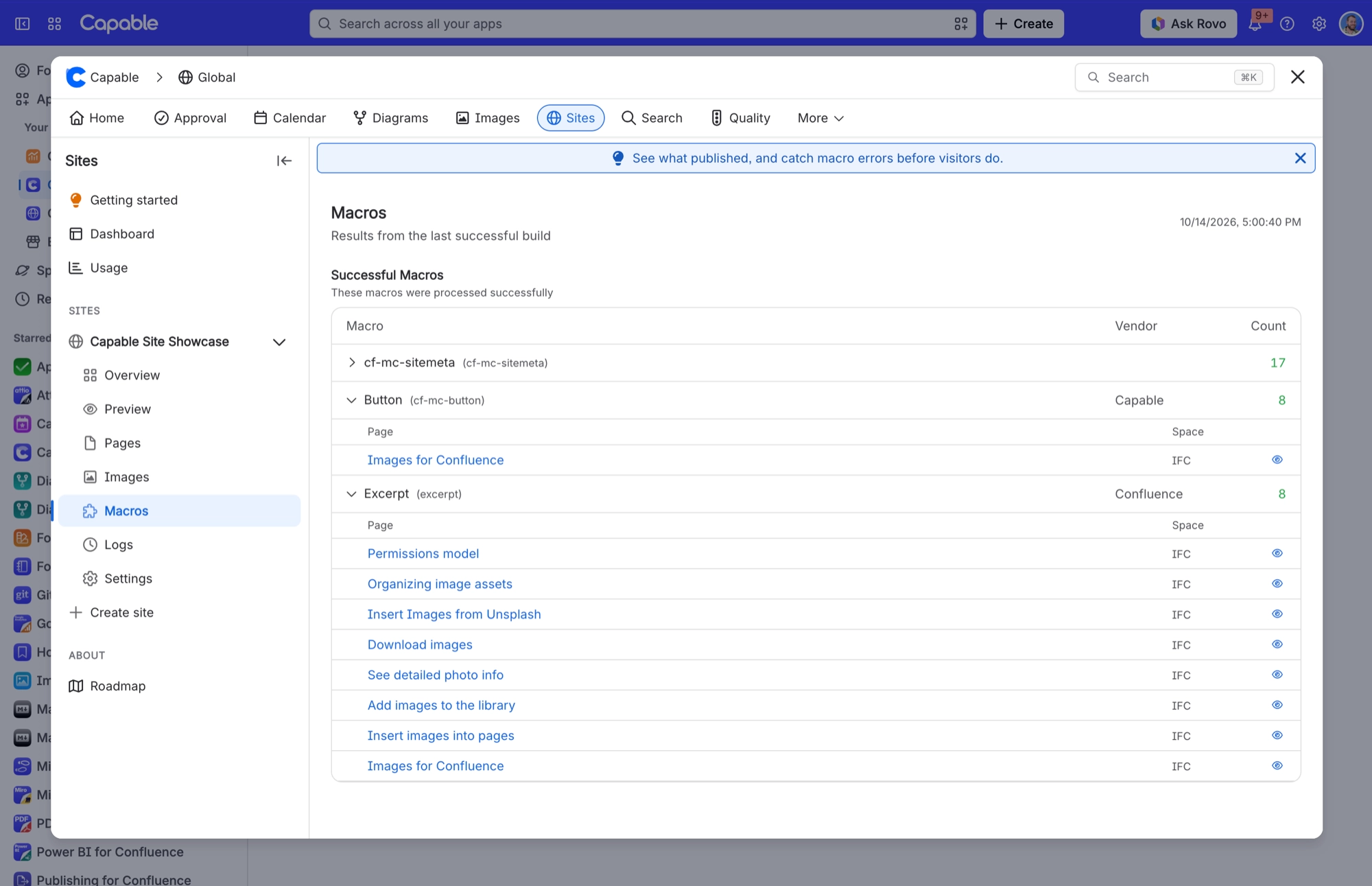
After a build, your site's Macros tab shows the results from the last successful build: each macro, who makes it, how many times it appears and which pages use it. It also lists any unsupported macros and the pages they sit on, so you can fix them before a visitor meets a grey box.
#A few things worth knowing
Sites cannot publish blog posts, whiteboards or databases. If you need them on your site, they have to become pages.
Comments and the attachment list are never published.
Drafts, archived pages and trashed pages are never published.
The Report content link appears on every published page and on the generated homepage. There is no setting to hide it.
#Related
Restrictions do not carry over. Check before publishing.






















