
Macro support matrix
Before you publish, it helps to know whether a page will look the same on your site as it does in Confluence. This page lists every macro Capable Sites recognises, grouped by the app it comes from, and says what your visitors see.
SUPPORTED renders on your published site. PARTIAL renders, with the difference described next to it. NOT SUPPORTED does not render: the last column says what shows instead, which is a short notice, nothing at all, or a grey box with the macro's name.
#Confluence
Built into Confluence.
See them on a published page: Confluence macros.
Macro | Support | On a published site |
|---|---|---|
Action items | SUPPORTED | Checkboxes show as they were when you published. Visitors cannot tick them. |
Date | SUPPORTED | |
Decisions | SUPPORTED | |
Excerpt | SUPPORTED | An excerpt set to hidden stays hidden. |
Expand | SUPPORTED | Nested expands work too. |
Images | SUPPORTED | Copied into your site when it builds. |
Include page | SUPPORTED | Only pages published on the same site. Otherwise visitors see "Included page not found". |
Layouts and columns | SUPPORTED | |
Live search | SUPPORTED | Searches the published site. Space and label filters narrow it. Up to 5 results as you type. |
Mention | SUPPORTED | Shows the person's display name, without a link to their profile. |
Page Properties | SUPPORTED | Hidden tables stay hidden but still feed reports. |
Panels | SUPPORTED | Info, note, success, warning, error and custom panels, with dark mode colours. |
Status | SUPPORTED | Colours get a dark mode version. |
SVG images | SUPPORTED | Cleaned before publishing. |
Table of contents | SUPPORTED | Level, style, outline, include and exclude settings are kept. |
Tables | SUPPORTED | Column widths match the editor. Cell colours get a dark mode version. |
Tabs | SUPPORTED | |
Text formatting, headings and lists | SUPPORTED | |
YouTube links | SUPPORTED | Play on the page. |
Children display | PARTIAL | Shows the direct child pages published on the site, as cards. Depth, sort and style settings are not applied. |
Code block | PARTIAL | No syntax colouring. |
Emoji | PARTIAL | Standard emoji render, including in headings and panel icons. Custom emoji you uploaded show as their :name: text. |
File attachments | PARTIAL | Show as a download card. Video and audio files download rather than play on the page. |
Page Properties Report | PARTIAL | Needs a label filter. Lists pages from the report's own space that are published on this site. |
Smart link, card | PARTIAL | Shows as a plain link, not a preview card. |
Smart link, embed | PARTIAL | Shown in a frame. Sites that refuse to be framed, including Confluence and Jira pages, stay blank. |
Smart link, inline | PARTIAL | A link to a published page shows its title. A link to an unpublished Confluence page shows as plain text. |
Anchor | NOT SUPPORTED | Shows a grey box with the macro's name. |
Attachments | NOT SUPPORTED | Shows a grey box with the macro's name. |
Blog posts | NOT SUPPORTED | Shows a grey box with the macro's name. |
Content by label | NOT SUPPORTED | Shows a grey box with the macro's name. |
Contributors | NOT SUPPORTED | Shows a grey box with the macro's name. |
Excerpt include | NOT SUPPORTED | Shows a grey box with the macro's name. |
Gallery | NOT SUPPORTED | Shows a grey box with the macro's name. Use Capable Gallery instead. |
Jira issues | NOT SUPPORTED | Shows a grey box with the macro's name. |
Page tree | NOT SUPPORTED | Shows a grey box with the macro's name. Your site's own navigation already shows the page tree. |
PDF viewer | NOT SUPPORTED | Shows a grey box with the macro's name. Use Capable PDF instead. |
Recently updated | NOT SUPPORTED | Nothing shows: it is a live, per-person feed. |
Roadmap planner | NOT SUPPORTED | Shows a grey box with the macro's name. |
Widget connector | NOT SUPPORTED | Shows a grey box with the macro's name. |
#Capable
Macros from every Capable app, including Formatting, Diagrams, Markdown, Images, Calendars, Approval, Forms and PDF.
See them on a published page: Capable Formatting, Capable Diagrams, Capable Markdown, Capable Images, Capable Calendars, Capable Approval.
Macro | Support | On a published site |
|---|---|---|
3D Model | SUPPORTED | Model files over 50 MB, or in a format the viewer cannot open, show a notice. |
Animated Banner | SUPPORTED | |
Animation | SUPPORTED | |
Background | SUPPORTED | |
Banner | SUPPORTED | Slides auto-scroll as they do in Confluence. |
Button | SUPPORTED | |
Cards | SUPPORTED | |
Clock | SUPPORTED | Keeps ticking in the visitor's browser. |
Color Palette | SUPPORTED | |
Countdown | SUPPORTED | Counts down live in the visitor's browser. |
Countdown Inline | SUPPORTED | Counts down live in the visitor's browser. |
Diagram Reference | SUPPORTED | draw.io diagrams open in the interactive viewer on the tab you chose. |
Diagrams | SUPPORTED | draw.io diagrams also open in the interactive viewer. |
Embed / iFrame | SUPPORTED | https:// addresses only. |
Event | SUPPORTED | Visitors can add it to their calendar with an .ics download. |
Footnote | SUPPORTED | |
Footnotes Summary | SUPPORTED | |
Gallery | SUPPORTED | |
Hide on Published Site | SUPPORTED | What is inside stays in Confluence and is left off the published page. |
HTML Block | SUPPORTED | Runs in an isolated frame. Scripts run only if your admin allows JavaScript in the HTML macro. |
Image Reference | SUPPORTED | |
LaTeX | SUPPORTED | |
LaTeX Inline | SUPPORTED | Sits inside the line of text. |
Lorem Ipsum | SUPPORTED | |
Metadata | SUPPORTED | Values as they were when you published. |
SUPPORTED | The PDF is copied into your site, so it does not depend on Confluence. | |
Progress Bar | SUPPORTED | Read-only. |
Progress Tracker | SUPPORTED | |
QR Code | SUPPORTED | |
Site Metadata | SUPPORTED | Sets the page's search title, description and social preview. Nothing shows on the page itself. |
Status Badge | SUPPORTED | Read-only. |
Swagger / OpenAPI | SUPPORTED | A spec loaded from a URL is fetched when you publish. |
Tabs | SUPPORTED | |
Tooltip | SUPPORTED | Shows an info icon. The text appears on hover. |
Approval | PARTIAL | Shows the approval status as it was when you published. Visitors cannot respond. |
Calendar | PARTIAL | Shows events as they were at the last publish, up to 500, with an .ics download. |
Code Block | PARTIAL | No syntax colouring. |
Diagram Source | PARTIAL | From an attachment, shows the diagram's source text. From a URL, a notice shows. |
Diff | PARTIAL | Before and after show side by side. Changed lines are not highlighted. |
Form | PARTIAL | Fields show read-only with their saved values. The form cannot be submitted. |
Image Compare | PARTIAL | The two images show side by side, without the slider. |
Input | PARTIAL | Read-only. User, space and page fields show a notice. |
Markdown | PARTIAL | Mermaid and other diagram code blocks show as code. |
Markdown Reference | PARTIAL | Mermaid and other diagram code blocks show as code. |
Service Status | PARTIAL | Shows links to your status pages, not live status. |
Table & Charts | PARTIAL | A static table with your header colours. Sorting, filtering, grouping and charts are not available. |
Variable | PARTIAL | Text, number and date values from your site's spaces and global variables show. Others show [unavailable]. |
Web Extraction | PARTIAL | The live value is not fetched: N/A shows in its place. |
Capable Studio | NOT SUPPORTED | Nothing shows. Studio is for adding other macros while you edit. |
Form Reference | NOT SUPPORTED | A notice shows instead. |
GitHub File | NOT SUPPORTED | A notice shows instead: it needs your GitHub connection, which visitors do not have. |
Google Analytics | NOT SUPPORTED | Nothing shows. Add analytics to the whole site in your site's settings instead. |
Image Folder Gallery | NOT SUPPORTED | A notice shows instead: it lists a Confluence image folder as the page is viewed. |
Image Library | NOT SUPPORTED | Nothing shows. Use Image Reference to show an image on a published site. |
Link Graph | NOT SUPPORTED | A notice shows instead: it reads live data from Confluence. |
Links | NOT SUPPORTED | A notice shows instead: it reads live data from Confluence. |
Miro | NOT SUPPORTED | Shows a grey box with the macro's name. |
Poll | NOT SUPPORTED | A notice shows instead: visitors cannot see or vote in polls. |
Power BI | NOT SUPPORTED | Shows a grey box with the macro's name. |
RSS Feed | NOT SUPPORTED | A notice shows instead: a published page cannot refresh the feed. |
Search Cards | NOT SUPPORTED | A notice shows instead: it reads live data from Confluence. |
Search Table | NOT SUPPORTED | A notice shows instead: it reads live data from Confluence. |
Smartsheet | NOT SUPPORTED | Shows a grey box with the macro's name. |
Space Graph | NOT SUPPORTED | A notice shows instead: it reads live data from Confluence. |
Table & Charts (CSV) | NOT SUPPORTED | A notice shows instead. |
Word Cloud | NOT SUPPORTED | A notice shows instead. |
Word Count | NOT SUPPORTED | A notice shows instead: it reads live data from Confluence. |
#draw.io
From the draw.io app for Confluence.
See them on a published page: draw.io Diagrams.
Macro | Support | On a published site |
|---|---|---|
draw.io Board | SUPPORTED | |
draw.io Diagram | SUPPORTED | Zoom and the interactive viewer work. Visitors' browsers never contact diagrams.net. |
Embed draw.io Diagram | PARTIAL | Only when the diagram's page is published on the same site. Otherwise visitors see that the diagram is not available on this site. |
Diagrams from GitHub, GitLab, OneDrive, Google Drive or a URL | NOT SUPPORTED | A notice shows instead. |
#Refined Toolkit
From Refined Toolkit and the other Refined apps.
See them on a published page: Refined Toolkit.
Macro | Support | On a published site |
|---|---|---|
Background | SUPPORTED | |
Banner | SUPPORTED | |
Button | SUPPORTED | |
Countdown | SUPPORTED | |
Expand | SUPPORTED | Starts expanded and can be collapsed. |
Expand Group | SUPPORTED | Sections start expanded and can be collapsed. |
LaTeX | SUPPORTED | |
Panel | SUPPORTED | Colour, title and outlined style are kept. |
Steps | SUPPORTED | Shows as a numbered list of steps. |
Tabs | SUPPORTED | |
Child Pages | PARTIAL | Shows the direct child pages published on the site, as cards. Refined's layout settings are not applied. |
Activity Stream | NOT SUPPORTED | A notice shows instead: it reads live data from Confluence. |
Create Space Button | NOT SUPPORTED | A notice shows instead: it reads live data from Confluence. |
Custom Code | NOT SUPPORTED | A notice shows instead: it reads live data from Confluence. |
Jira Work Items | NOT SUPPORTED | A notice shows instead: it reads live data from Confluence. |
My Work | NOT SUPPORTED | A notice shows instead: it reads live data from Confluence. |
News | NOT SUPPORTED | A notice shows instead: it reads live data from Confluence. |
Numbered Headings | NOT SUPPORTED | Shows a grey box with the macro's name. |
Page Tree | NOT SUPPORTED | A notice shows instead: it reads live data from Confluence. |
Search | NOT SUPPORTED | A notice shows instead: it reads live data from Confluence. |
Space List | NOT SUPPORTED | A notice shows instead: it reads live data from Confluence. |
#Mosaic (Kolekti)
From Mosaic by Kolekti.
See them on a published page: Mosaic Content Formatting (Kolekti).
Macro | Support | On a published site |
|---|---|---|
Alert | SUPPORTED | Shows as a panel with the alert's title and text. |
Background | SUPPORTED | Colour, image and opacity are kept. |
Button | SUPPORTED | |
Button Group | SUPPORTED | |
Card | SUPPORTED | Shows as a single card. |
Cards | SUPPORTED | |
Expand | SUPPORTED | Starts expanded and can be collapsed. |
Footnote | SUPPORTED | |
Footnotes Summary | SUPPORTED | |
HTML | SUPPORTED | Cleaned, then shown in an isolated frame. |
Interactive Banner | SUPPORTED | |
LaTeX | SUPPORTED | Includes LaTeX Builder. |
LaTeX Inline | SUPPORTED | |
Progress Tracker | SUPPORTED | Steps next to each other join into one tracker. |
Round Rectangle | SUPPORTED | |
Tabs | SUPPORTED | |
Tooltip | SUPPORTED | Shows an info icon. The text appears on hover. |
Nestable Tabs | PARTIAL | The content shows without Mosaic's own tab styling. |
Pop-up Dialog | PARTIAL | Opens in place, as an expandable section, rather than as a pop-up. |
Table | PARTIAL | The content shows without Mosaic's own table styling. |
BibTeX Display | NOT SUPPORTED | Shows a grey box with the macro's name. |
BibTeX Reference | NOT SUPPORTED | Shows a grey box with the macro's name. |
Numbered Headings | NOT SUPPORTED | Shows a grey box with the macro's name. |
Progress Tracker (older version) | NOT SUPPORTED | Shows a grey box with the macro's name. |
Smart Page Editor | NOT SUPPORTED | Shows a grey box with the macro's name. |
#Aura (Seibert Media)
From Aura by Seibert Media.
See them on a published page: Aura Content Formatting.
Macro | Support | On a published site |
|---|---|---|
Background Content | SUPPORTED | Includes a background image from the page's attachments. |
Button | SUPPORTED | |
Cards | SUPPORTED | Classic, flip and hover cards. |
Countdown | SUPPORTED | |
Divider | SUPPORTED | |
Embed | SUPPORTED | https:// addresses only. |
Expand | SUPPORTED | |
Expand Group | SUPPORTED | |
HTML (iframe) | SUPPORTED | Runs in an isolated frame. |
LaTeX | SUPPORTED | |
Panel | SUPPORTED | |
Progress | SUPPORTED | Bars and circular rings. |
Status | SUPPORTED | |
Tab Group | SUPPORTED | |
Title | SUPPORTED | |
User Profile | SUPPORTED | Names and details as they were when you published. |
Child Tabs | PARTIAL | Each tab links to its child page rather than showing it in place. |
Dynamic Content | PARTIAL | The child pages type shows, as links to those pages. Other types show a notice. |
Numbered Headings | NOT SUPPORTED | Shows a grey box with the macro's name. |
#Handy Macros (Stiltsoft)
From Handy Macros by Stiltsoft.
See them on a published page: Handy Macros.
Macro | Support | On a published site |
|---|---|---|
Handy Button | SUPPORTED | |
Handy Date | SUPPORTED | |
Handy Timestamp | SUPPORTED | Shows the time as it was when you published. |
Handy Slider | PARTIAL | Shows as a read-only progress bar. |
Handy Poll | NOT SUPPORTED | A notice shows instead: visitors cannot see or vote in polls. |
Handy Post Organizer | NOT SUPPORTED | A notice shows instead: it reads live data from Confluence. |
Handy Status | NOT SUPPORTED | A notice shows instead: the status is held by the Handy Macros app. |
#Just Add+ (Modus Create)
From Just Add+ by Modus Create.
See them on a published page: Just Add+.
Macro | Support | On a published site |
|---|---|---|
Diagram (Excalidraw) | SUPPORTED | Shows the image saved with the drawing. A drawing with no saved image shows a notice. |
HTML | SUPPORTED | Cleaned, then shown in an isolated frame. |
LaTeX | SUPPORTED | Content from a URL is fetched when you publish. An attachment must be on the same page. |
Markdown, and Markdown from a URL, GitHub, GitLab or Bitbucket | SUPPORTED | Content from a URL is fetched when you publish. An attachment must be on the same page. |
Swagger / OpenAPI | SUPPORTED | Content from a URL is fetched when you publish. An attachment must be on the same page. |
AsciiDoc | PARTIAL | Shows the source as code, not as a formatted document. |
Diagram (Mermaid, PlantUML, Graphviz and others) | PARTIAL | Shows the diagram's source text, not the drawn diagram. |
#Macro Pack (Warsaw Dynamics)
From Macro Pack by Warsaw Dynamics.
See them on a published page: Macro Pack.
Macro | Support | On a published site |
|---|---|---|
Code and JSON | SUPPORTED | Shows as a code block. Content from a URL is fetched when you publish. An attachment must be on the same page. |
HTML | SUPPORTED | Runs in an isolated frame. Content from a URL is fetched when you publish. An attachment must be on the same page. |
LaTeX and LaTeX inline | SUPPORTED | Content from a URL is fetched when you publish. An attachment must be on the same page. |
Markdown | SUPPORTED | Content from a URL is fetched when you publish. An attachment must be on the same page. |
Swagger / OpenAPI | SUPPORTED | Content from a URL is fetched when you publish. An attachment must be on the same page. |
AsciiDoc and AsyncAPI | PARTIAL | Shows the source as code, not as a formatted document. |
CSV | PARTIAL | Shows the CSV as text, not as a table. |
draw.io | PARTIAL | No preview image. An Open draw.io diagram button opens the interactive viewer. |
Mermaid, PlantUML and other text diagrams | PARTIAL | Shows the diagram's source text, not the drawn diagram. |
Excalidraw, BPMN and DMN | NOT SUPPORTED | A notice shows instead: the drawing has no image to publish. |
#MacroSuite (Warsaw Dynamics)
From the MacroSuite apps by Warsaw Dynamics, such as Swagger, Markdown and HTML.
Macro | Support | On a published site |
|---|---|---|
HTML from Page | SUPPORTED | Runs in an isolated frame. |
JSON, and JSON from Page | SUPPORTED | Shows as a code block. |
LaTeX from Page and LaTeX Inline | SUPPORTED | |
Markdown, and Markdown from Page | SUPPORTED | Content from a URL is fetched when you publish. An attachment must be on the same page. |
Swagger, and Swagger from Page | SUPPORTED | |
AsciiDoc from Page | PARTIAL | Shows the source as code. |
CSV, and CSV from Page | PARTIAL | Shows the CSV as text, not as a table. |
Mermaid, and Mermaid from Page | PARTIAL | Shows the diagram's source text, not the drawn diagram. |
PlantUML | PARTIAL | Shows the diagram's source text, not the drawn diagram. |
AsciiDoc | NOT SUPPORTED | Shows a grey box with the macro's name. |
draw.io from Page | NOT SUPPORTED | Shows a grey box with the macro's name. |
HTML | NOT SUPPORTED | A notice shows instead. |
LaTeX | NOT SUPPORTED | Shows a grey box with the macro's name. |
PlantUML from Page | NOT SUPPORTED | Shows a grey box with the macro's name. |
#Mermaid and PlantUML (Stratus)
From the Mermaid and PlantUML apps by Stratus Add-ons.
See them on a published page: More apps.
Macro | Support | On a published site |
|---|---|---|
PlantUML | SUPPORTED | Shows the diagram image saved with the macro. |
Mermaid | PARTIAL | Shows the diagram's source text, not the drawn diagram. |
Mermaid (Legacy) | PARTIAL | Shows the diagram's source text, not the drawn diagram. |
#Appfire
From Appfire's HTML and LaTeX Math apps.
See them on a published page: More apps.
Macro | Support | On a published site |
|---|---|---|
HTML (Bob Swift) | SUPPORTED | Cleaned, then shown in an isolated frame. |
Math Block and Math Inline | SUPPORTED | |
Math Block Reference | NOT SUPPORTED | Shows a grey box with the macro's name. |
Math List of Equations | NOT SUPPORTED | Shows a grey box with the macro's name. |
Page Approval, Document Approvals, Document State and Get Metadata | NOT SUPPORTED | Shows a grey box with the macro's name. |
Unit | NOT SUPPORTED | Shows a grey box with the macro's name. |
#Narva
From Narva's Easy Math and HTML & iFrame Embed apps.
See them on a published page: More apps.
Macro | Support | On a published site |
|---|---|---|
HTML & iFrame Embed | SUPPORTED | Cleaned, then shown in an isolated frame. |
LaTeX Block and LaTeX Inline (Easy Math) | SUPPORTED |
#Vectors
From the formatting apps by Vectors.
See them on a published page: More apps.
Macro | Support | On a published site |
|---|---|---|
Tabs | SUPPORTED | |
Expander | NOT SUPPORTED | Shows a grey box with the macro's name. |
Panel | NOT SUPPORTED | Shows a grey box with the macro's name. |
Progress Bar | NOT SUPPORTED | Shows a grey box with the macro's name. |
#Other apps
Smaller apps, and what happens with any app not listed here.
See them on a published page: Released.so, More apps.
Macro | Support | On a published site |
|---|---|---|
Released Embed (Released) | SUPPORTED | Loads live from Released in the visitor's browser. |
Scroll Ignore (K15t) | SUPPORTED | What is inside is left off the published page, as in Scroll exports. |
Any other app's macro | NOT SUPPORTED | Shows a grey box with the macro's name. Content inside a macro with a body still shows, without the app's styling. |
Approvals (AppFox) | NOT SUPPORTED | Shows a grey box with the macro's name. |
CQL Query (StreamlineSoft) | NOT SUPPORTED | Shows a grey box with the macro's name. |
Gliffy (Perforce) | NOT SUPPORTED | Shows a grey box with the macro's name. |
Swagger / OpenAPI (Toshihiro) | NOT SUPPORTED | Shows a grey box with the macro's name. |
#Check your own site
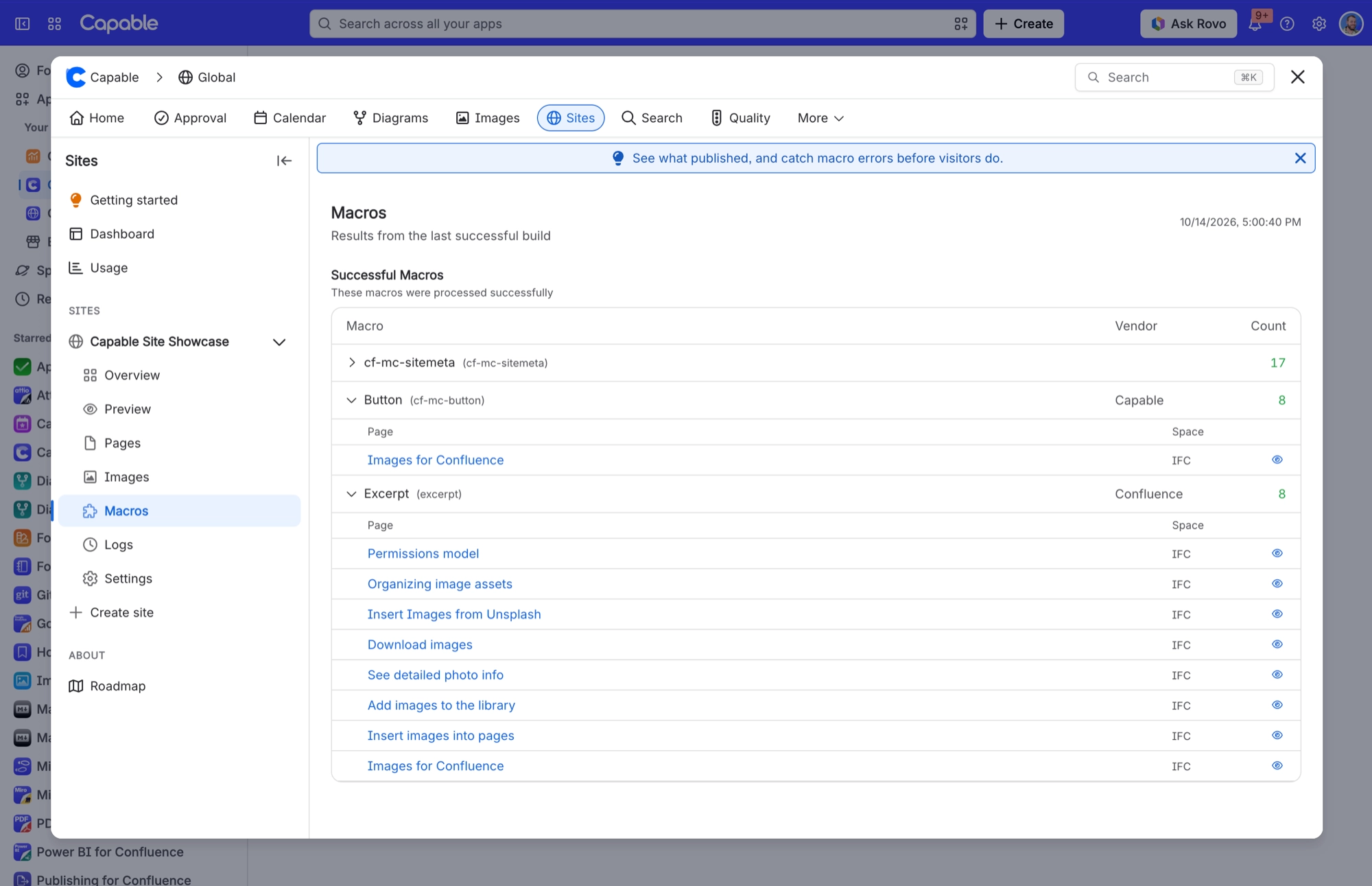
To see which macros made it onto your site, open your site in Capable Sites and choose Macros. It shows the results from your last successful build, with each macro's app, how many times it is used and the pages it appears on. Macros that did not render are listed separately.
#A few things that catch people out
Macros that load content from another website, such as Markdown or Swagger from a URL, fetch it when you publish. If your Confluence admin has not allowed that website for Capable, a notice shows instead.
Values that change over time, such as approvals, calendars, metadata and timestamps, show what they were at your last publish. Publish again to refresh them, or use Live site publishing.
Text diagrams from other apps, such as Mermaid or PlantUML source, show as source text. Capable Diagrams draws them, and the migration assistant can convert those macros to Capable Diagrams.