
Metadata
Drops one piece of live page metadata, such as the last updated date, published date, version number, page title or space key, into a sentence as inline text.
Use it when a sentence in the page body needs to state a fact about the page itself and stay correct forever: "This policy was last reviewed on 25.09.2019 12:42", "Version 14 of the onboarding guide", "Published in space HR". Type those by hand and they go stale the moment somebody edits the page. This macro reads the value from Confluence afresh every time the page is opened. It is an inline macro, so it sits mid-sentence rather than breaking the text into its own block, and it shows as plain text that matches the surrounding styling. If you are moving from Handy Timestamp, this is the macro that replaces it. In the Capable Suite it can also show Capable's own timestamps, approval dates, publish dates, Sites export dates and slugs, so a page can display its own governance state.
#See it
Every example below is a real macro on this page, not a screenshot, and each one is a configuration taken from a page somebody actually built. Open this page in the editor to see how any of them is set up.
#A custom value
This page was last updated .
#Last updated date
This page was last updated .
#Sites last exported date
This page was last exported to Sites on .
#Settings
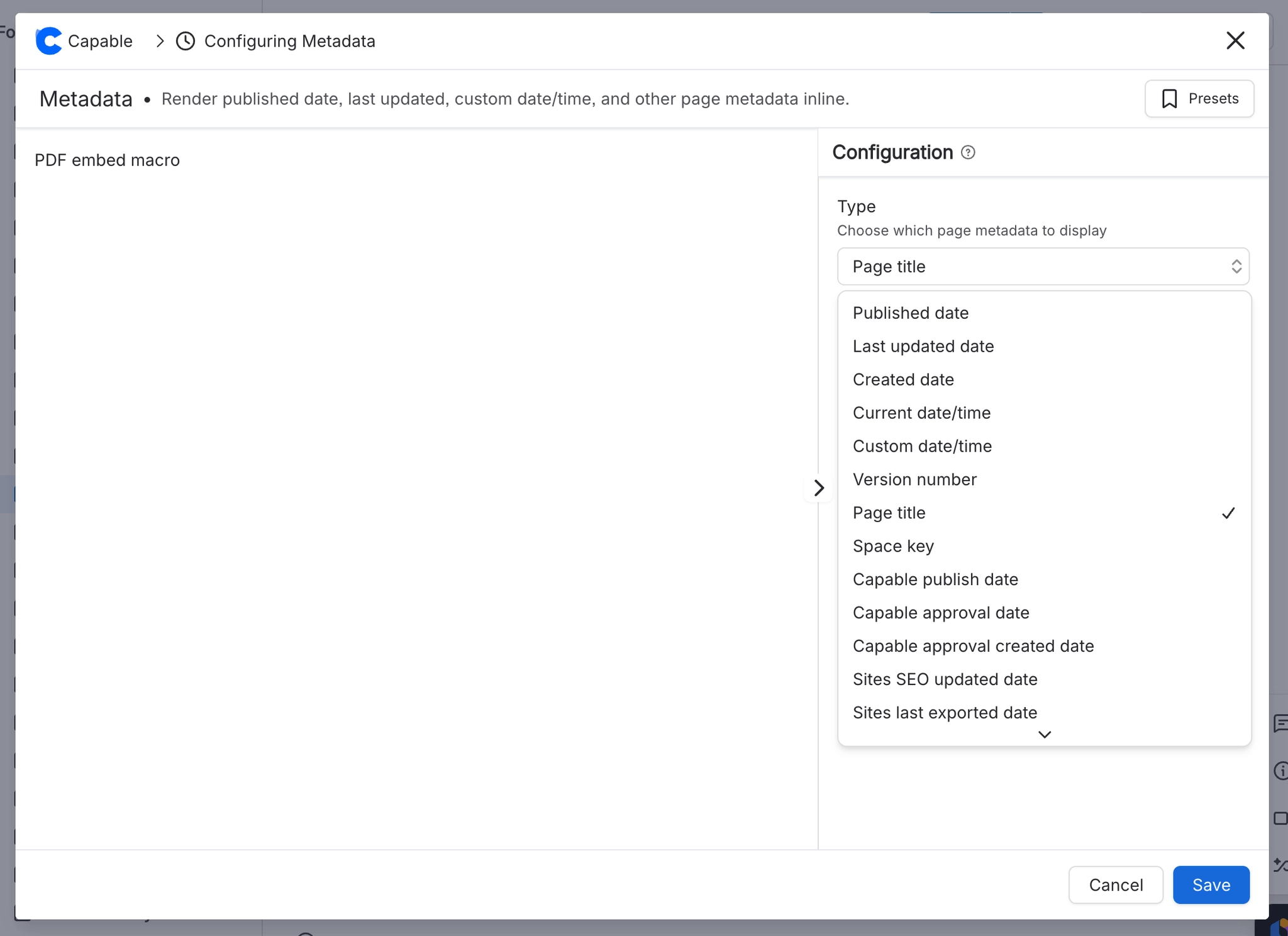
Setting | Values | What it changes |
|---|---|---|
Type | Always available: Published date, Last updated date, Created date, Current date/time, Custom date/time, Version number, Page title, Space key. Available only when your app includes the matching feature, which means the Suite rather than standalone Formatting: Capable publish date, Capable approval date, Capable approval created date, Sites SEO updated date, Sites last exported date, Sites page slug. | Chooses which fact is displayed. Dates are written out using the Format you pick. Version number, Page title, Space key and Sites page slug show exactly as they are. |
Value | Free text. Accepts dd.MM.yyyy, dd.MM.yyyy HH:mm, dd.MM.yyyy HH:mm:ss, or any ISO date such as 2026-08-03. The empty box shows 03.08.2026 08:31:08 as an example. | The date to display. Only shown, and only used, when Type is "Custom date/time". If the value cannot be read as a date, the Empty fallback text shows instead. |
Format | dd.MM.yyyy HH:mm (25.09.2019 12:42), dd.MM.yyyy HH:mm:ss (25.09.2019 12:42:13), MM/dd/yyyy hh:mm a (09/25/2019 12:42 PM), MMM dd, yyyy hh:mm a (Sep 25, 2019 12:42 PM), dd.MM.yyyy (25.09.2019), MM/dd/yyyy (09/25/2019), MMM dd, yyyy (Sep 25, 2019), Relative (3 days ago) | How a date or time is written out. Only shown, and only used, when Type is one of the date types. |
Empty fallback | Free text | Shown instead of the value when the metadata is missing, the page details cannot be loaded, or a custom value cannot be read as a date. It also shows briefly while the page details are loading. |
#Related
Small, and quietly useful.






















