
Shared image picker (Formatting macros)
The Images capability adds a 'Capable Images' section to the shared image picker used by the Formatting Banner, Cards, Gallery, Compare and Background macros. It searches the current space library and the global library together.
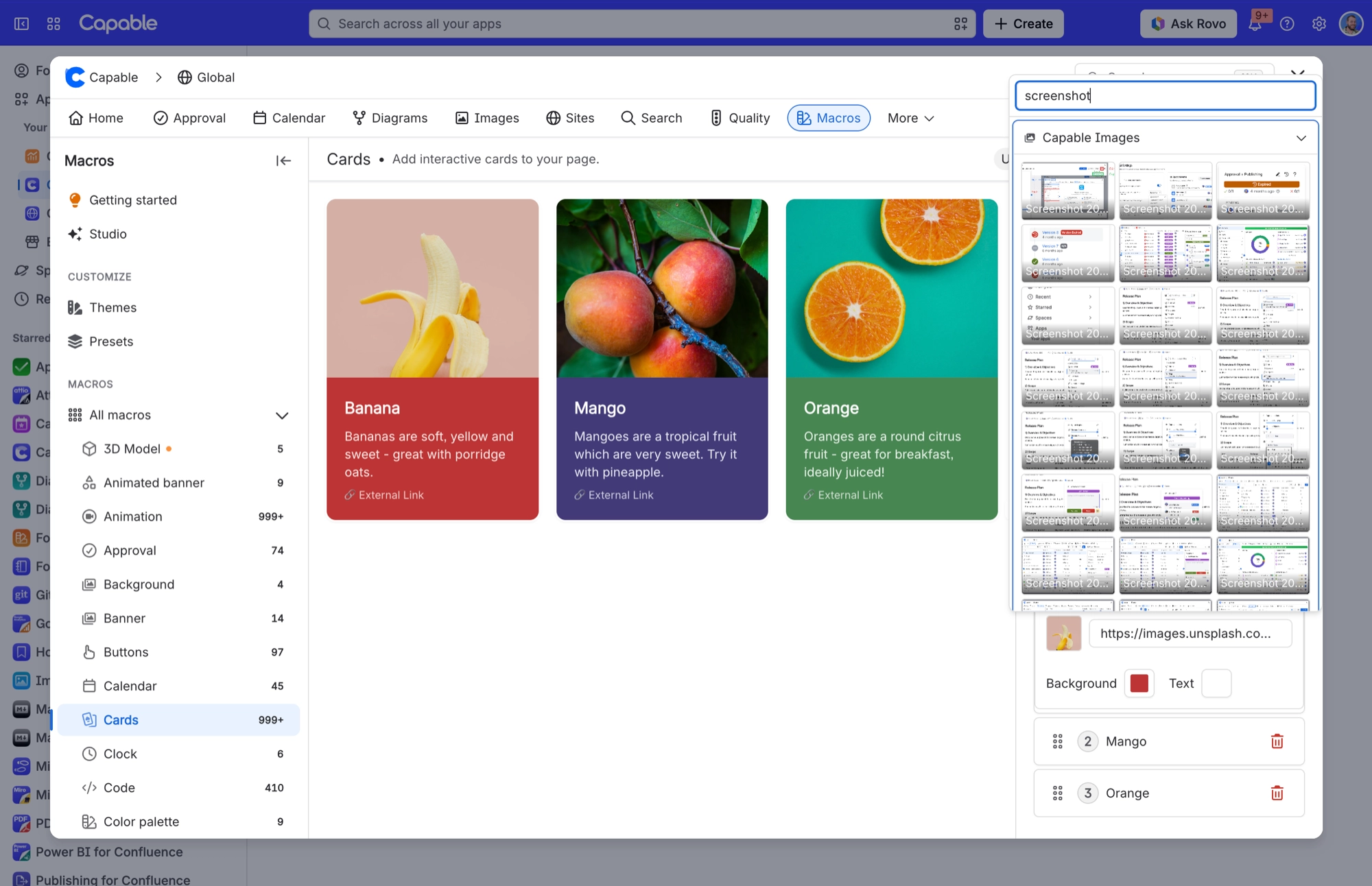
#Important
When you pick an image, the macro stores a direct link to it, not a live Capable reference. These macros therefore never follow later changes to the library image. If you delete the library image, the macro keeps pointing at a broken link and gives no warning.
#Availability
This works in the Capable Suite. The section comes from Images and is used by Formatting. The standalone Images app does not include Formatting, so there is nothing there to use it.
#Where you do it
Task | Where |
|---|---|
Open the image library | Confluence space or global apps menu → 'Capable Images' (standalone) or 'Capable' (Suite) |
Create a folder | Images library → Space images or Global images → new folder control |
Rename or delete a folder | Folder context menu in the library navigation |
#Settings that affect this
Setting | Where | What it does |
|---|---|---|
Global settings → Capabilities | Confluence admin → Apps → Capable → Settings → Capabilities | - |
Global settings → Asset access (Permissi | Capable settings → Asset access | - |
Global settings → Egress | Capable settings → Egress | - |
#Limits that apply here
Limit | Value | What happens |
|---|---|---|
Upload. Drag and drop accepted extensions. | Bmp, gif, ico, jfif, jpeg, jpg, png, svg | Anything else shows 'Invalid file type. Only image files are allowed'. |
General image compression target | 5 MB and 2500 px on the longest side | - |
Editor / attachment-import fetch ceiling | 3 MB | An attachment loaded for editing or importing into the library is capped at 3 MB of raw bytes. Larger files are resized to PNG to fit. If that still fails, you get an error. |
#Worth knowing
Standalone Images has no space settings screen, so there is nothing to configure per space in that app.
The Indexing tab is not available in standalone Images, so you cannot force a reindex there when the search index lags.
The Migration tab never appears in the Images app. Start a standalone-to-Suite migration from the Suite side.
Customer-managed egress domains are not available in standalone Images.
You cannot turn Images off for a single space. In Space settings, Images shows a fixed 'Available from Capable Menu' badge, because it cannot be pinned to the nav bar and only pinnable capabilities get the Auto, Always and Never control.
There is no Capabilities tab in standalone Images, so a standalone customer cannot hide the capability across the whole instance from the app either.
#Related
Better with company.






















