
Target space homepage was replaced by one of my source pages
What you are seeing
Your target space homepage has been replaced by one of your source pages.
#Why it happens
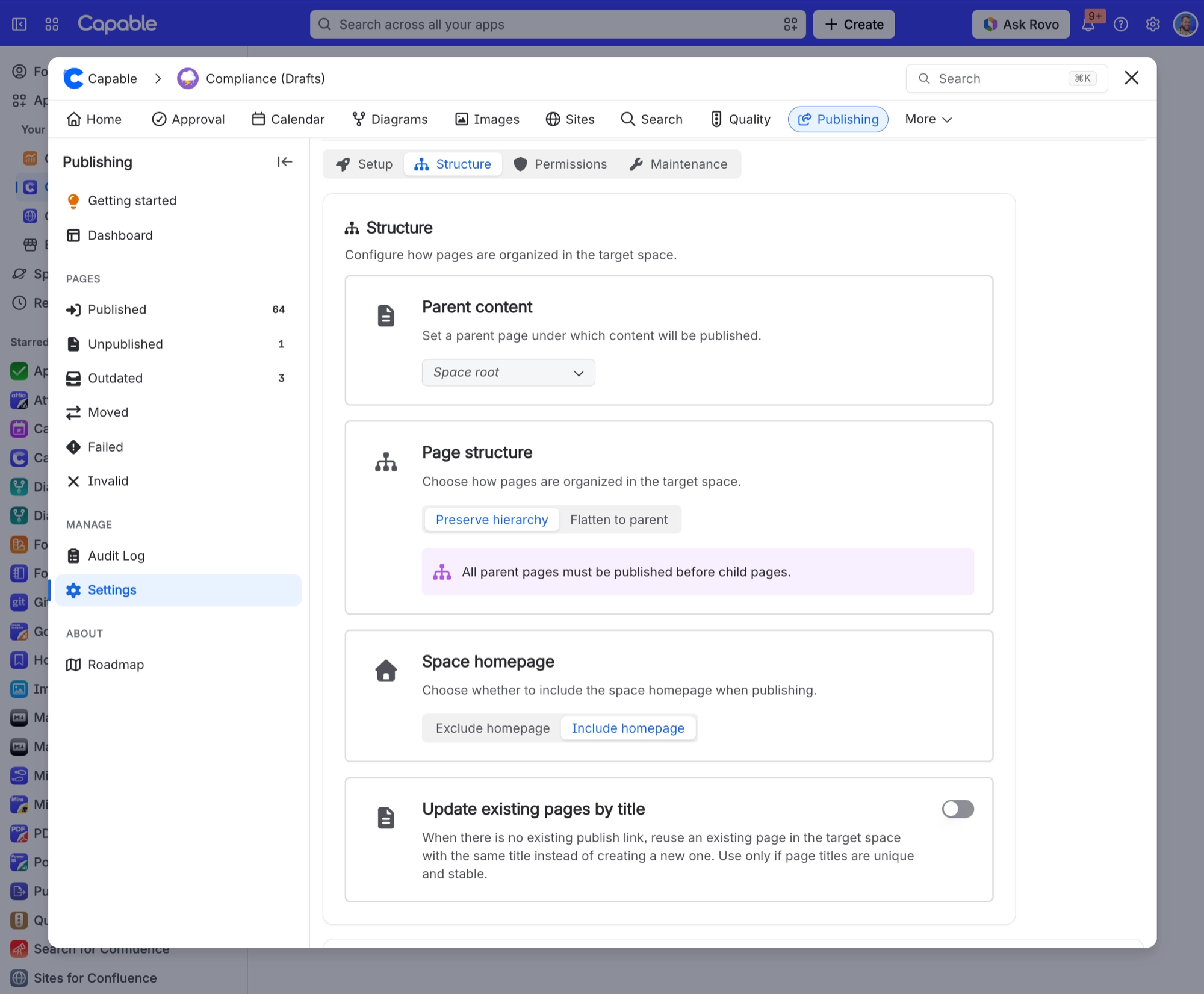
"Include homepage" is set, which publishes the source space homepage over the target space's own homepage.
#What to do
Open Space settings → Publishing → Structure tab.
Switch Space homepage to "Exclude homepage". The homepage's children are then re-parented under your configured parent instead.
Restore the target homepage from its version history.
#Settings involved
Setting | Where | What it does |
|---|---|---|
Space homepage | Space settings → Publishing → Structure tab | Chooses whether the space homepage is included when publishing: Exclude homepage or Include homepage. |
Enable publishing | Space settings → Publishing → Setup tab | Allows content from this space to be published to another space. |
Target space | Space settings → Publishing → Setup tab | Chooses where approved content is published. |
Allow manual publishing | Space settings → Publishing → Setup tab | Lets users publish content manually from the page byline. |
#Related
Page keeps flipping to "Out of sync"
Somebody is editing the published copy directly in the target space. (An edit made by the
Want a draft area and a validated area inside the same space
Publishing to the same space is deliberately blocked in three places. The picker leaves th
Everything else
The rest of this family.
Found it? Good.






















