
Publish on approval
Publish on approval is the only way pages publish without someone clicking Publish. When an approval reaches Approved, the page is queued for publishing with the method Approval, and the people who approved it are shown as Approved by in the Publishing byline.
It needs an app that includes both Approval and Publishing, such as the Capable Suite or Approval for Confluence. The standalone Publishing app has no approvals, so nothing can trigger it there.
#Where to switch it on
Level | Where | What it does |
|---|---|---|
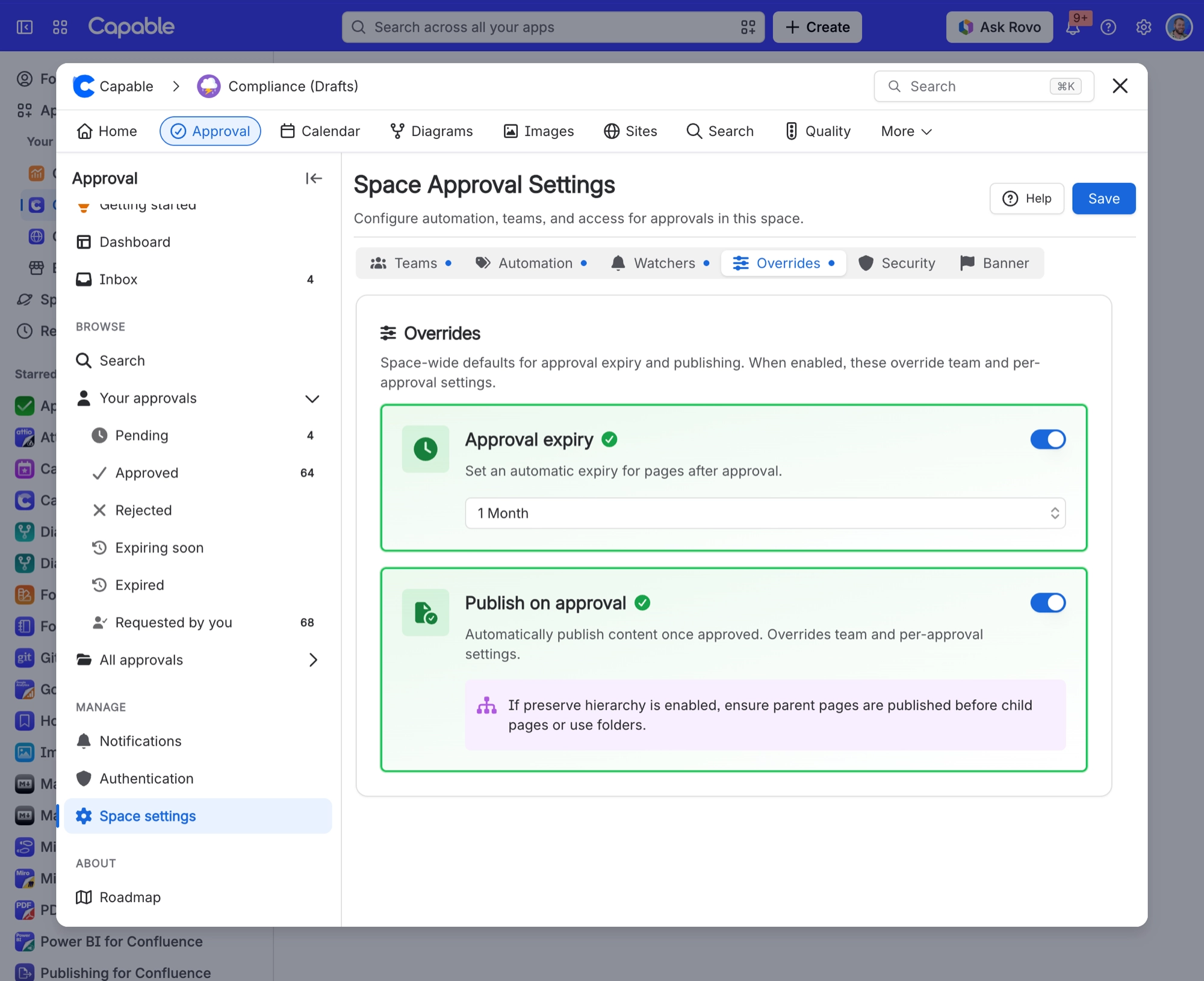
Whole space | Space settings, Approval, Overrides tab, Publish on approval | Publishes every approved page in the space. Overrides team and per-approval settings, and locks the per-approval checkbox on. |
Approval team | The team's settings | Publishes pages approved by that team. |
One approval | The approval byline options, Publish on approval | Publishes this page when this approval is approved. Only shown when publishing is enabled for the space. |
#Before it works
Publishing must be enabled for the space, with a target space chosen, on the Setup tab of Publishing Space settings. See Publishing settings.
Switch on Publish on approval for the space, the team or the approval, as in the table above.
When the approval reaches Approved, the page is queued and published a few moments later. Its byline then shows Published with the tooltip Published via Approval.
#How the page tree is kept
With Preserve hierarchy on the Structure tab, approvals can arrive in any order and the target space still ends up mirroring the source.
Situation | What happens |
|---|---|
The parent page is already published | The page goes under its parent's published copy. |
The parent is a folder | The folder is created in the target space if it is not there yet, then the page goes inside it. |
The parent page is not published yet | The page goes under its nearest published ancestor, or the parent page set on the Structure tab, or the target homepage. When the parent is published later, the page moves under it. |
Several pages in one tree are approved at the same time | Each is placed by the same rule, and they settle into the right tree within a few minutes. |
Someone moved the published copy by hand in the target space | It is left where it is. Publishing only moves pages that sit where it put them. |
An approval never publishes an unapproved parent page for you. The parent stays unpublished until it is approved or published by hand, and its children wait under the nearest published ancestor until then.
#A few things that catch people out
The note under Publish on approval on the Overrides tab still asks you to publish parent pages before child pages. Since 19 October 2026 that is no longer needed.
Page restrictions are not carried onto the published copy, so a restricted source page becomes an unrestricted page in the target space.
Nobody is told when an approval publish fails. Check the Failed list on the Publishing space page.
A page with the
capable_never_publishlabel is never published, even when approved.Status lists and counts come from Confluence search, so a page published a moment ago can take a little while to show as Published.
#Related
Approved page sits in the wrong place in the target space, or shows Failed with "Parent page is not published"
When a page is not under its parent yet.
Publishing settings
Target space and page structure.
Publishing folders
How folders are created and kept.
Approval
How Publishing works with Approval.
Page statuses
What each status means.
Approved means published.






















