
Permissions and access
Start from what you are seeing rather than from what you think is broken. Each page below names the symptom, explains why it happens, and says what to do about it.
Several of these are the product working as designed, which is worth knowing before you raise a support request.
#At a glance
Symptom | Usually because |
|---|---|
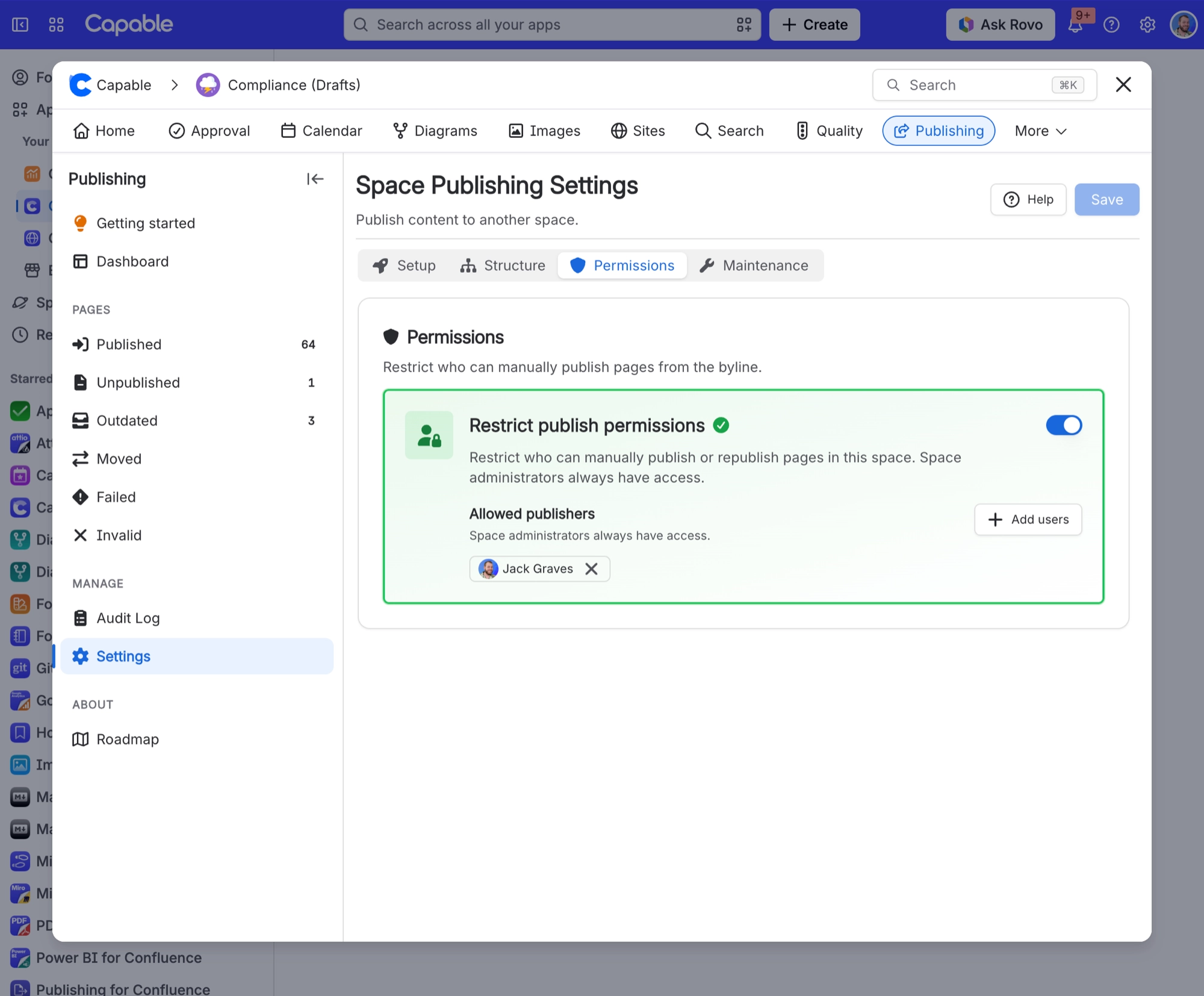
I turned on "Restrict publish permissions" but everyone can still publish | The restriction only takes effect when the Allowed publishers list has at least one person in it. Switched on with an empty list, publishing stays open to everyone with edit rights. |
I cannot save my publishing settings, or bulk publish is greyed out, and a maintenance task is mentioned | A cleanup or rebuild is in progress for that space. Saving shows "A maintenance task (cleanup or rebuild) is currently running for this space", and the Maintenance cards show a "Cannot publish" message. |
Anonymous readers see nothing from Publishing, or just a "Powered by Capable" panel | The Publishing byline requires the viewer to be signed in. In the standalone Publishing app the space and global pages do open for anonymous and unlicensed viewers. |
For the first symptom, the restriction lives on the Permissions tab of the Publishing settings. Switch it on, then add at least one person to the Allowed publishers list.
#In this section
#Related
Most of these are expected behaviour.






















