
Turn Confluence quality rules on or off
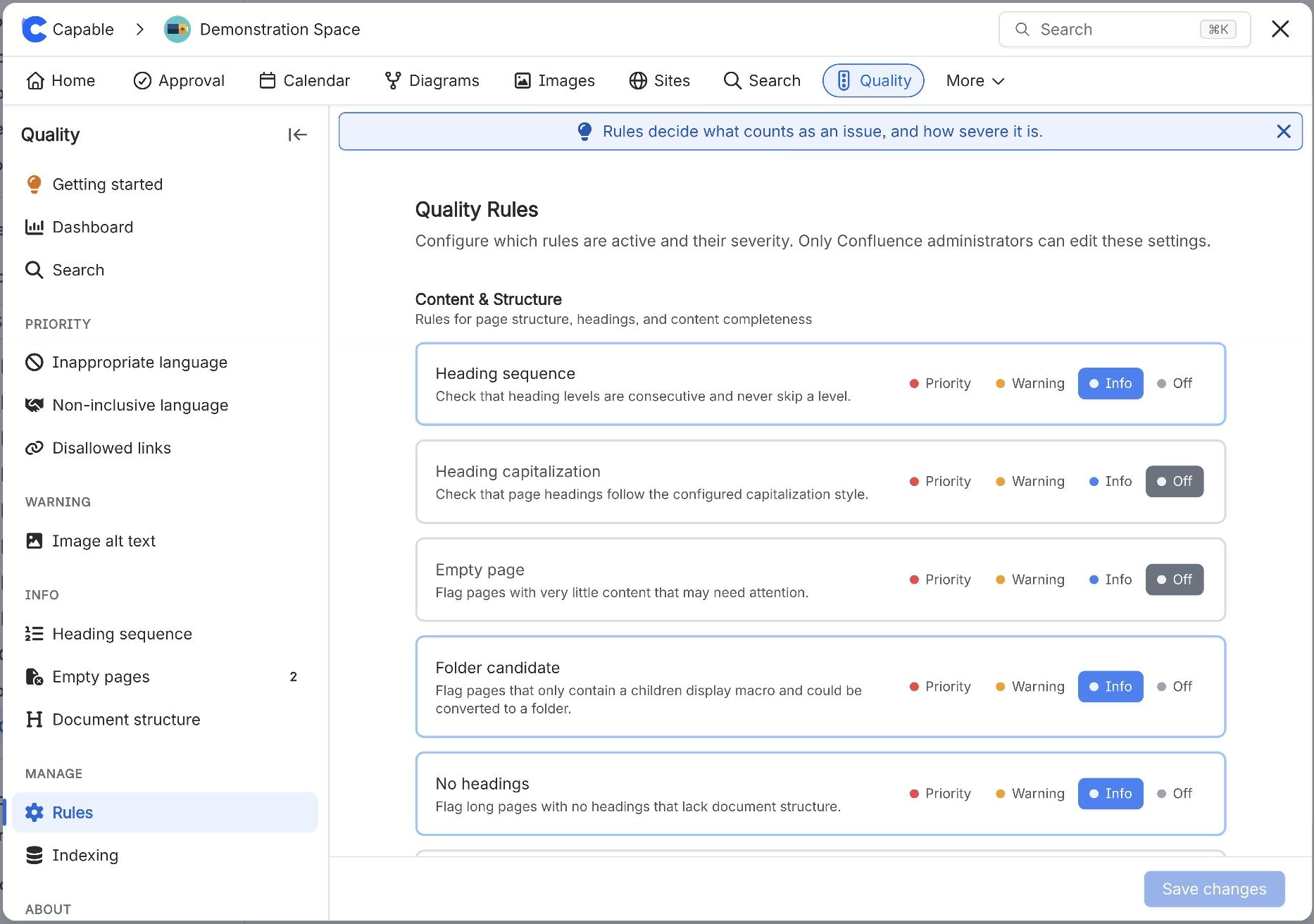
To turn Confluence quality rules on or off, open Capable Quality, select Rules under Manage and set each rule to Priority, Warning, Info or Off. Select Save changes. The rules apply to the whole site, and page bylines follow the new levels the next time a page loads.
#Before you start
You need | Why |
|---|---|
Capable Quality, or the Capable Suite on the Advanced edition | Quality is part of Capable Quality for Confluence and the Advanced edition of the Capable Suite. |
Confluence administrator | Only Confluence administrators can save changes on the Rules page. |
#Steps
Open Capable Quality: select Capable Quality in the Confluence Apps menu, or in a space sidebar to see only that space (in the Suite, Capable, then Quality).
Under Manage, select Rules.
For each rule, choose Priority (red), Warning (amber), Info (blue) or Off. Rules are grouped under Content & Structure, Accessibility, Language and Compliance.
Some rules need more once they are on: a Mode: for Heading capitalization, domains for Disallowed domain links, macros for Disallowed macros, an age for Stale content and labels for Disallowed labels.
Select Save changes. Unsaved changes shows next to the button until you do.
#Which rules are on to start with
Rule | Starts as |
|---|---|
Image alt text | Warning |
Heading sequence | Info |
Folder candidate | Info |
No headings | Info |
Inappropriate language | Priority |
Non-inclusive language | Priority |
Heading capitalization, Empty page, Disallowed domain links, Disallowed macros, Third-party macros, Stale content, Disallowed labels | Off |
If saving fails with Failed to save. You may need Confluence admin permissions., ask a Confluence administrator. Opening Quality from a space changes the same site-wide rules.
#Related
Your standards, set once.