
Common tasks
Rather than a tour, this is the list of things people do, with the route to each.
#What you can do
Task | Where | Notes |
|---|---|---|
Turn Quality on for a site | Suite: Global settings → Capable → Capabilit | Only takes effect on an Advanced-edition install (or where the confluence.quality flag is on); on Standard, Quality stays a locked entry linking to help.gocapable.com/quality/. The standalon |
Turn Quality on or off for one space | Suite: Space Settings → Capable → General → | Auto / Always / Never. Requires space admin. In the Suite choose Always if you want the Quality byline on pages in that space. Auto is not enough. In the standalone app only Never has an eff |
Configure which rules run and how serious they are | Capable Quality → Manage → Rules | Confluence admin only. Each rule has a Priority / Warning / Info / Off selector; enabled rules appear under the matching heading in the left navigation. Settings apply to the whole site. The |
Choose a heading capitalization house style | Rules → Heading capitalization → Mode | Sentence case, Title Case (AP Stylebook) or Title Case (Chicago Manual of Style). The rule is Off by default. Switching mode takes effect immediately, including for stored trend history. No |
Block links to specific domains | Rules → Disallowed domain links | Set the rule to a level other than Off first, then type a domain (for example example.com) and press Enter or click Add. On the page and in search, subdomains match too; in the counts and ba |
Block specific macros | Rules → Disallowed macros | An empty list matches nothing. Matching on the page is loose. A short key can catch more macros than you intend. |
Block specific labels | Rules → Disallowed labels | Type a label name and press Enter or click Add. Comparison is case-insensitive. |
Flag pages that have not been touched in a long time | Rules → Stale content → Not updated in | Choose 1, 2, 3 or 5 years. Default 2 years, rule Off by default. Listed under Content & Structure, not Compliance. |
See the overall state of content quality | Capable Quality → Dashboard (headed "Reports | Scorecards and the Issues by rule / severity / category and Rule health charts are live for the current scope. Issues over time and Top spaces by issues come from the weekly snapshots. Open |
Drill from a chart into the offending pages | Dashboard → click a bar in "Issues by rule", | Opens that rule's list with a live badge count. Clicking a slice of the severity donut currently does nothing. |
Force a fresh cross-space collection | Dashboard → Refresh | Confluence admin only. It queues a background sweep rather than repainting immediately; the header then shows "Aggregating… (n/N spaces)". On a large site the run resumes across several pass |
Check how much of the site has been scanned | Capable Quality → Manage → Indexing, or the | Shows the percentage indexed for the current scope. The banner appears below 95% coverage. Indexing runs automatically about once an hour for up to roughly 15 minutes. If manual controls are |
Work out why a report is empty | Capable Quality → Dashboard | Read the freshness line beside Refresh and the chart messages. "Space data not yet collected" or "No space data yet. Collected weekly." means the weekly sweep has not completed; "No history |
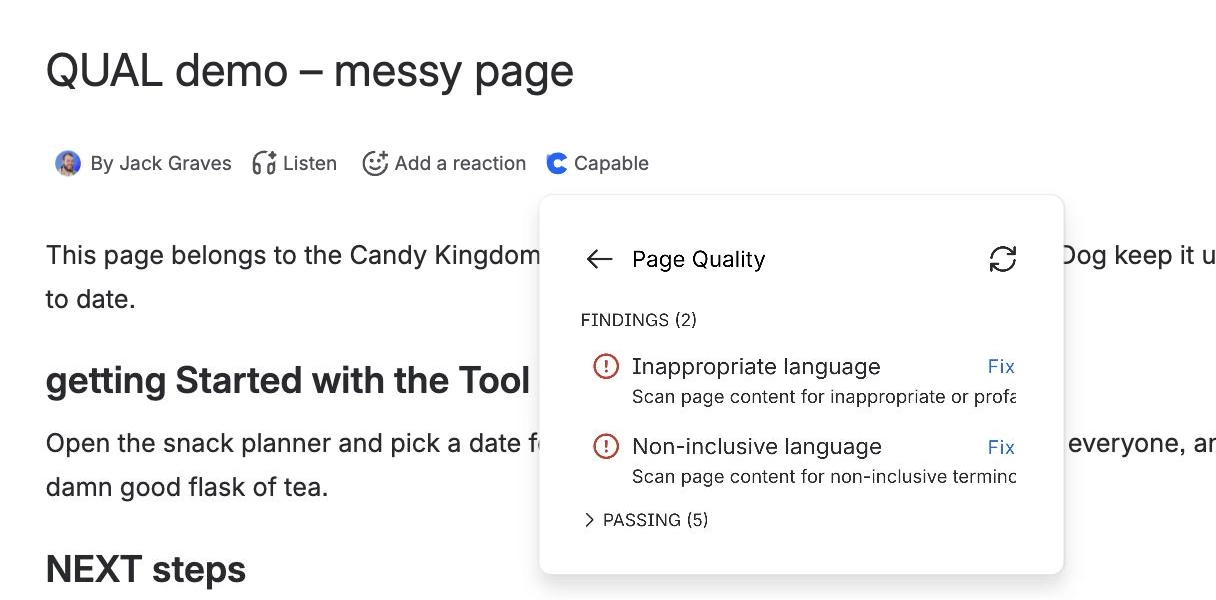
Review and fix issues on one page | Suite: page byline → Quality. Standalone: Ca | Findings are listed severity-first; open one to see the exact headings, words, macros, domains or labels involved. Heading capitalization, Inappropriate language and Non-inclusive language s |
Hide an issue that does not apply to a page | Page Quality panel → open the finding → Dism | Requires page edit rights. The finding moves to the Dismissed section with the date and survives re-indexing. "Restore all" brings back any dismissed findings that still apply. The byline lo |
Find every page failing a rule | Capable Quality → the rule's section under P | Each enabled rule has its own list with a live badge count. Counts are scoped to the space when Quality is opened from a space, and only include content you are allowed to see. |
Filter or export quality data from Capable Search | Capable Search → Quality column, Quality fil | The Quality column exports the raw issue count, not the rule names. |
Write your own CQL for quality | Search query builder | Use <hash>_capable_refs_quality_tags = "alt-text" (values are hyphenated) and <hash>_capable_refs_links_domains = "example.com". Match one tag at a time. The field holds several values. In C |
#A few things worth knowing
Some tasks need an administrator. The Where column says so.
Anything relying on search needs the page to have been indexed first.
Macro names differ slightly between the standalone app and the suite.
#Related
What people actually do.






















