
Quality page byline item
A "Quality" item on the page byline showing a lozenge. "No issues" (green) or "N priority, N warnings, N info" (red when any priority issue exists, otherwise orange). Clicking it opens the "Page Quality" panel with three collapsible sections: Findings (n), Dismissed (n) and Passing (n); Dismissed and Passing are collapsed by default. Each finding opens to show the exact headings, words, macros, domains or labels involved, and offers Dismiss. A Refresh action and a "Restore all" action (only when there are dismissed issues and the viewer can edit) sit in the panel header. Tooltip: "View quality issues on this page"; description: "Page content quality and compliance".
#Worth knowing
The lozenge is recalculated from the page's current content on every render, so it never waits for indexing. The panel reads the stored index, so on a page edited since its last index the two can disagree. In the Suite the byline only appears in spaces set to "Always" and only on the Advanced edition; in the standalone app it never appears at all (see caveats).
#Where to find it
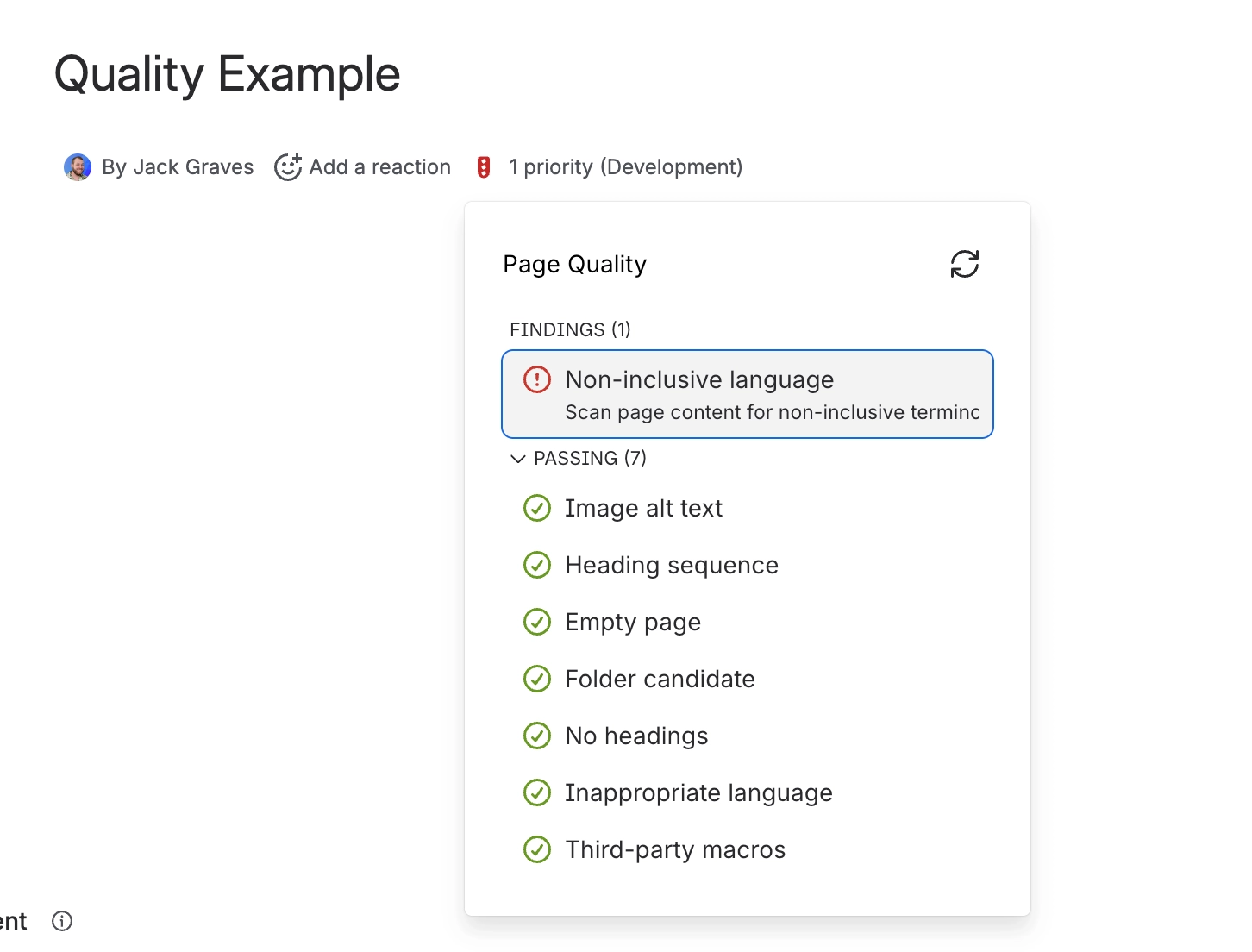
#Where you do it
Task | Where |
|---|---|
Turn Quality on for a site | Suite: Global settings → Capable → Capabilities → Quality → Visible |
Turn Quality on or off for one space | Suite: Space Settings → Capable → General → Quality. Standalone: Capable Quality space page → Settings. |
Configure which rules run and how serious they are | Capable Quality → Manage → Rules |
#Settings that affect this
Setting | Where | What it does |
|---|---|---|
Rule level (per rule) | Capable Quality → Manage → Rules | - |
Disallowed domain links | Rules → Compliance | - |
Blocked domains list (Disallowed domain | Rules → Disallowed domain links | - |
#Worth knowing
Rules are configured once for the whole site. Opening Quality from a space scopes the counts to that space but edits the same global rule set, so a space administrator changing a rule level changes it for every space. There is no per-space rule configuration. The only per-space control is the Auto/Always/Never visibility switch.
In the standalone Capable Quality app the page byline can never appear, because its display condition depends on a content property nothing in the app writes. The Quality side panel in Capable Search is the only per-page surface there.
In the Capable Suite the byline only appears in spaces explicitly set to "Always". The default "Auto" silently produces no byline, unlike other Capable byline capabilities.
Four gates decide whether Quality is visible, in this order: the site-wide Capabilities Visible/Hidden switch; the space set to "Never"; the space set to "Always" (Suite byline only. Ignored standalone); and the Advanced edition (Suite only).
The byline lozenge ignores administrator severity overrides for the eight indexed rules and always buckets them by their built-in severity.
The byline lozenge counts only the eight indexed rules plus Disallowed macros. Disallowed domain links, Third-party macros, Stale content and Disallowed labels are missing from the lozenge even when enabled and violated, although they do appear in the widget count, the search panel badge, the Quality column and the panel itself.
#Limits that apply here
Quality tags stored per page
#Related
How it actually behaves.























