
Dashboard
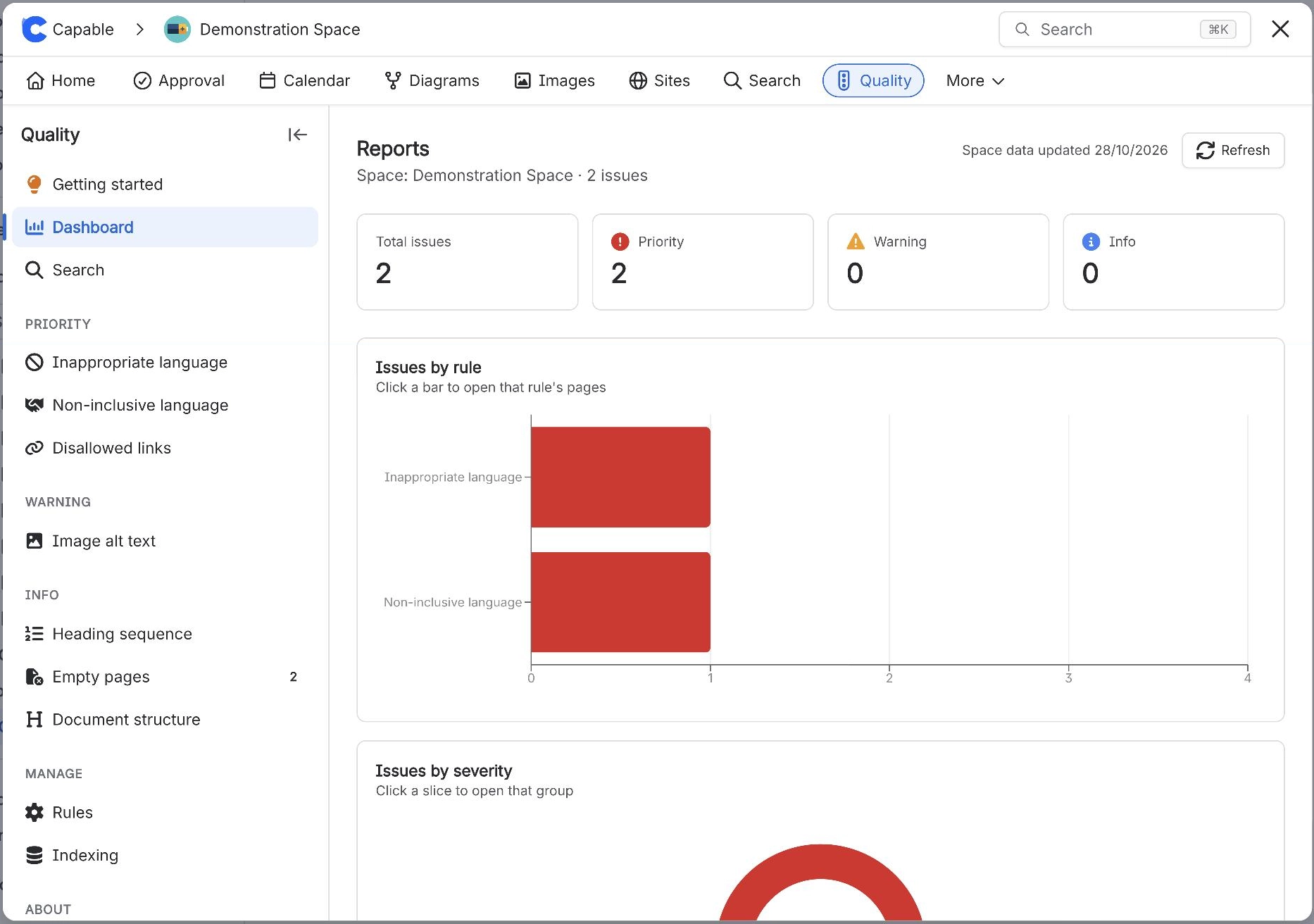
Titled "Reports" on screen, listed as "Dashboard" in the navigation ("Charts, trends and rule breakdown across all indexed pages"). Contains four scorecards (Total issues, Priority, Warning, Info), four charts (Issues by rule, Issues by severity, Issues by category, Rule health), an "Issues over time" area chart with Week/Month toggles, a "Top spaces by issues" stacked bar chart (global scope only), a "Rule breakdown" panel grouped by severity, a "Recent rule violations" table of the 20 most recently updated offending pages, a freshness line with a Refresh button, and an amber indexing banner below 95% coverage.
#Worth knowing
Scorecards and the four charts are live counts for the current scope, cached 30 seconds. Issues over time and Top spaces by issues come from the weekly snapshots. Clicking a bar in "Issues by rule" or a card in "Rule breakdown" opens that rule's list.
#Where to find it
Capable Quality → Dashboard
#Where you do it
Task | Where |
|---|---|
See the overall state of content quality | Capable Quality → Dashboard (headed "Reports" on screen) |
Drill from a chart into the offending pages | Dashboard → click a bar in "Issues by rule", or a card in "Rule breakdown" |
Force a fresh cross-space collection | Dashboard → Refresh |
#Settings that affect this
Setting | Where | What it does |
|---|---|---|
Rule level (per rule) | Capable Quality → Manage → Rules | - |
Blocked domains list (Disallowed domain | Rules → Disallowed domain links | - |
Refresh (Dashboard) | Capable Quality → Dashboard → Refresh | - |
#Worth knowing
The eight indexed rules only see pages Capable has indexed. The five live rules (disallowed domain links, disallowed macros, third-party macros, stale content, disallowed labels) have no such requirement and count every page, so on a partly indexed site the Dashboard total mixes full-coverage and partial-coverage numbers and the amber banner does not distinguish them.
Navigation labels and page headings differ: "Dashboard" opens a page headed "Reports", and "Rules" opens a page headed "Quality Rules". The product is named three ways in the app: "Quality", "Capable Quality" and "Content Quality".
#Related
How it actually behaves.






















