
Who can do what
Good news first: there is nothing new to learn. Capable Approval has no user directory of its own and no roles of its own. It reads your Confluence permissions, and adds two optional controls a space administrator can switch on.
#At a glance
You want to | You need |
|---|---|
See a page's approval status | Permission to view the page |
Raise an approval | Permission to edit the page |
Add or remove reviewers | Permission to edit the page |
Approve, reject or comment | To be on the reviewer list |
Change a space's approval settings | Space administrator |
Manage teams inside one space | Space administrator for that space |
Manage teams for the whole site | Confluence administrator, or delegated team management |
Connect Slack, reset authenticators | Confluence administrator |
Being an administrator does not let you approve. Only people on the reviewer list can answer, and that is on purpose: an approval is supposed to mean a specific named person agreed to something.
If you need to answer, ask to be added. Any editor can add you without restarting the request. See Request an approval.
#Two restrictions a space can add
Both live on the Security tab of Space settings, and both are about the same problem: a controlled space where not just anybody should be starting approvals.
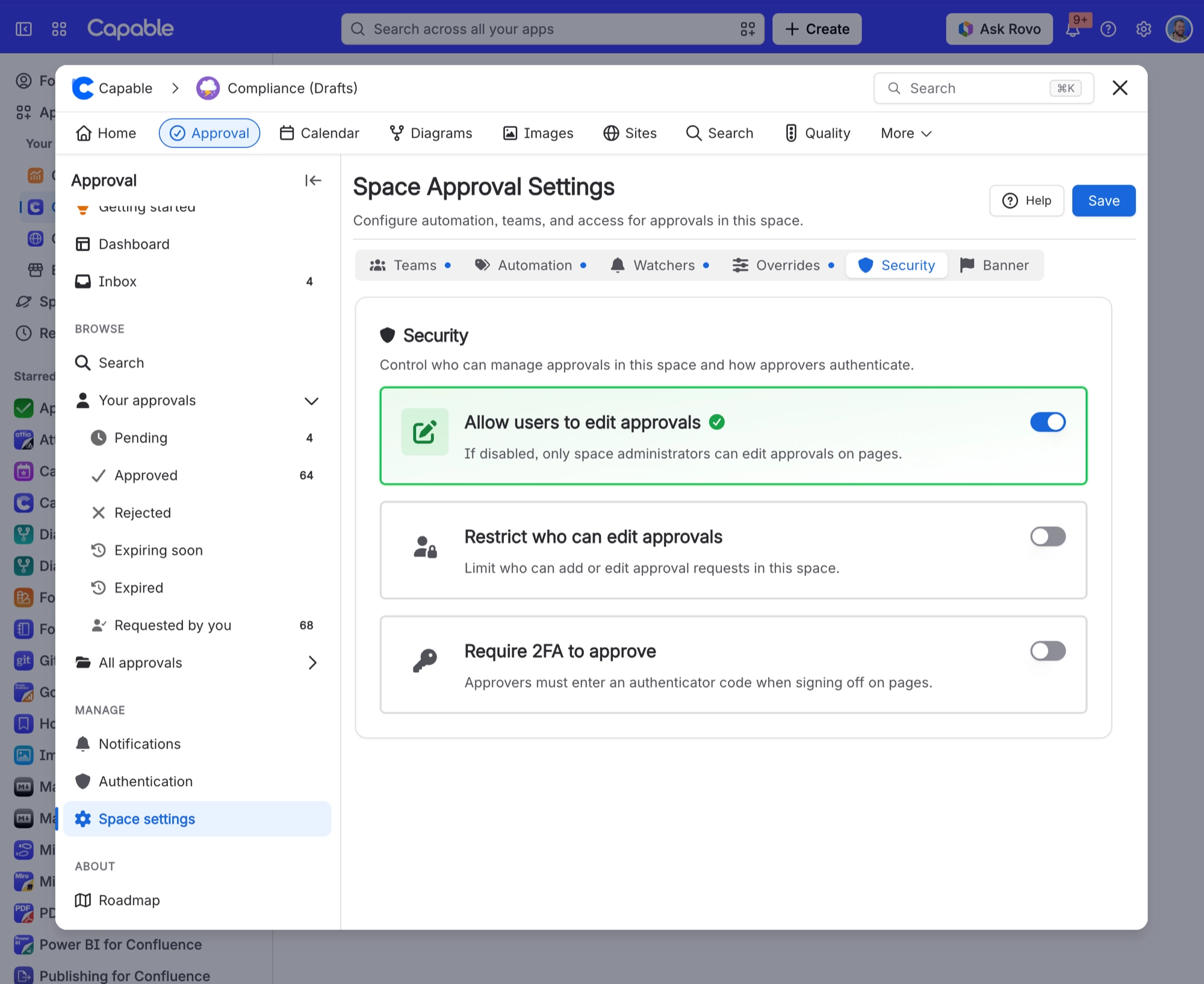
Setting | Default | What it does |
|---|---|---|
Allow users to edit approvals | ON | Switch it off and only space administrators can raise or change approvals here. Everyone else can still see and respond to what they were asked about. |
Restrict who can edit approvals | OFF | Name the users and groups allowed to raise approvals. Anyone else cannot, even with edit permission on the page. |
The second one is the one to reach for when a controlled space should only have approvals raised by the quality team, rather than by whoever happens to be editing that afternoon.
#Handing team management to someone else
By default only Confluence administrators manage global teams, which gets old quickly if your document owners are not administrators. You can add named people or groups in Site settings, Team permissions.
Confluence administrator groups and your own account are locked into that list, so you cannot accidentally lock everybody out of team management.
Space-level teams are separate and always sit with the space administrator. Manage approval teams covers both.
#What an AI assistant can do on your behalf
An assistant acting for you can look approvals up and raise one, always after checking with you first. It can never respond to an approval, and it can never see a page you cannot see, because it inherits exactly your permissions. See Rovo and AI assistants.
#A few things that catch people out
Edit permission on the page is what lets you raise an approval, not any approval-specific role.
Restricting who can raise approvals does not stop anyone responding to one they are on.
Site-level and space-level team management are different permissions. Being a space administrator does not give you the global list.
Visibility is a separate question from permission. See Who can see what.
#Related
Who can see what
Visibility rather than actions.
Space settings
Where both restrictions live.
Manage approval teams
Site level teams and delegated management.
Teams and assignment
Reviewer lists that fill themselves in.
Request an approval
Sending one, and who is allowed to.
Rovo and AI assistants
What an assistant may and may not do for you.
Your existing Confluence permissions, doing all the work.






















