
See who filled in a form in Confluence
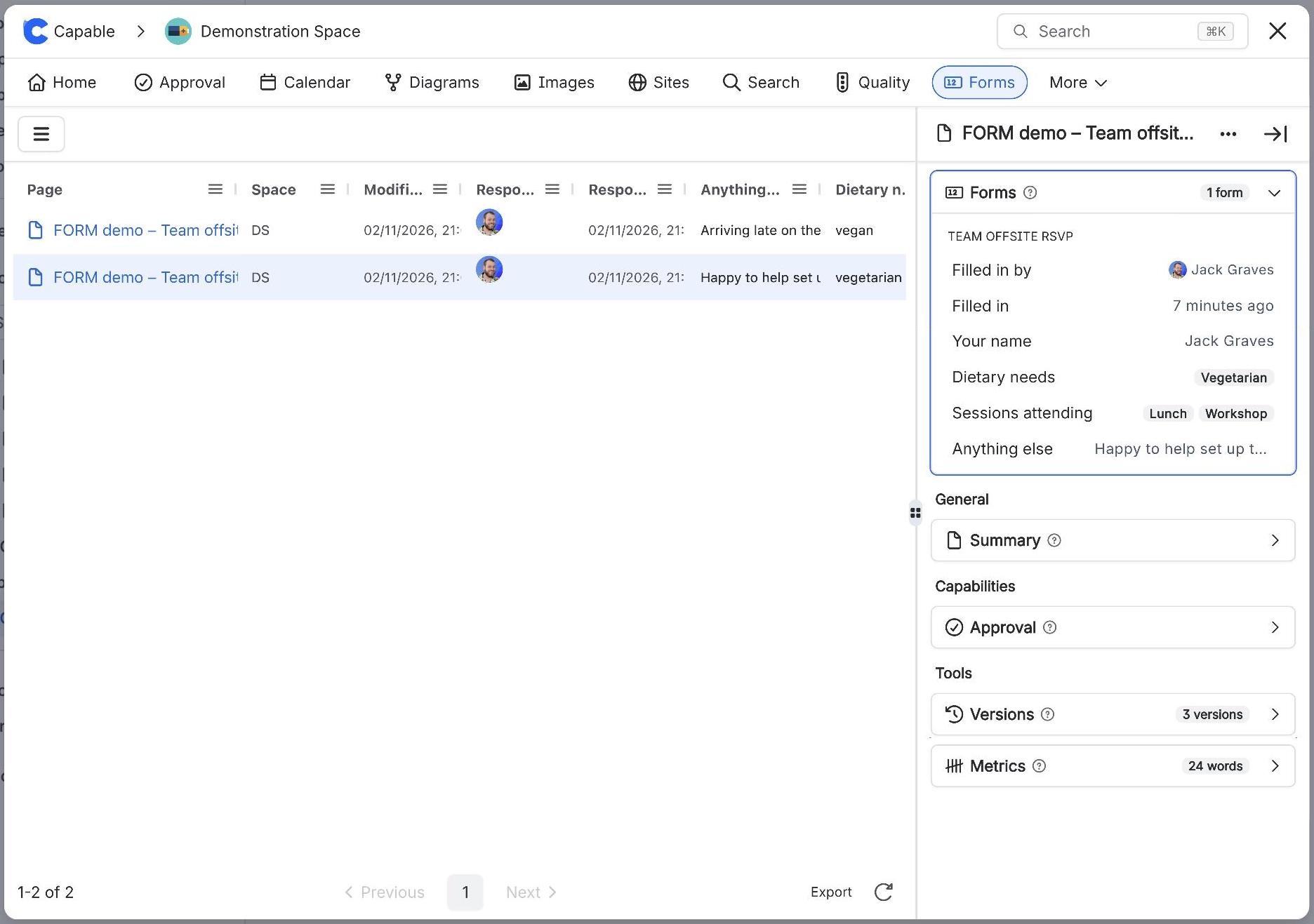
To see who filled in a form in Confluence, open Capable Forms, select All forms and choose the form. The Responded by and Responded at columns show who last filled it in on each page, and when. Select a row to see that page's answers in the side panel, under Filled in by.
#Before you start
You need | Why |
|---|---|
Capable Forms installed | Forms is part of Capable Forms for Confluence and the Capable Suite. |
View permission on the pages | You only see pages, and answers, you are allowed to see. |
#Steps
Open Capable Forms: select Capable Forms in the Confluence Apps menu or the space sidebar (in the Suite, Capable, then Forms).
Select All forms, then the form. Use Search forms… to find it by name or Form ID.
Read Responded by and Responded at for each page.
Select a row. The side panel opens on the Forms panel, showing Filled in by, Filled in and every answer.
#What happens next
On a single page you can also select Forms in the page byline, then the form, to see the same details.
A dash under Responded by means nobody has filled the form in on that page, or its stamp is from before 13 October 2026, when page edits also moved it. Those older stamps show as Updated by in the side panel. See Who filled in a form.
#Related
Know who answered, and when.






















