
Columns
The columns you can add to the search table depend on which Capable capabilities you have installed. Search itself supplies the everyday ones, such as Title, Created by and Labels. Everything else comes from another capability that adds its details to the search index.
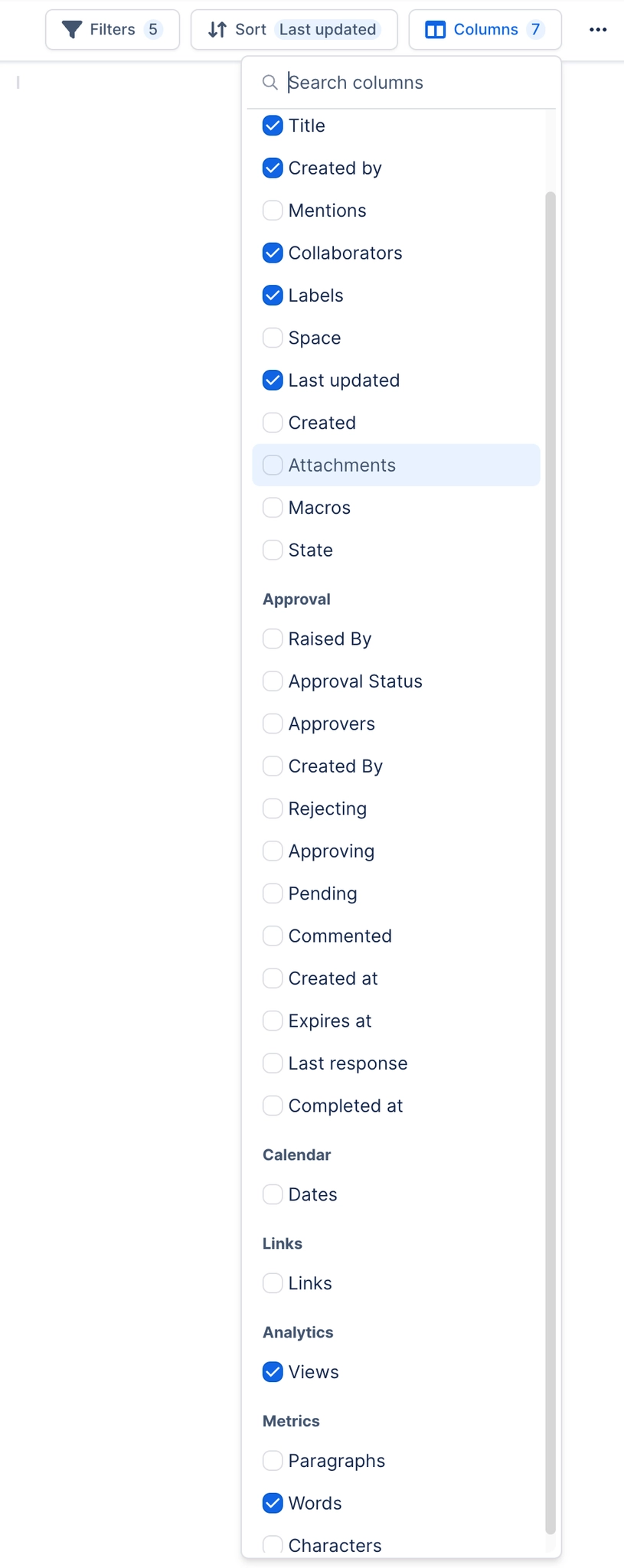
That is why the table gets richer as you install more, and why the standalone app has the fewest.
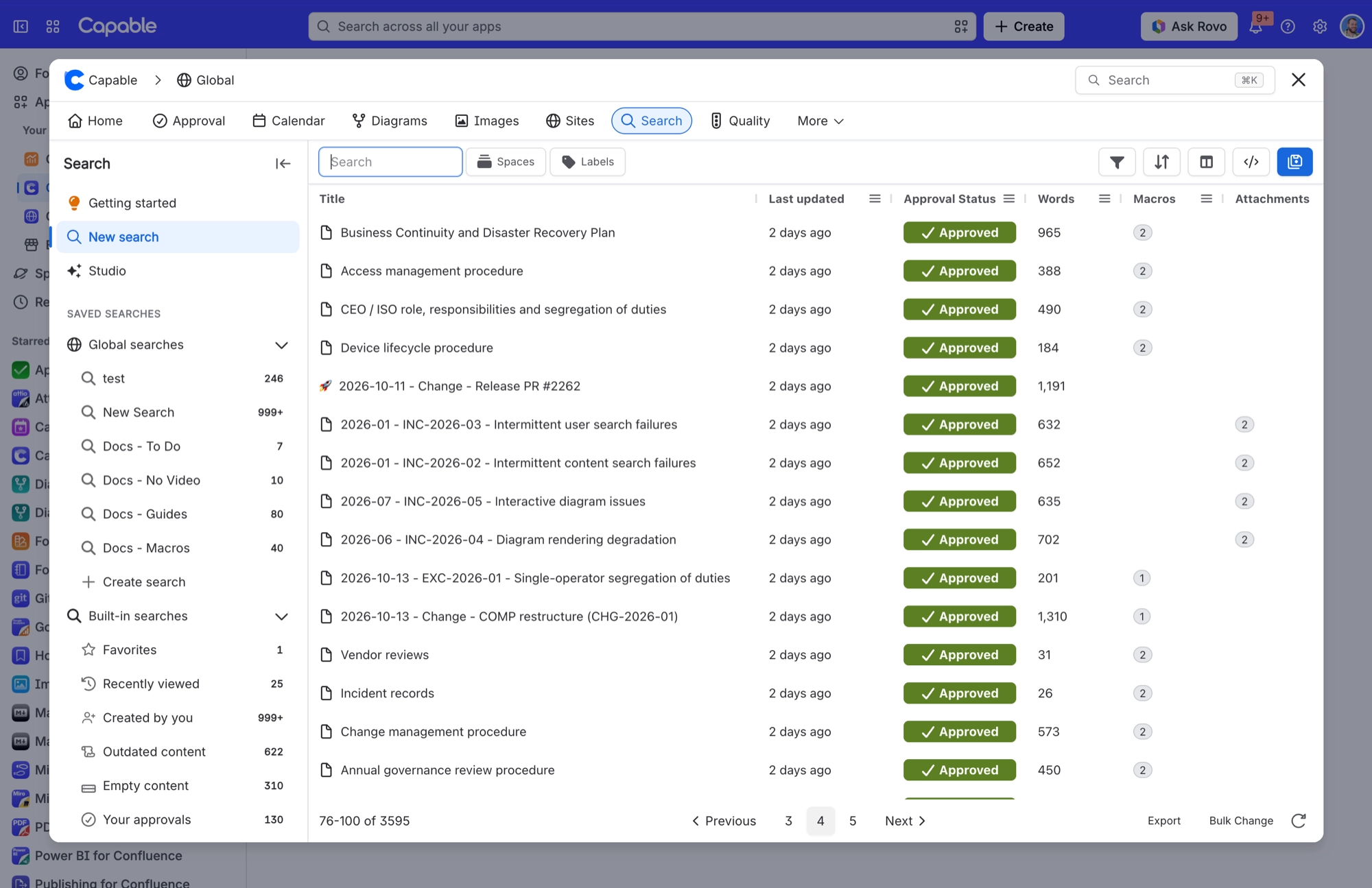
#Every column
Column | What it shows |
|---|---|
ID | The page's Confluence ID. |
Title | Page title with its icon. Edit it right in the table to rename the page. |
Created by | Avatar of the person who created the page. |
Version | Current version number. |
Mentions | People @mentioned in the page. It has to read each page's full content, so searches with this column turned on take more work to load. |
Collaborators | Avatars of the people who contributed to or published the page. |
Labels | Page labels. |
Space | Space the page lives in. |
Last updated | When the latest version was saved. |
Created | When the page was created. |
Attachments | Number of attachments on the page. |
State | The page's Confluence content state, shown as a chip. It is looked up separately for each row, and exports as an empty cell. |
Status | The page's content status. Change it right in the table with the status picker. |
Intel | A row of icons that flag page size (Empty, Tiny, Small or Long page) and how fresh the page is (from Recently updated through to Not updated in over a year). Exports as an empty cell. |
Paragraphs | Number of paragraphs in the page. |
Words | Number of words in the page. |
Characters | Number of characters in the page. |
Raised By | Who raised the approval request. |
Approval Status | Progress bar of the approval. |
Assigned | All assigned approvers. |
Rejected | Approvers who rejected. |
Approved | Approvers who approved. |
Reviewing | Approvers who haven't responded yet. |
Commented | Approvers who commented without deciding. |
Created at | When the approval was raised. |
Expires at | When the approval expires. |
Last response | When the most recent response came in. Its column heading starts with a stray space. |
Completed at | When the approval reached a final decision. |
Approved on | When approval was granted. |
Raised By (Email) | Email address version of Raised By. Never shown by default, so add it yourself if you need it. |
Assigned (Email) | Email address version of Assigned. |
Created By (Email) | Email address version of Created By. |
Rejected (Email) | Email address version of Rejected. |
Approved (Email) | Email address version of Approved. |
Reviewing (Email) | Email address version of Reviewing. |
Commented (Email) | Email address version of Commented. |
Files | Number of GitHub files referenced on the page. |
Repositories | GitHub repositories referenced. |
Organizations | GitHub owners or organisations referenced. |
File Types | File extensions referenced. |
Overview | A single chip summing up the page's publishing. |
Approvers | Approvers on the publish request. |
Method | How the page was published. |
Publisher | Who published it. |
Published at | When it was published. |
Quality | Number of quality issues flagged on the page. |
SEO Title | The page's custom SEO title on your site. |
SEO Description | The page's custom SEO description on your site. |
SEO Slug | The page's custom URL slug on your site. |
Cover Image | Whether a cover image is set. Exports as Yes or No. |
Links | Number of links in the page. |
Dates | Dates found in the page. |
Text | Full-text match, written as |
Space | Restrict to one or more spaces. |
Contributors | Pages a given person contributed to. Uses the CQL field |
Created | Creation date range. |
Updated | Last-modified date range. |
Mentions | Pages that mention a given person. |
Favorited by | Pages a given person has favourited. Written as |
Ancestor | Anything beneath a chosen page, at any depth. |
Parent | Direct children of a chosen page only. |
Creator | Pages created by a given person. |
Labels | Pages carrying any of the chosen labels. |
Apps | Pages that use a chosen third-party app's macros. Each app stores its macros differently, so Search builds the right query for each one for you. |
Raised by | Approvals raised by a given person. |
Approvers | Approvals assigned to a given person. |
In Review | Approvals still waiting on a given person's response. |
Approved | Approvals a given person approved. |
Rejected | Approvals a given person rejected. |
Status | Approval status: pending (0), approved (1) or rejected (2). |
Expiry | Approvals expiring within a date range. |
Created at | Approval creation date range. |
Completed at | Approval completion date range. |
Last response at | Date range of the most recent response. |
Expired | Approvals that actually expired. |
Minimum Files | Pages referencing at least a set number of GitHub files. |
Repository | Pages referencing a given repository, as owner/name. |
Organization | Pages referencing a GitHub organisation. |
File Type | Pages referencing a given file extension. |
Published | Publish date range. |
Columns belong to each saved search. If you change which columns show and then save, everyone using that saved search sees the change.
#A few things worth knowing
If a capability isn't installed, its columns don't appear in the picker.
Sorting on a Capable field only orders pages that have been indexed.
Column choices travel with a saved search, including into the macros.
#Related
The table grows with what you install.






















