
How a page is rewritten
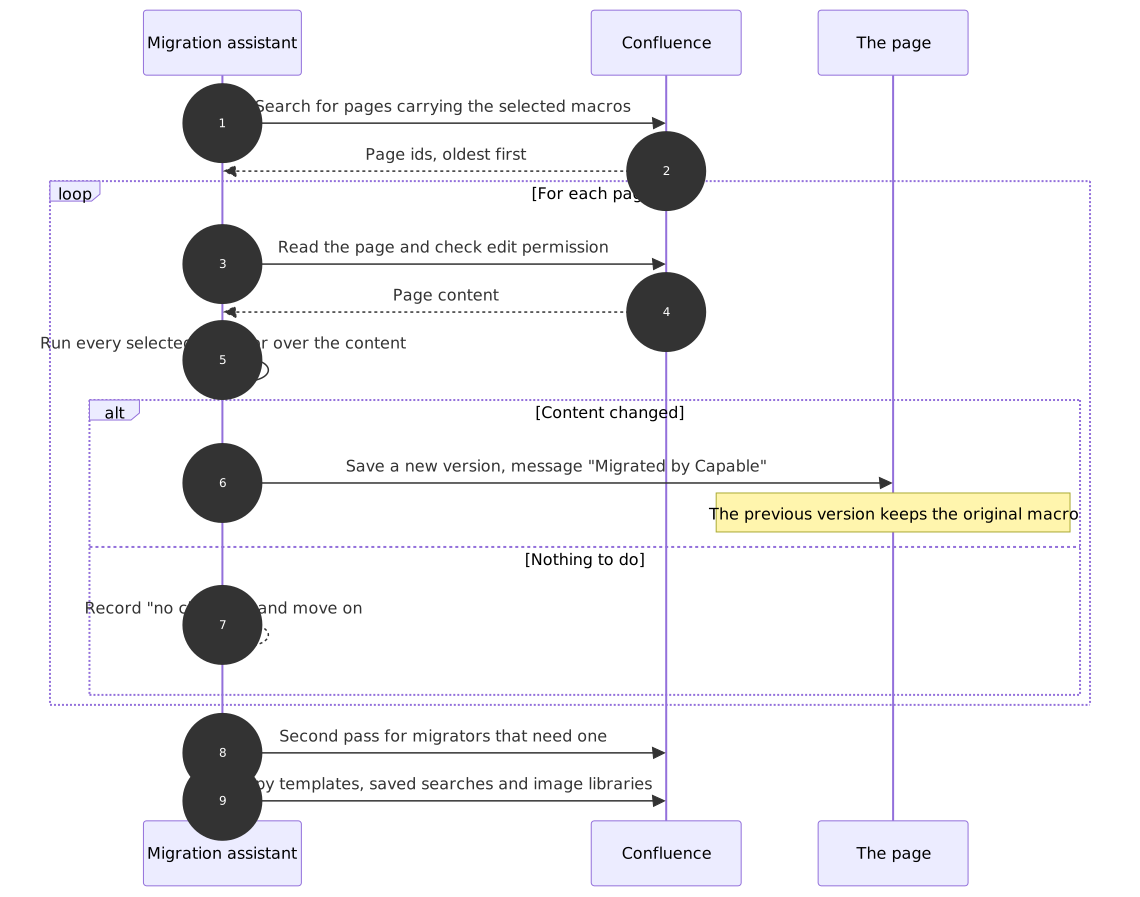
This is the part that makes a migration safe to try. Capable does not edit a page in place: it saves a new version, so the version before it, complete with the original vendor macro, stays in Confluence page history.
That version is what rollback restores, and it is what you restore by hand if you only need to undo one page.
#What happens to one page
#The rules
A page is only saved when its content actually changed. Pages that matched the search but needed nothing are read and left alone, so a re-run creates no spurious versions.
Every save carries the message
Migrated by Capable. That is how repair and rollback later recognise their own work.A macro that fails is left exactly as it was. A failure is never data loss, and a later run can convert it.
Some migrators need a second pass and revisit their pages once everything else has finished and saved.
Versions accumulate. On a large space this is a lot of new versions, and watchers may be notified. That is the third acknowledgement on step 1, and it is worth telling your space admins before a big run.
#A few things that catch people out
Re-running is naturally incremental: once a page's macros are converted, it no longer matches the search and drops out of scope.
Repairs also write through a new page version with their own version message, so repairs are visible in history too.
A repair rewrites the whole page rather than just the macro, and normalises the body on the way through, so it can incidentally tidy unrelated formatting.
#Related
New version, every time. That is the safety net.






















