
Secure and public reports
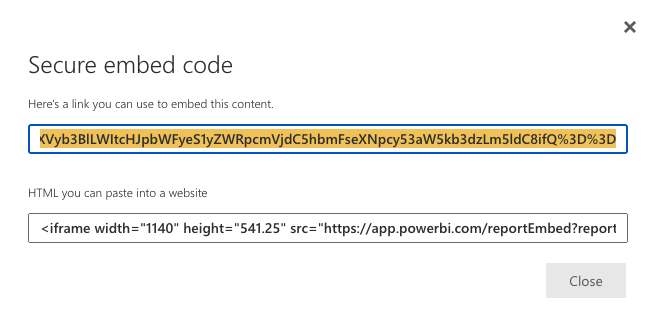
The macro accepts both kinds of Power BI link. A secure embed link, the /reportEmbed?reportId= form from Website or portal, shows the report only to readers Power BI lets in. A public link, the /view?r= form from Publish to web (public), shows it to anyone.
#Where you do it
Task | Where |
|---|---|
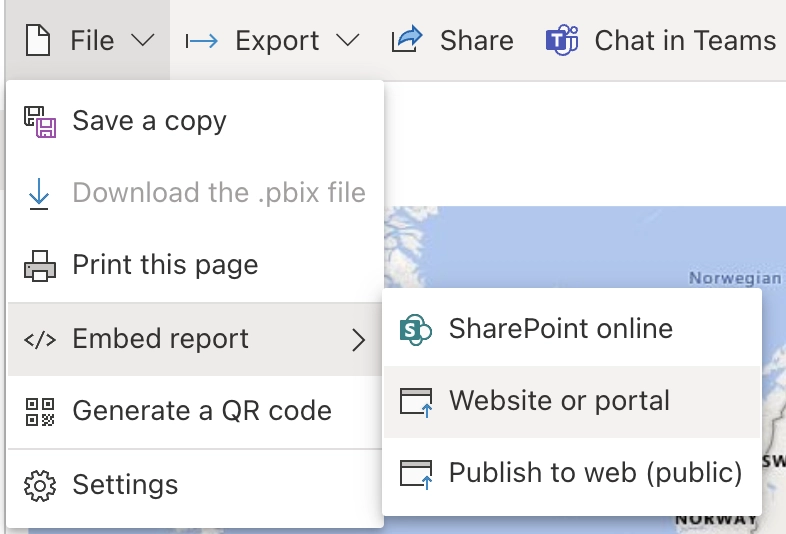
Get a secure link | Power BI: File, Embed report, Website or portal. Gives |
Get a public link | Power BI: File, Embed report, Publish to web (public). Gives |
Put either on a page | Paste it on an empty line in the editor, or into Embed URL, iframe code, or report ID. See Embed a Power BI report in Confluence. |
#Who sees what
Link | Reader experience |
|---|---|
Secure ( | Readers with access in Power BI see the report, after a Microsoft sign-in if needed. Others see Power BI's sign-in or no-access message inside the frame. |
Public ( | Everyone who can open the Confluence page sees the report. So can anyone on the internet who has the link. |
A public link is public on the internet, not just to your Confluence readers. Use it only for data that is safe to publish.
#Related
How it actually behaves.






















