
Configure the Status column
Workflow Hub reads a Status column and turns its labels into steps, so the column is worth getting right before you draw any transitions.
You can use a column that already exists, or add one.
#Setting it up
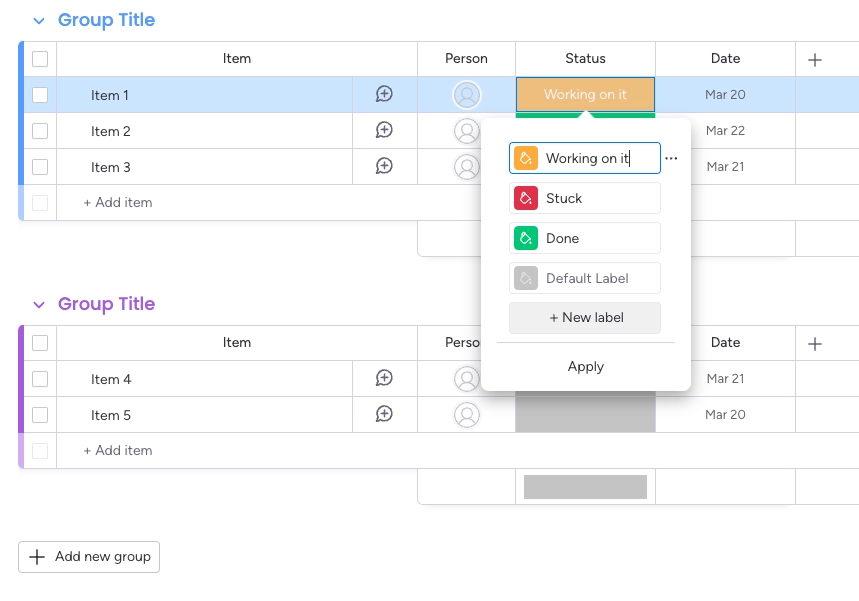
Step | What you do |
|---|---|
1 | Open the board you want the workflow on. An existing board is fine. |
2 | If it has no Status column, add one with the + button to the right of the existing columns. |
3 | Set the labels to the steps of your process, in the order work actually moves through them. |
Name the labels after the state, not the action. "In review" is a step; "Send for review" is a transition. The transitions are drawn separately, in the workflow builder.
#Getting the labels right
One label per real step. Two labels nobody can tell apart become two steps nobody can tell apart.
Include the ends: where work starts and where it finishes.
Include the unhappy ones. Rejected, blocked and cancelled are steps too.
#A few things worth knowing
Changing a label later changes the step, because the column stays the source of truth.
Every item on the board shares the workflow, so the labels have to suit all of them.
The status is still editable from the column itself; the workflow governs the app's transitions.
#Related
Labels are steps. Get them right first.























