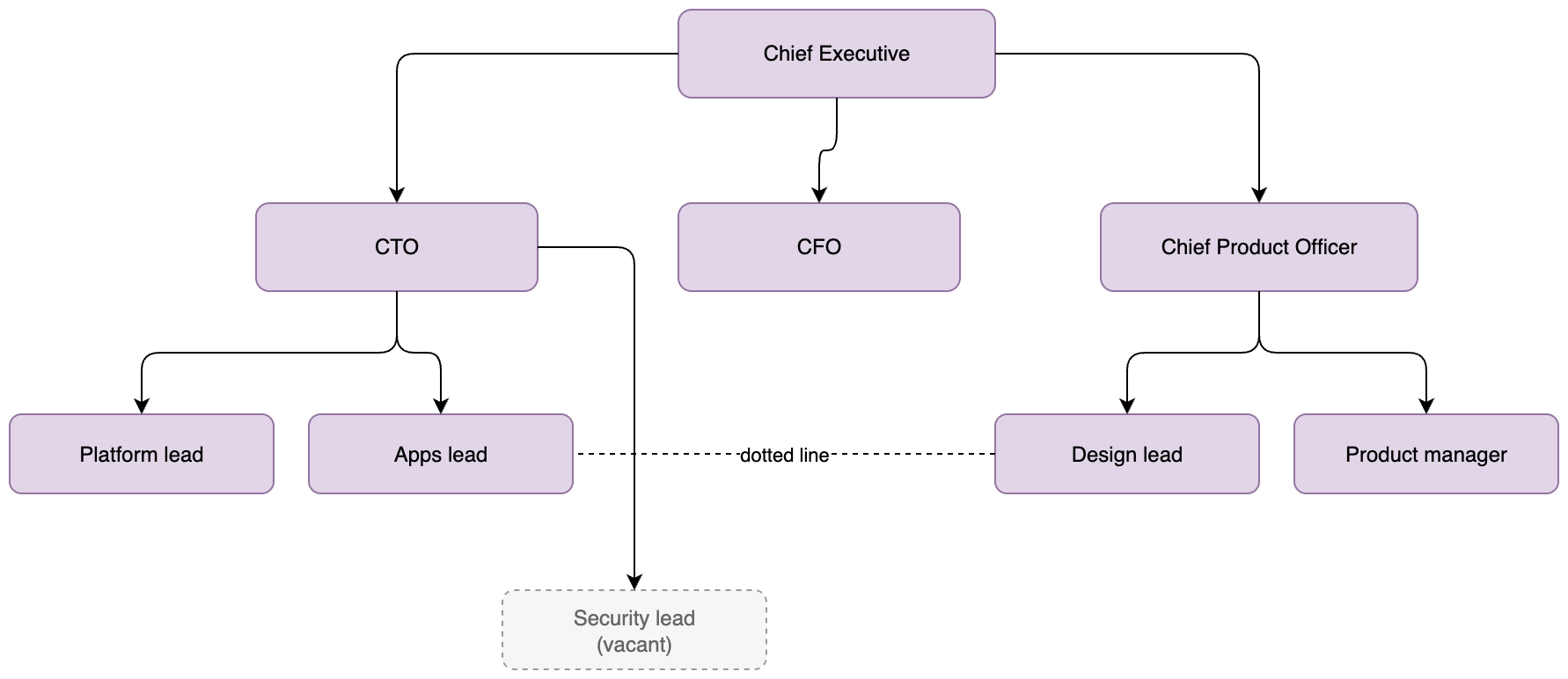
Organigramm (draw.io)
Ein Organigramm mit den zwei Dingen, nach denen Leute tatsächlich suchen: welche Rollen vakant sind und welche Beziehungen gepunktet statt durchgezogen dargestellt sind.
#Was dieses Beispiel zeigt
Eine Vakanz, dargestellt mit gestricheltem Rahmen und abgeschwächtem Text.
Eine gepunktete Beziehungslinie ohne Pfeilspitze.
Ein Baumlayout, das Sie über das Menü „Anordnen“ neu generieren können.
#Ein durchgängiges Beispiel
Öffnen und bearbeiten Sie es, oder kopieren Sie den Quelltext unten.
Der Quelltext, den Sie in ein neues Diagramm einfügen und bearbeiten können:
<mxfile host="app.diagrams.net" modified="2026-09-02T00:00:00.000Z" agent="Capable" version="24.7.7">
<diagram name="Page-1" id="page-1">
<mxGraphModel dx="1100" dy="760" grid="1" gridSize="10" guides="1" tooltips="1" connect="1" arrows="1" fold="1" page="1" pageScale="1" pageWidth="1100" pageHeight="850" math="0" shadow="0">
<root>
<mxCell id="0" />
<mxCell id="1" parent="0" />
<mxCell id="c" value="Chief Executive" style="rounded=1;whiteSpace=wrap;html=1;fillColor=#e1d5e7;strokeColor=#9673a6;" vertex="1" parent="1">
<mxGeometry x="440" y="40" width="180" height="50" as="geometry" />
</mxCell>
<mxCell id="cto" value="CTO" style="rounded=1;whiteSpace=wrap;html=1;fillColor=#e1d5e7;strokeColor=#9673a6;" vertex="1" parent="1">
<mxGeometry x="200" y="150" width="160" height="50" as="geometry" />
</mxCell>
<mxCell id="cfo" value="CFO" style="rounded=1;whiteSpace=wrap;html=1;fillColor=#e1d5e7;strokeColor=#9673a6;" vertex="1" parent="1">
<mxGeometry x="440" y="150" width="160" height="50" as="geometry" />
</mxCell>
<mxCell id="cpo" value="Chief Product Officer" style="rounded=1;whiteSpace=wrap;html=1;fillColor=#e1d5e7;strokeColor=#9673a6;" vertex="1" parent="1">
<mxGeometry x="680" y="150" width="180" height="50" as="geometry" />
</mxCell>
<mxCell id="plat" value="Platform lead" style="rounded=1;whiteSpace=wrap;html=1;fillColor=#e1d5e7;strokeColor=#9673a6;" vertex="1" parent="1">
<mxGeometry x="60" y="270" width="150" height="45" as="geometry" />
</mxCell>
<mxCell id="apps" value="Apps lead" style="rounded=1;whiteSpace=wrap;html=1;fillColor=#e1d5e7;strokeColor=#9673a6;" vertex="1" parent="1">
<mxGeometry x="230" y="270" width="150" height="45" as="geometry" />
</mxCell>
<mxCell id="sec" value="Security lead (vacant)" style="rounded=1;whiteSpace=wrap;html=1;dashed=1;fillColor=#f5f5f5;strokeColor=#999999;fontColor=#666666;" vertex="1" parent="1">
<mxGeometry x="400" y="270" width="150" height="45" as="geometry" />
</mxCell>
<mxCell id="des" value="Design lead" style="rounded=1;whiteSpace=wrap;html=1;fillColor=#e1d5e7;strokeColor=#9673a6;" vertex="1" parent="1">
<mxGeometry x="620" y="270" width="150" height="45" as="geometry" />
</mxCell>
<mxCell id="pm" value="Product manager" style="rounded=1;whiteSpace=wrap;html=1;fillColor=#e1d5e7;strokeColor=#9673a6;" vertex="1" parent="1">
<mxGeometry x="790" y="270" width="150" height="45" as="geometry" />
</mxCell>
<mxCell id="o1" value="" style="edgeStyle=orthogonalEdgeStyle;rounded=1;html=1;" edge="1" parent="1" source="c" target="cto">
<mxGeometry relative="1" as="geometry" />
</mxCell>
<mxCell id="o2" value="" style="edgeStyle=orthogonalEdgeStyle;rounded=1;html=1;" edge="1" parent="1" source="c" target="cfo">
<mxGeometry relative="1" as="geometry" />
</mxCell>
<mxCell id="o3" value="" style="edgeStyle=orthogonalEdgeStyle;rounded=1;html=1;" edge="1" parent="1" source="c" target="cpo">
<mxGeometry relative="1" as="geometry" />
</mxCell>
<mxCell id="o4" value="" style="edgeStyle=orthogonalEdgeStyle;rounded=1;html=1;" edge="1" parent="1" source="cto" target="plat">
<mxGeometry relative="1" as="geometry" />
</mxCell>
<mxCell id="o5" value="" style="edgeStyle=orthogonalEdgeStyle;rounded=1;html=1;" edge="1" parent="1" source="cto" target="apps">
<mxGeometry relative="1" as="geometry" />
</mxCell>
<mxCell id="o6" value="" style="edgeStyle=orthogonalEdgeStyle;rounded=1;html=1;" edge="1" parent="1" source="cto" target="sec">
<mxGeometry relative="1" as="geometry" />
</mxCell>
<mxCell id="o7" value="" style="edgeStyle=orthogonalEdgeStyle;rounded=1;html=1;" edge="1" parent="1" source="cpo" target="des">
<mxGeometry relative="1" as="geometry" />
</mxCell>
<mxCell id="o8" value="" style="edgeStyle=orthogonalEdgeStyle;rounded=1;html=1;" edge="1" parent="1" source="cpo" target="pm">
<mxGeometry relative="1" as="geometry" />
</mxCell>
<mxCell id="o9" value="dotted line" style="edgeStyle=orthogonalEdgeStyle;html=1;dashed=1;endArrow=none;" edge="1" parent="1" source="des" target="apps">
<mxGeometry relative="1" as="geometry" />
</mxCell>
</root>
</mxGraphModel>
</diagram>
</mxfile>
#Anpassen an die eigenen Anforderungen
Verwenden Sie Anordnen, Layout, Baum, um das Diagramm nach dem Hinzufügen einer Person wieder aufzuräumen.
Zeichnen Sie Rollen statt nur Personen; Rollen bleiben bestehen, wenn Personen das Unternehmen verlassen.
Halten Sie es auf einer internen Seite. Organigramme sind sensibler als die meisten anderen Diagramme.
Öffnen Sie es. Ziehen Sie etwas herum. Es ist eine echte Zeichenfläche.