.png)
Use eSignatures (MFA approvals)

This document outlines the steps for setting up and using TOTP authentication tokens in Confluence approvals.
In regulated industries where e-signatures are required, ensuring secure and verified responses is crucial. Capable now offers a feature that allows space admins to enforce the use of Time-based One-Time Passwords (TOTP) for user approvals.
Enabling TOTP Authentication
Access Space Settings: Space admins should navigate to the space settings in Confluence and the Capable Space settings page.
Enable TOTP Requirement: Look for the option to force users to provide a TOTP auth token. Enable this feature to ensure that all users must authenticate before responding to approvals.
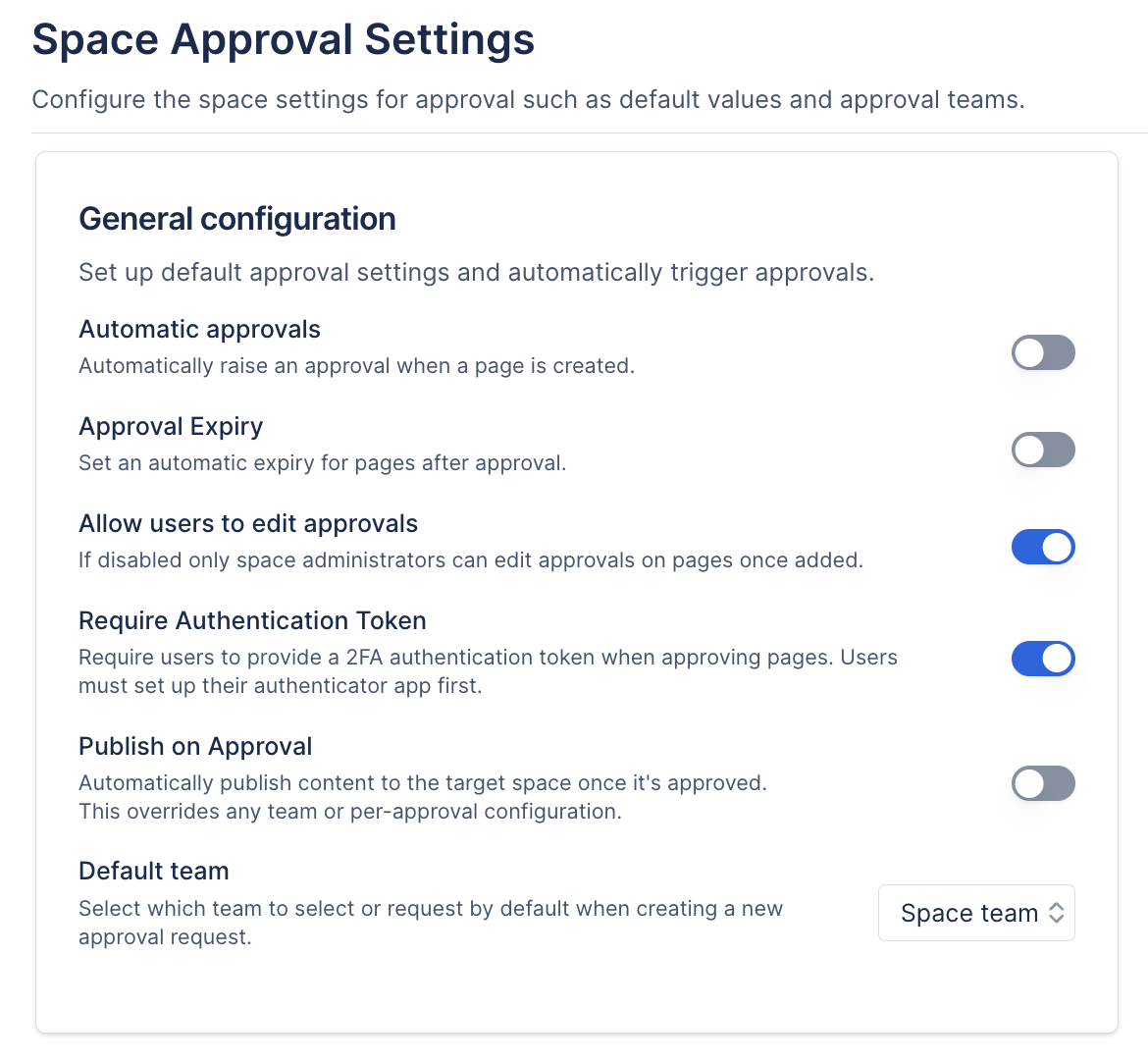
User Setup for TOTP Authentication
When a user attempts to respond to an approval for the first time, they will be prompted to set up their TOTP authentication. The process is as follows:
Prompt to Set Up Authentication: Upon the first attempt to respond, users will see a prompt indicating that they need to set up their authentication token.
Scan QR Code: Users will be presented with a QR code to scan using their preferred TOTP authenticator app (e.g., Google Authenticator, Authy, etc.).
Generate Token: After scanning the QR code, the authenticator app will generate a TOTP that the user can use for authentication.
.gif?inst-v=8965c66a-75b3-4a08-9b21-587a15410ad3)
Responding to Approvals
Once TOTP authentication is set up, users can respond to approvals securely:
Initiate Response: When a user tries to approve or reject an approval request, they will be prompted to enter their TOTP.
Provide One-Time Password: Users must enter the one-time password generated by their authenticator app.
Complete Action: Upon entering the correct TOTP, the user's response (approve or reject) will be processed.
.gif?inst-v=8965c66a-75b3-4a08-9b21-587a15410ad3)
Benefits of Using TOTP Authentication
Enhanced Security: By requiring a TOTP, Confluence ensures that only authenticated users can respond to approvals, reducing the risk of unauthorized actions.
Compliance with Regulations: This feature is particularly beneficial for industries that require strict compliance with regulations regarding e-signatures and verified responses.
User-Friendly Setup: The setup process is straightforward, allowing users to quickly begin using TOTP for their approvals.
Conclusion
Implementing TOTP authentication in Confluence approvals significantly enhances security and compliance for regulated industries. By following the outlined steps, space admins can easily enable this feature, and users can securely authenticate their responses, ensuring that all actions are verified and legitimate.